
The fastest way to coordinate senior caregiver coordination for multiple paid caregivers is one published mobile schedule, verified time tracking, and templated handoff notes shared through a single app. Every paid caregiver needs mobile access and a schedule-approval workflow, not a group text and a paper calendar. Tools like CareTracker cover the core of this setup with multi-job calendars, schedule approvals, time tracking, and shared care profiles in one place.
TL;DR:
- Using a single, mobile-first, published schedule with real-time alerts minimizes missed visits and ensures all caregivers and family members see the same information.
- Caregiver coordination tools should include multi-job calendars, supervisor-approved time tracking, and shared profiles to prevent shift conflicts and streamline communication.
- Establishing clear rules for scheduling conflicts, such as open shift pools and overtime alerts, reduces last-minute gaps and burnout risks.
- Accurate, integrated time and visit records support proper payroll, compliance, and dispute resolution, saving an estimated 37 to 38 percent of administrative work.
- Simplified handoff notes with structured fields for medications, allergies, and critical updates enable quick caregiver reading and improve safety.
Table of Contents
- What Is a Step-by-Step Checklist for Coordinating Daily Caregiver Work?
- Which Features Actually Matter in Caregiver Coordination Tools?
- How Do You Set Rules for Scheduling Conflicts and Last-Minute Gaps?
- How Should Families Track Hours and Handle Basic Payroll Records?
- What Should Go in a Caregiver Handoff Note?
- How Do You Roll Out a New Coordination Tool Without Losing Your Team?
- What Are the Best Strategies for Emergency Response Coordination?
- What Legal and Compliance Issues Come Up in Senior Caregiver Coordination?
- How Often Should a Senior's Care Plan Be Reassessed?
- How Do You Bring Family Members and Healthcare Professionals Into Coordination?
- How Can Families Prevent Caregiver Burnout?
- A Coordinator's View on What Actually Fixes Coverage Gaps
- How CareTracker Puts This Checklist Into Practice
- Sources
- FAQ
What Is a Step-by-Step Checklist for Coordinating Daily Caregiver Work?
Coordinating a home care team well comes down to routine, not personality. Families who avoid missed visits and last-minute scrambles tend to run the same five or six habits every single week.
- Publish one authoritative weekly roster. Every caregiver, every family member, and every backup should look at the same schedule, not a version texted to one person and forwarded to another.
- Push mobile notifications for any change. A shift swap that isn't pushed to a phone is a shift swap nobody sees until it's too late.
- Name a primary and a backup caregiver for every slot. Keep a short, pre-approved pool of backups so a last-minute gap doesn't turn into a scramble through old text threads.
- Require a standard check-in method. An app clock, a photo timestamp, or a quick supervisor approval all work, as long as start and end times are logged the same way every time.
- Use templated visit notes. Meds given, allergies, meals, and activities belong in the same fields every shift, with sign-off required on anything safety-related.
- Automate shift reminders and arrival alerts. A short push notification to the family when a caregiver clocks in does more for peace of mind than any phone call.
Pro Tip: Set your weekly roster to publish on the same day and time every week (Thursday afternoon works well for most households) so caregivers build the habit of checking it without being reminded.
Practitioner guidance on caregiver scheduling best practices backs this up directly: publish-first rosters, mobile access, and open-shift visibility are the single highest-leverage changes a household or agency can make to cut missed visits.
Which Features Actually Matter in Caregiver Coordination Tools?
Most apps in this space look similar from the app store screenshot. The differences that matter show up only after a few weeks of real use, when a shift swap request gets buried or an overtime warning arrives two weeks too late.
- A mobile-first published schedule with a multi-job calendar, so a caregiver working for two families sees both without switching apps.
- A real time clock, GPS-based or supervisor-approved, with visible overtime warnings before hours accrue past a threshold.
- Care profiles that store medications, allergies, emergency contacts, and running visit notes in one searchable place instead of a paper folder in a kitchen drawer.
- Open-shift posting and swap approval, so a caregiver who needs Tuesday off can post the shift to an approved pool instead of texting six people.
- Exportable payroll and time reports, because a household employer eventually needs clean numbers for a tax preparer.
- Simple privacy controls and onboarding materials, since a tool nobody can figure out in ten minutes won't get used past week one.
A guide to home health aide scheduling software walks through how these features typically work together in practice, which is worth a look before committing to any single tool.
How Do You Set Rules for Scheduling Conflicts and Last-Minute Gaps?
Scheduling conflict rules should exist before the first conflict, not after. A few written policies save hours of negotiation later.
- Publish the schedule at least one week ahead and rotate weekend and holiday shifts fairly across the team.
- Cap consecutive long shifts to prevent burnout and reduce the odds of a call-out from exhaustion.
- Route open shifts to the approved backup pool first, and require manager or family approval for any swap requested with less than 48 hours' notice.
- Set one clear escalation path for a missed visit: who gets called first, second, and third, with no guessing.
- Define a make-up-pay rule in advance so a covered shift doesn't turn into a pay dispute.
- Use a schedule tool that flags overtime risk before the hours hit, not on the next pay stub.
Homecare agencies that combine scheduling with attendance tracking consistently report fewer missed visits and less time spent chasing coverage by phone.
How Should Families Track Hours and Handle Basic Payroll Records?
Clean payroll starts with clean time data, and clean time data starts with recording clock-in and clock-out on the same system that publishes the schedule. A caregiver who logs hours in one app while the family tracks the schedule in another almost guarantees a dispute eventually.
- Keep a running weekly summary per caregiver, not just a monthly total.
- Choose tools that export clean CSV reports and flag overtime thresholds, since state overtime rules vary and a household employer rarely has time to track them manually.
- Link visit notes to hours worked. If a dispute comes up over a shift, the note showing what care was provided settles it faster than memory does.
- Save weekly exports for your payroll or tax advisor, formatted to match W-2 and Schedule H recordkeeping needs.
Integrating scheduling, time tracking, and billing into one system can cut administrative costs on those tasks by roughly 37 to 38 percent, according to a case study on smart care platforms. That's hours a week most families spend untangling paper timesheets, freed up for actual caregiving oversight.
What Should Go in a Caregiver Handoff Note?
A handoff note is only useful if the next caregiver reads it in under a minute and knows exactly what changed. Long paragraphs get skipped; short structured fields get read.
- Meds given and timing. Note the dose, the time, and anything unusual, with a required sign-off for anything safety-related.
- Allergies and recent changes. A new symptom, a new medication, or a canceled appointment all belong here, front and center.
- Emergency contacts. Confirm they're current every few weeks, not just when the profile was first set up.
- Meals, activities, and mood notes. These feel minor day to day but matter enormously when a doctor asks about changes over the past month.
- A free-text critical-notes field. Reserve this for anything that needs a family's attention before the next shift starts, and attach a photo when it helps.
- Urgent versus non-urgent rules. Define clearly what warrants a phone call versus a message in the app, so a caregiver isn't left guessing at 11 p.m.
A medication log template and a daily log guide both offer field-tested formats worth adapting for your own household.
How Do You Roll Out a New Coordination Tool Without Losing Your Team?
Adoption fails when training feels like homework. Keep it short, role-specific, and immediately useful, and most caregivers pick it up within days.
Run a 10 to 20 minute session per role rather than one long group meeting, and hand out a one-page quick-reference card for the phone or fridge. Name one local superuser, someone the rest of the team can ask instead of guessing, and give everyone a single point of contact for technical questions. Check in again at day 7 and day 30 to see what's working and adjust notification frequency or note templates based on real feedback.
Pro Tip: Ask your superuser to sit with each new caregiver for their first clock-in and first handoff note. Five minutes of hands-on help beats a ten-page manual nobody reads.
Research on digital health tool adoption backs this approach: structured technical assistance and training consistently increase how well caregivers accept and stick with new systems. A guide to coordinating multiple caregivers offers a ready-made 48-hour rollout plan if you'd rather not build one from scratch.
What Are the Best Strategies for Emergency Response Coordination?
Emergency response only works when everyone already knows their role before the emergency happens. Waiting to figure out who calls 911, who calls the family, and who stays with the senior wastes minutes that matter.
Post a written emergency protocol in the same app where the schedule lives, not in a separate binder nobody remembers to check. It should list, in order: call 911 if there's any doubt about a medical emergency, notify the primary family contact immediately after, and log what happened in the app so every future caregiver sees the update. Every caregiver profile should carry current emergency contacts, known allergies, and any standing medical directives, kept visible without requiring a search through old messages.
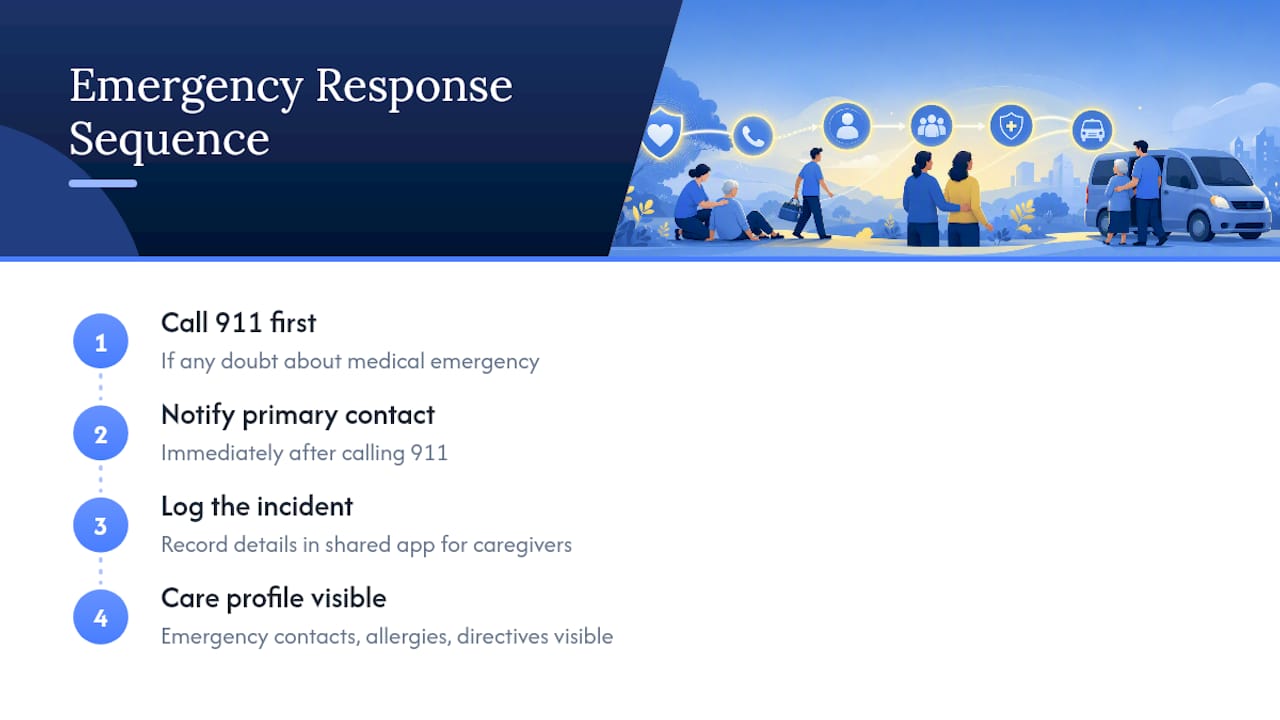
Practice matters more than paperwork. A caregiver who has walked through the steps once, even in conversation, reacts faster than one reading a laminated card for the first time during a fall. Build a habit of a monthly two-minute review: confirm emergency contacts are current, confirm the nearest hospital or urgent care is still correct, and confirm every caregiver on the team knows who calls whom first.
Backup coverage plans double as emergency plans. If a primary caregiver can't be reached during an incident, the same approved backup pool used for shift coverage should already know they may need to step in. Building that overlap once means never building it under pressure.
What Legal and Compliance Issues Come Up in Senior Caregiver Coordination?
Household employment law varies by state, and most families underestimate how much of it applies to them the moment they hire a paid caregiver directly rather than through an agency. Overtime rules, minimum wage requirements, and worker classification (employee versus independent contractor) all carry real financial and legal consequences if handled incorrectly.
Accurate time records matter here beyond payroll convenience. If a wage dispute or an audit ever comes up, a time log tied to actual clock-in and clock-out data holds up far better than a handwritten estimate reconstructed after the fact. Keep every weekly summary, every handoff note, and every schedule change on file, since these documents together show a consistent, defensible record of hours worked and care provided.
Household employers also carry responsibilities around workers' compensation coverage and payroll tax withholding in many states, and a caregiver's classification affects both. This isn't a substitute for legal or tax advice specific to your state, but it is a reminder that "informal" arrangements carry the same underlying obligations as formal ones. A consultation with a household payroll specialist before the first paycheck saves far more time than untangling a mistake after six months.
Privacy also deserves a mention. Medication lists, health conditions, and emergency contact details are sensitive information, and any tool storing them should offer basic access controls so only the people who need that information can see it.
How Often Should a Senior's Care Plan Be Reassessed?
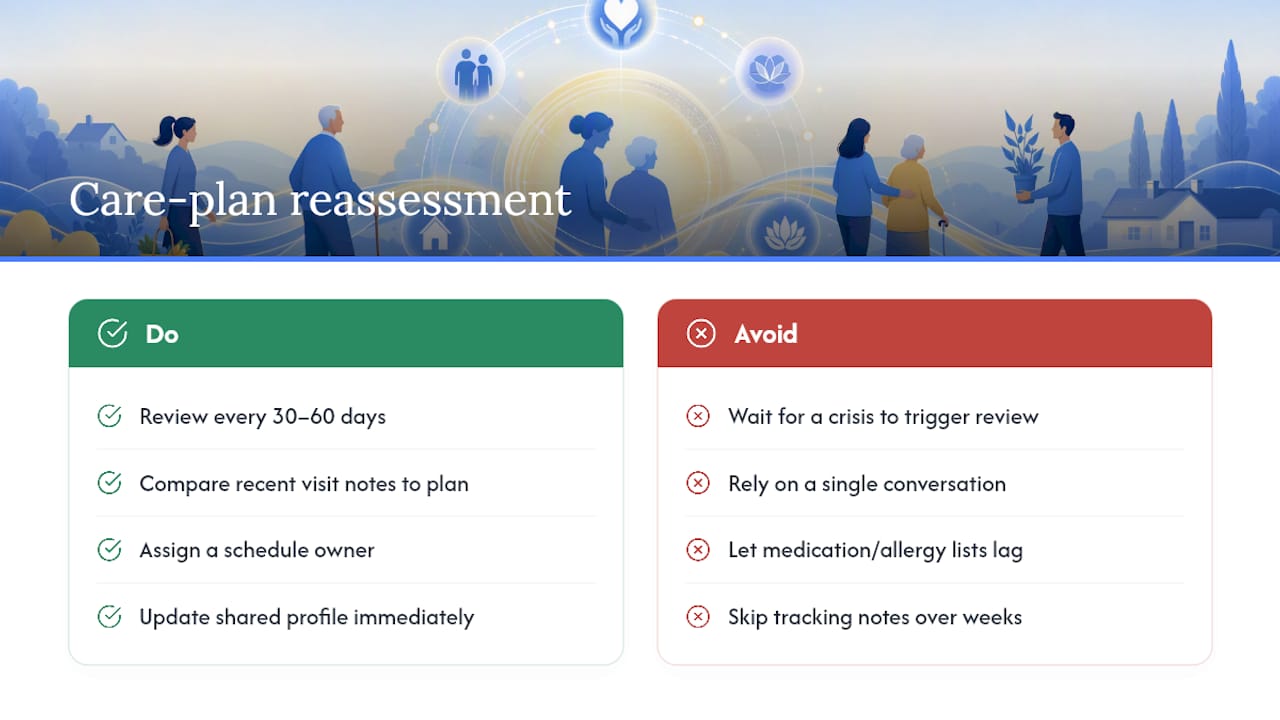
A care plan written six months ago rarely fits a senior's needs today. Mobility, memory, medication regimens, and even mood shift gradually, and a plan that isn't revisited tends to lag behind reality by the time anyone notices.
Build reassessment into the calendar rather than waiting for a crisis to force it. A short review every 30 to 60 days, comparing recent visit notes against the current plan, catches most changes early: a new fall, a new prescription, a growing reluctance to eat meals alone. These small signals, tracked consistently in visit notes over weeks, tell a more accurate story than any single conversation.
Whoever owns the schedule should also own the plan update, at least on paper. That might be a family member, a case manager, or a designated lead caregiver, but someone needs responsibility for reading the accumulated notes and deciding whether meal plans, mobility support, or medication schedules need to change. Update the shared care profile immediately after any change, since an outdated allergy list or medication dose is one of the most preventable safety risks in home care.
Rapid reviews of digital coordination tools in home care consistently find that systems collecting structured data over time support better-informed care plan updates than sporadic verbal check-ins, largely because the record itself becomes the evidence base for what's changing.
How Do You Bring Family Members and Healthcare Professionals Into Coordination?
A caregiving team that excludes the doctor or the out-of-town sibling from the loop is inviting confusion. Both groups need visibility, though not necessarily the same level of access as the caregivers doing daily hands-on work.
Family members who don't provide daily care still need to see the schedule and recent visit notes, especially when decisions about the senior's condition come up. A shared care profile that any authorized family member can check removes the need for a nightly recap phone call and reduces the odds of two siblings getting two different versions of events.
Healthcare professionals bring a different need: they usually want a summary, not a raw feed of daily notes. Before an appointment, compile a short list of recent changes, new symptoms, medication adherence issues, and any concerns caregivers have logged. This turns a rushed 15-minute appointment into a productive one, because the doctor walks in already knowing what's changed since the last visit.
Partner tools built around family notifications can add a layer here. Something like Kin Watchdog focuses specifically on keeping family members alerted to changes, which pairs well with a caregiver-facing scheduling and notes system rather than replacing it.
How Can Families Prevent Caregiver Burnout?
Burnout shows up quietly at first: a caregiver who used to write detailed notes starts writing one line, or someone who never missed a shift suddenly calls out twice in a month. Catching it early takes less effort than replacing a caregiver who's already burned out.
Fair scheduling is the first line of defense. A caregiver working six days in a row with no relief is far more likely to make a mistake or quit outright than one on a predictable, rotated schedule. Build slack into the system, not just coverage, so no single person becomes the fallback for every gap.
Give caregivers a real channel for feedback that isn't just a complaint line. A quick check-in at 30 days, asking what's working and what's exhausting, often surfaces problems before they become resignations. Simple recognition matters too. A short note acknowledging a hard week does more for morale than most families expect.
For family caregivers managing paid help alongside their own caregiving duties, the emotional load compounds fast. Structured digital coordination tends to ease part of that load by reducing the mental tracking involved in remembering who did what and when, which reviews of home care technology associate with lower reported caregiver burden. That's not a cure for burnout, but it removes one layer of constant low-grade stress.
A Coordinator's View on What Actually Fixes Coverage Gaps
Balancing fairness with coverage is the hardest part of this work, harder than any app setup. One household I've seen described fixed a recurring Sunday gap not with a new hire, but by publishing the roster two weeks out and opening unfilled shifts to an approved backup pool instead of one overworked caregiver. The gap disappeared within a month. Small, consistent changes beat big overhauls almost every time.
— mercedes
How CareTracker Puts This Checklist Into Practice
Every step in this playbook maps directly onto a feature built for exactly that purpose. Some caregiver coordination tools offer a multi-job calendar so someone working across two households sees both schedules in one place, plus schedule-approval workflows so shift changes go through an actual process instead of a group text. Time tracking running on the same system that publishes the schedule can help close the gap between hours worked and hours recorded. Shared care profiles can hold medications, allergies, emergency contacts, and daily notes where caregivers can find them quickly.
!
Getting started typically involves downloading the app, creating a care profile with essentials like meds, allergies, and emergency contacts, and adding jobs so schedules and hours can be managed in one place. Some apps offer free access to caregivers to use tools for scheduling and time tracking without a subscription or paywall. Families managing payroll or compliance questions can get additional support directly through Thecaretracker, and anyone focused specifically on accurate hours and overtime visibility should look at the nanny time tracking feature built for exactly that. For a walkthrough of setup from a caregiver's side, the caregiver scheduling app guide covers it step by step. Download the app and create your first profile today.
Sources
This playbook draws on peer-reviewed evidence about digital home care coordination, practitioner scheduling guides, and CareTracker's own resources on medication logs, daily logs, and multi-caregiver coordination templates.
- Evaluating the Economic Impact of Smart Care Platforms: Qualitative and Quantitative Results of a Case Study
- Health information systems and home care (review/chapter)
- Health information systems in home care: a rapid review of reviews
- Caregiver scheduling best practices (2026) | Heyshift Blog
FAQ
What Is the Fastest Way to Coordinate Multiple Caregivers?
A single published mobile schedule combined with verified time tracking and templated handoff notes covers most coordination problems immediately, with tools like CareTracker built around exactly that combination.
How Often Should a Caregiver Schedule Be Published?
Publish the schedule at least one week in advance and keep it on a consistent weekly cadence, since predictable timing is what gets caregivers into the habit of checking it.
What Belongs in a Caregiver Handoff Note?
Every handoff note should include medications given, allergies, emergency contacts, meals, activities, and a free-text field for anything critical that needs family attention.
Do Household Employers Need to Track Overtime for Caregivers?
Yes. Overtime rules vary by state, and accurate time tracking tied to the published schedule is the clearest way to catch overtime risk before it turns into a payroll surprise.
How Can Families Reduce Caregiver Burnout?
Fair, rotated scheduling, a real feedback channel, and reducing the mental load of manual coordination all help, and structured digital tools are associated with lower reported caregiver burden in home care.