
Set up one shared calendar in your scheduling app, block your availability today, and require every swap or time-off request to go through the app. That single rule, backed by caregiver scheduling best practices from Heyshift and care management guidance from the Caregiver Action Network, is the fastest path to a reliable, burnout-resistant schedule. Thecaretracker makes it free for nannies and caregivers to do exactly that.
Two immediate steps:
- Open your app and set your weekly availability blocks and preferred notice period.
- Invite your client families to view your calendar or submit schedule requests through the app.
Once those two steps are done, the roster in your app becomes your official schedule. Nothing changes unless it goes through the app first.
Pro Tip: Treat the published roster as the single source of truth. Off-book swaps via text or phone create gaps that are nearly impossible to fix after the fact.
Table of Contents
- How do you set up a caregiver scheduling app in the first 15 minutes?
- Scheduling practices that preserve continuity of care and prevent burnout
- How do you handle swaps, time-off requests, and last-minute coverage?
- How should caregivers accurately record hours and handle U.S. pay rules?
- What care details should you store in the app and share with families?
- What features does a caregiver scheduling app need, and how does Thecaretracker deliver?
- Practical templates you can copy into your scheduling app today
- Key Takeaways
- Why the scheduling conversation in caregiving needs to change
- Thecaretracker gives you a free scheduling system built for caregivers
- Useful sources and further reading
How do you set up a caregiver scheduling app in the first 15 minutes?
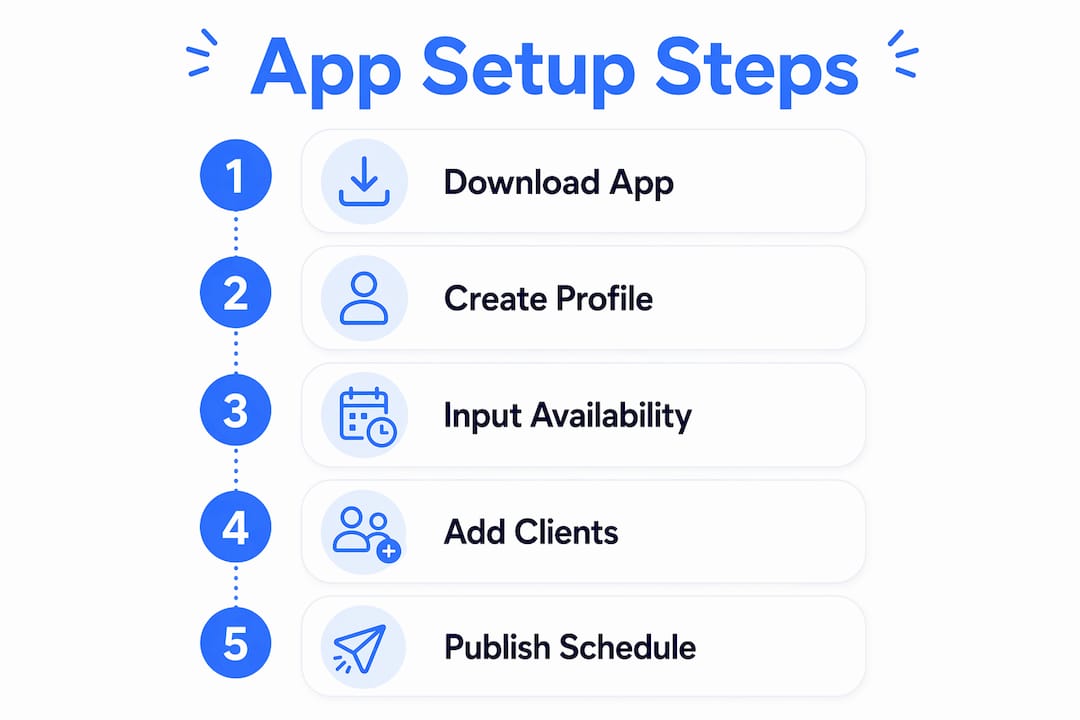
Get these steps done before your next shift and your calendar will be accurate from day one.
- Create your caregiver profile. Add your name, contact info, and any certifications or skills relevant to your clients.
- Add client care profiles. Enter each client's name, care needs, allergies, medications, and emergency contacts.
- Set weekly availability blocks. Mark the days and hours you are available, including any blackout periods for secondary jobs.
- Configure your notice period. Set the minimum advance notice you need for new assignments or changes (24–72 hours is a reasonable starting range).
- Enable mobile notifications. Turn on alerts for new requests, approvals, and schedule changes so nothing slips through.
- Invite families or clients. Send invitations and confirm whether each family has view-only access or can submit schedule requests.
- Set your clock-in method. Choose manual entry or in-app clock-in and connect pay period settings if the app supports them.
After setup, open the calendar on a second device or ask a family member to confirm they can see your schedule correctly. A quick check now prevents confusion later.
Pro Tip: Track availability, secondary jobs, and credential expirations in the same app you publish from. Keeping everything in one place closes the gaps that cause last-minute scrambles.
Scheduling practices that preserve continuity of care and prevent burnout
Caregiver scheduling is not the same as retail shift planning. Continuity of care and burnout prevention must be weighted as heavily as filling hours, especially for high-acuity clients.
Publish early. Posting your availability one to two weeks out reduces last-minute doubles and gives families time to plan. When you know your schedule in advance, you can also flag conflicts before they become emergencies.

Match caregivers to client needs. Use your app's notes or tagging fields to record skills, language preferences, and continuity preferences for each client. Matching caregivers to patient needs using tags for skills, language, and dementia training protects outcomes for high-acuity clients. When a backup caregiver steps in, those notes make the handoff smoother.
Balance your workload. Limit consecutive high-acuity days when possible and track which weekends and holidays you have already covered. A fair rotation keeps fatigue from concentrating on one person.
Review your schedule daily. Daily morning reviews of staffing levels catch coverage problems earlier than weekly checks. A two-minute scan of your app each morning is enough.
Pro Tip: Use your app's notes fields to record client handoff details after every shift: medications given, mood observations, and any changes from the care plan. The next caregiver walks in informed instead of guessing.
How do you handle swaps, time-off requests, and last-minute coverage?
Every change to the schedule should follow the same path: request in the app, approval in the app, updated roster in the app. That flow prevents off-book changes and keeps attendance records accurate.
- Submit all requests through the app. Whether it is a swap, a planned day off, or an emergency, the request goes in writing through the platform.
- Set a notice-period threshold. Configurable notice periods stabilize coverage. Request at least 24 hours for routine changes and 72 hours for full-day absences when your assignment allows it.
- Post open shifts to qualified caregivers first. Before reaching outside your regular network, offer the shift to someone already familiar with the client. Continuity matters.
- Get written approval before the shift changes. A confirmed approval in the app protects both you and the family if a dispute arises later.
- Update attendance and hours immediately. Once a swap is approved, adjust your time-tracking records so payroll stays aligned.
Here are three short message templates you can send inside the app:
- Planned time-off: "Hi [Family], I'd like to request [date] off. I can suggest [Backup Name] as coverage if helpful. Please approve through the app."
- Short-notice swap: "Hi [Family], I need to swap my [day/time] shift. [Caregiver Name] is available and familiar with [Client]. Approving in the app will update the calendar."
- Emergency coverage: "Hi [Family], I have an emergency and cannot make [shift]. I'm posting the open shift now. Please approve the replacement through the app as soon as possible."
Pro Tip: Keep phone calls for true emergencies only. Every other schedule change belongs in the app so there is a written record.
How should caregivers accurately record hours and handle U.S. pay rules?
Always clock in and out at the client location, or as your assignment policy requires. Precise timestamps are your best protection if a pay dispute arises.
Common time-tracking methods:
- In-app clock: The most reliable option. Thecaretracker's nanny time tracking feature records clock-in and clock-out times and compiles weekly totals for pay reconciliation.
- Manual entry: Acceptable for caregivers without consistent connectivity, but requires same-day entry to stay accurate.
- Geolocation clock-in: Available in some apps; useful for verifying you were at the client site.
Basic U.S. pay awareness. Federal law requires overtime pay at 1.5x the regular rate for hours over 40 in a workweek for employees, but state rules vary. Some states set daily overtime thresholds. Independent contractors are not covered by the same overtime rules, though your contract terms still govern pay. Check your state's Department of Labor website for the rules that apply to your classification.
The Caregiver Action Network advises caregivers to "think like a professional care manager" by coordinating care plans, medications, and documentation alongside the daily schedule. Accurate time records are part of that professional standard.
If you miss a clock-in: Document the actual start and end times, notify the family the same day, and submit a correction request through the app. Do not leave a gap in your records and hope no one notices.
What care details should you store in the app and share with families?
The Caregiver Action Network recommends thinking like a professional care manager, which means keeping documentation, coordination, and contingency information in one place alongside your schedule.
Essential fields to store for each client:
- Allergies and dietary restrictions
- Current medications and dosing schedules
- Emergency contacts (primary and secondary)
- Nap and nursing schedules
- Mobility notes and physical limitations
- Behavioral triggers and calming strategies
- Daily activity preferences
| Field | Why it matters | Who needs access |
|---|---|---|
| Allergies | Prevents medical emergencies | All caregivers, family |
| Medications | Ensures correct dosing | Primary and backup caregivers |
| Emergency contacts | Speeds up crisis response | All caregivers |
| Nap/nursing schedule | Maintains routine and continuity | Primary and backup caregivers |
| Behavioral triggers | Reduces distress for the client | All caregivers |
Thecaretracker's care profile features let you store and access all of these details instantly from your phone.
Permissions matter. Give families view access to care notes and schedules. Backup caregivers need read access to care profiles but not edit rights unless they are a regular part of the care team. Keep edit access limited to reduce errors.
For daily handoffs, keep notes short: medications given, any changes from the care plan, and one line on the client's mood or condition. That structure takes two minutes to write and saves the next caregiver from guessing.
What features does a caregiver scheduling app need, and how does Thecaretracker deliver?
A solid caregiver roster app must cover these functions:
- Unified calendar showing all jobs in one view
- Availability blocks you control and update
- Manager-approved swaps with a written approval trail
- Open-shift posting to qualified caregivers
- Mobile notifications for new requests and changes
- In-app messaging to keep schedule changes off personal texts
- Time tracking with exportable weekly reports
- Care profiles storing allergies, medications, and emergency contacts
- Flexible reports for pay period reconciliation
"Scheduling for caregivers is not the same as retail or hospitality scheduling: continuity of care and burnout prevention must be weighted as heavily as fill rate and clock hours." — Heyshift caregiver scheduling best practices
Thecaretracker covers every item on that list and is completely free for caregivers. You receive and approve schedule requests, view all your jobs in one calendar, track weekly hours, and access client care details from one app.
Practical templates you can copy into your scheduling app today
Weekly schedule templates
Template 1: Part-time recurring Enter as a recurring visit in the app.
- Monday, Wednesday, Friday: 8:00 AM–1:00 PM, Client A
- Tuesday, Thursday: 9:00 AM–3:00 PM, Client B
- Handoff note field: "Meds at 9 AM, nap at 11 AM, emergency contact: [Name/Number]"
Template 2: Variable-week blocks Enter as availability blocks, not fixed shifts.
- Week A: Available Monday–Thursday, 7:00 AM–5:00 PM
- Week B: Available Wednesday–Saturday, 8:00 AM–4:00 PM
- Note: Flag week B Saturday as "holiday rotation — confirm 72 hours in advance"
Swap and request message templates
- Planned time-off: "Requesting [date] off. [Backup Name] is available and briefed on [Client]'s routine. Please approve in the app."
- Short-notice pickup: "Available to cover [shift] for [Client]. I've worked with this client before. Please confirm through the app."
- Emergency coverage: "Unable to make [shift] due to emergency. Open shift posted. Please approve replacement in the app immediately."
Availability-block rules
- Morning-only: Available 7:00 AM–1:00 PM; no afternoon assignments without 48-hour notice
- Weekend-only: Available Saturday–Sunday; weekday requests require 72-hour advance notice
- Max consecutive hours: No more than 10 hours in a single shift; flag anything longer for family discussion
Pro Tip: Set your recurring availability blocks at the start of each month. Families can see your open windows and submit requests without a back-and-forth phone call.
Key Takeaways
A reliable caregiver schedule starts with one shared digital calendar, accurate availability blocks, and a firm rule that all changes go through the app.
| Point | Details |
|---|---|
| One shared calendar | Publish all shifts in a single in-app roster so families and backup caregivers always see the current schedule. |
| Set notice periods | Require reasonable advance notice for swaps and time-off to prevent last-minute coverage gaps. |
| App-based changes only | Route every swap, time-off request, and approval through the app to keep attendance records accurate. |
| Track hours precisely | Clock in and out at the client site every shift; export weekly totals for pay reconciliation. |
| Thecaretracker is free | Thecaretracker provides a unified calendar, time tracking, care profiles, and schedule approvals at no cost to caregivers. |
Why the scheduling conversation in caregiving needs to change
Most scheduling advice treats caregivers like warehouse workers: fill the slot, hit the hours, move on. That framing misses what actually drives quality care. Continuity is not a soft benefit; it is a clinical and relational outcome. A client with dementia who sees a familiar face has a measurably different experience than one who gets a different caregiver every other day.
The burnout side of this is equally concrete. When schedules are built from outdated availability or off-book swaps pile up, the same reliable caregivers absorb the extra shifts. That concentration is how good people leave the profession. An app that enforces a single published roster and requires written approvals is not bureaucracy. It is protection for the caregiver and the client at the same time.
The other thing most guides skip: documentation is part of scheduling. Knowing a client's behavioral triggers or nap schedule is not separate from the shift plan. It is what makes the shift plan work. Caregivers who store that information in the same app they use to clock in are practicing exactly what the Caregiver Action Network calls "thinking like a professional care manager." That standard is worth holding yourself to, regardless of whether anyone is checking.
Thecaretracker gives you a free scheduling system built for caregivers
Nannies and caregivers who need a unified calendar, accurate time tracking, and care profile access in one place have a free option ready today. Thecaretracker is built specifically for caregivers, not agencies, which means the controls are in your hands.

- Free for caregivers: No subscription, no credit card required.
- Mobile-first: Receive and approve schedule requests, view all jobs in one calendar, and clock in from your phone.
- Exportable hours: Generate weekly reports for pay reconciliation and state-specific overtime tracking.
Start with your caregiver profile and time tracking today, then add your client care profiles and invite families through the app features page. Your schedule, your hours, and your client details will all be in one place from day one.
Useful sources and further reading
- Caregiver scheduling best practices (2026) | Heyshift Blog — Covers early publication, notice-period thresholds, continuity matching, and manager-approved swaps.
- Care Management for Family Caregivers | Caregiver Action Network — Guidance on thinking like a professional care manager, including documentation and contingency planning.
- Thecaretracker: Track hours for nannies or caregivers — Overview of the free caregiver app, including calendar, schedule approvals, and care profile features.
- Thecaretracker app features and onboarding — Details on care recipient profiles, schedule request workflows, and calendar views.
- Nanny time tracking | Thecaretracker — Time-tracking and weekly reporting features for pay reconciliation.