
A caregiver daily log is a time-stamped, objective record of every shift — covering medications, activities, incidents, and observations — used for continuity of care, billing, and audits. Start using a structured, time-stamped log for every shift, beginning today. Tools like Thecaretracker make this practical by combining time-stamped entries with care profiles and payroll reporting in one free app.
Without a consistent log, the next caregiver starts their shift with a blind spot — missing small changes that can signal larger problems. That gap in information is where care quality breaks down.
Table of Contents
- What does a caregiver daily log actually do?
- What fields must every professional log entry include?
- Copy-ready templates you can paste into an app or print
- How do you write entries that are objective and legally defensible?
- Does an app really improve accuracy and handoffs over paper?
- What do U.S. caregivers need to know about privacy and legal rules?
- Your shift-start and shift-end checklist
- How to connect your daily log to billing and time tracking
- Key Takeaways
- Why documentation features matter more than most caregivers realize
- Thecaretracker puts these templates to work for you
- Useful sources and further reading
What does a caregiver daily log actually do?
A daily care log is both a work record and a handoff document. Its primary job is continuity of care: making sure the next caregiver, family member, or clinician knows exactly what happened during your shift without having to ask.

Professional logs differ from personal journals in one key way. They record observable facts, not feelings or opinions. "Client refused breakfast at 7:15 AM" belongs in a log. "Client seemed unhappy this morning" does not.
The main use cases for a daily log include:
- Shift handoff: Outgoing caregivers document unresolved items and a clear next step so the incoming caregiver can act immediately.
- Incident recording: Falls, behavioral changes, or medication refusals need a time-stamped record for safety and legal protection.
- Time tracking for payroll: Logged shift start and end times support accurate billing and overtime calculations.
- Family updates: Families rely on daily notes to stay informed without being present.
- Clinical reference: Nurses and physicians use caregiver notes to track patterns and adjust care plans.
What fields must every professional log entry include?
Every entry needs a minimum set of fields to be useful for care continuity, billing, and audits. A structured daily note covers identification, activities, observations, incidents, and follow-up actions.
| Field | What to write | Why it matters |
|---|---|---|
| Date and time | "June 3, 2026 — 8:00 AM–4:00 PM" | Establishes the audit trail and billing period |
| Caregiver name | Full name and signature | Accountability and legal record |
| Care recipient | Full name | Prevents mix-ups in multi-client settings |
| Medications | Drug name, dose, time, response | Tracks adherence; flags missed or refused doses |
| Activities | "Assisted with morning hygiene, 30-min walk" | Documents care delivered |
| Meals and fluids | "Ate 75% of lunch; drank 8 oz water at noon" | Tracks nutrition and hydration trends |
| Mood and behavior | Observable actions, not labels | Gives clinicians usable data |
| Incidents | What happened, time, action taken | Required for audits and safety reviews |
| Next steps | "Monitor left ankle swelling; notify RN if worsens" | Triggers follow-up and prevents missed items |
| Signature | Caregiver initials or full name | Confirms the entry is complete |
Pro Tip: Avoid abbreviations and clinical jargon. Write "refused medication" rather than "med non-compliant." Plain language keeps your notes readable by families, clinicians, and auditors alike — and reduces the chance of a misread entry causing a care error.
Escalate immediately — do not wait for end-of-shift logging — when you observe a fall, sudden confusion, significant pain, or any change that could require medical attention.
Copy-ready templates you can paste into an app or print
Two templates cover most professional caregiving situations. Adapt the fields in Thecaretracker's care information profiles to match the recipient's specific needs, such as PT exercises or nursing schedules.
Shift summary template
| Field | Example entry |
|---|---|
| Date / Shift | June 3, 2026 / 8:00 AM–4:00 PM |
| Caregiver | Jane Smith |
| Care recipient | Robert D. |
| Medications given | Lisinopril 10 mg at 8:30 AM — taken without issue |
| Activities | Morning hygiene, breakfast, seated exercises, TV |
| Meals / fluids | Ate full breakfast; lunch 50%; 24 oz water total |
| Mood / behavior | Calm in AM; increased restlessness 2:00–4:00 PM |
| Incidents | None |
| Next steps | Monitor restlessness; report if continues tomorrow |
| Signature | J. Smith |
Detailed clinical-style note
| Field | Example entry |
|---|---|
| Date / Time | June 3, 2026 — 13:45 |
| Caregiver | Jane Smith |
| Observation | Client paced living room for 30 min; declined afternoon snack |
| Response | Offered water; redirected to music; pacing reduced by 13:50 |
| Medication note | Afternoon dose offered — refused; documented per protocol |
| Incident | None requiring escalation |
| Next steps | Notify family; flag for RN review at next visit |
| Signature | J. Smith |
Sample entries you can copy and edit:
- "8:15 AM — Assisted with shower. Client cooperative. No skin breakdown noted."
- "10:00 AM — Metformin 500 mg administered with breakfast. Client tolerated without complaint."
- "13:45 — Client fell attempting to stand unassisted. No injury observed. Family notified at 13:50. Incident report filed."
- "15:30 — Client refused afternoon medication. Reason given: 'makes me dizzy.' Documented; supervisor notified."
How do you write entries that are objective and legally defensible?
Use observable, specific language and time-stamp every entry immediately after the event. Notes written close to the event are more accurate and carry more weight in audits or legal reviews.
Follow this checklist each shift:
- Record shift start immediately. Log your name, the date, and your start time before you do anything else.
- Document medications as they happen. Never log meds from memory at end of shift.
- Describe behavior in observable terms. Note what you saw and heard, not what you interpreted.
- Record refusals with exact wording. Write what the client said, not your assessment of why.
- Note responses to care. "Client grimaced when repositioned on left side" is more useful than "seemed uncomfortable."
- Log incidents immediately. Time-stamp the event, your response, and who you notified.
- Complete next-steps field before signing off. This is what the incoming caregiver acts on first.
Pro Tip: Replace vague mood words with timed behavioral observations. Instead of "had a bad day," write "refused morning medication, paced 30 minutes, increased restlessness 2:00–4:00 PM." That version gives a clinician or family member something concrete to act on.
Professional logs should never substitute for a clinical escalation — they should trigger it. A clear "next steps" field is what turns a note into a prompt for action.
Does an app really improve accuracy and handoffs over paper?
Yes, and the difference is significant. Apps enable real-time hour tracking, automated reporting, centralized care profiles, and sync across multiple caregivers and family members — none of which paper can replicate reliably.
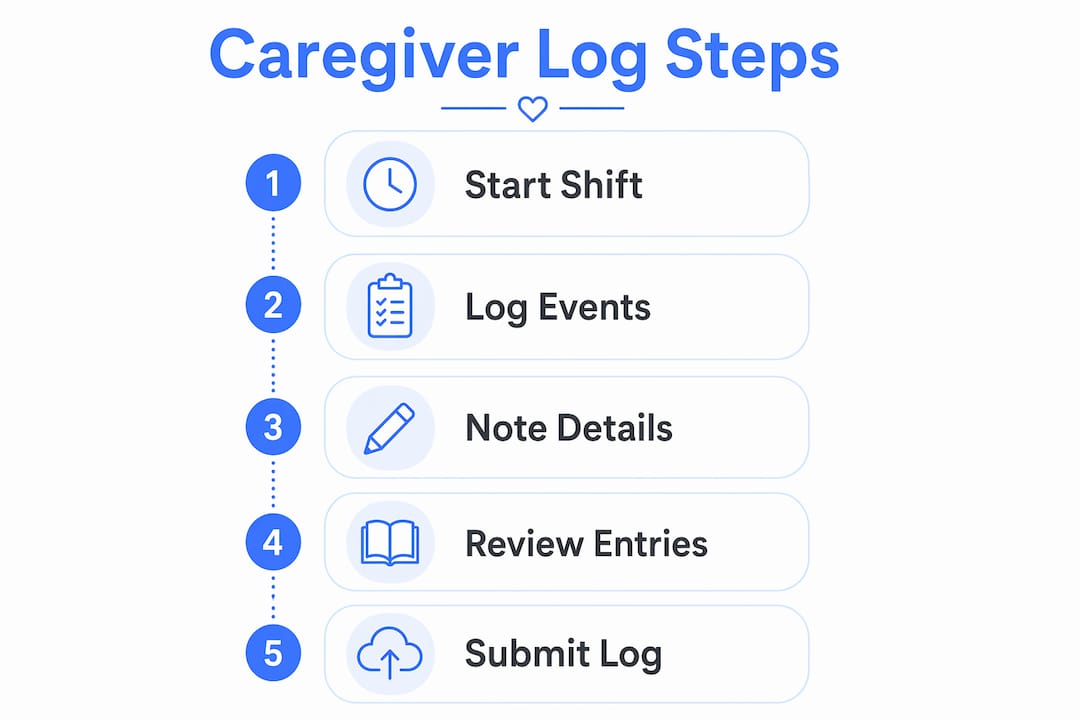
Here is how a single shift looks with an app-based workflow:
Start of shift: Open the app, confirm the care recipient's profile (allergies, medications, emergency contacts), and clock in. Any notes from the previous caregiver are visible immediately.
During the shift: Log entries as events happen. Medication administered? Log it now. Incident? Time-stamp and record within minutes. Apps that auto-generate structured notes cut the administrative time significantly and make records searchable for future audits.
End of shift: Review your entries, complete the next-steps field, and submit. The outgoing record is instantly available to the incoming caregiver and the family. Reports for payroll or clinical review are ready in seconds rather than requiring manual formatting.
Good workforce transparency in care settings depends on records that multiple people can access and trust. Paper logs sit in a binder; app records travel with the care team.
What do U.S. caregivers need to know about privacy and legal rules?
In most home-care and nanny situations, HIPAA does not apply directly to the individual caregiver. HIPAA governs covered entities — hospitals, insurers, and healthcare providers — and their business associates. However, if your logs are shared with or integrated into a clinician's workflow, those records may fall under HIPAA-adjacent obligations.
Practical steps to protect yourself and the families you work with:
- Request written consent before sharing clinical notes with anyone outside the immediate care team.
- Use a secure app with an audit trail rather than paper or unsecured messaging apps.
- Retain logs according to your employer's or agency's retention policy. When in doubt, keep records for at least three years.
- Check the HHS caregiving guidelines and your state's home-care rules for jurisdiction-specific requirements.
This article provides general information, not legal advice. Confirm current rules with HHS, your state licensing board, or a qualified professional for your specific situation.
Your shift-start and shift-end checklist
A single-page checklist keeps every shift consistent. Print it or keep it pinned in your app.
Shift start:
- Confirm care recipient identity and active care plan
- Review previous caregiver's notes and next-steps field
- Check medication schedule and allergy alerts
- Clock in and log shift start time
During shift:
- Log medications as administered (not from memory)
- Record meals, fluids, and refusals with amounts
- Note mobility, toileting, and sleep observations
- Time-stamp any incident immediately
Shift end:
- Complete next-steps field for incoming caregiver
- Review entries for completeness and objective language
- Sign and submit log
- Clock out
Pro Tip: Set a recurring reminder in your app five minutes before your shift ends. That buffer is enough time to review your entries, catch any missing fields, and write a clear next-steps note — without rushing.
How to connect your daily log to billing and time tracking
Integrating your log with billing is straightforward when your time-tracking and note-taking live in the same app.
Step 1: Clock in at shift start. Your logged start time becomes the billing record. Never rely on memory to reconstruct hours later.
Step 2: Log care events in real time. Each entry carries a timestamp that corroborates your clocked hours. If a family or agency questions a billing period, your notes confirm what care was delivered and when.
Step 3: Use the app's reporting feature at week's end. Apps like Thecaretracker generate weekly hour summaries that align directly with pay periods, including state-specific overtime rules. Export the report and attach it to your invoice or timesheet.
Step 4: Flag reimbursable expenses in the same session. If your app supports reimbursement requests, submit them alongside your time log so everything is in one record.
Step 5: Archive completed logs. Retain weekly reports for at least the duration of your employment plus your employer's stated retention period. Searchable digital records are far easier to retrieve than paper binders when a payroll dispute arises.
Nanny time tracking built into your logging app removes the need to maintain separate timesheets, reducing errors and saving time every week.
Key Takeaways
A structured, time-stamped caregiver daily log is the single most reliable tool for continuity of care, accurate billing, and a defensible audit trail.
| Point | Details |
|---|---|
| Time-stamp every entry | Log medications, incidents, and shift times as they happen — never from memory. |
| Use objective language | Replace mood labels with timed behavioral observations clinicians and families can act on. |
| Escalate immediately | Incidents like falls or medication refusals require a real-time entry, not an end-of-shift note. |
| App beats paper for audits | Apps produce searchable, time-stamped records and payroll-ready reports that paper cannot match. |
| Thecaretracker is free | Thecaretracker combines time tracking, care profiles, and reporting in one free app for caregivers. |
Why documentation features matter more than most caregivers realize
Most caregivers think of a daily log as paperwork. The better way to see it: your log is the only record that proves care happened, protects you legally, and gives the next caregiver a real starting point instead of guesswork.
What gets underestimated is the compounding value of consistent entries. A single note about restlessness at 2:00 PM means little. Thirty days of the same observation at the same time tells a clinician something actionable. That pattern only exists if the entries are specific, time-stamped, and written in observable language — not "seemed off" logged three hours after the fact.
The shift to an app is not about technology for its own sake. It is about removing the friction that causes caregivers to skip entries or write vague ones. When logging takes 30 seconds instead of five minutes, caregivers actually do it. That consistency is what makes the record worth anything.
Thecaretracker puts these templates to work for you
Professional caregivers deserve tools that match how they actually work. Thecaretracker is a free app built specifically for nannies and caregivers that puts time tracking, care profiles, and shift coordination in one place — no paper binders, no separate timesheets.

Every feature maps directly to the workflows in this guide. Clock in at shift start, access allergy and medication details instantly, log notes tied to the care recipient's profile, and generate a payroll-ready report at week's end. Schedule requests, time-off submissions, and reimbursements all live in the same app.
Download Thecaretracker free and start your first structured shift log today. For a closer look at the time-tracking features that connect your daily notes to billing, visit the nanny time tracking page.
Useful sources and further reading
For legal and clinical rules, start with U.S. government sources and peer-reviewed care documentation guides — then check your state's home-care licensing requirements.
- National Institute on Aging — Caregiver Worksheets: Free, printable worksheets for coordinating care responsibilities and tracking needs.
- Daily Care Notes Guide — Noota: Best practices for writing objective, audit-ready care notes with template examples.
- Caregiver Daily Log Template — MySageBeam: Downloadable templates and guidance for families and professional caregivers in the U.S.
- Sunshine Health Caregiver Journal: Structured journal covering medications, emergency contacts, and legal documents for long-term care.
- Scheduling and carer retention — TimeProf: Research-based look at how scheduling tools and transparent records affect caregiver retention.