HIPAA does not automatically protect most caregivers or give them access to a care recipient's health records. If you are a family caregiver or a paid aide, your first three moves matter more than any law: secure every shared account with strong passwords and multi-factor authentication, get a signed HIPAA authorization or personal representative designation in writing, and check the privacy settings on every caregiving app before you enter sensitive information.
TL;DR:
- Changing shared passwords and enabling multi-factor authentication within the first hour significantly reduces immediate security risks.
- Caregivers must obtain documented consent, such as HIPAA authorizations or power of attorney, before accessing health records, as HIPAA does not grant automatic rights.
- Regular review of app permissions and privacy policies every quarter prevents outdated access and detects privacy policy changes that could affect data security.
- Using role-based accounts and centralizing records in a secure app minimizes scattered PHI and limits exposure across multiple communication channels.
- Caregivers should document and update permissions with signed documents and strict routines to maintain lawful access and respond quickly to data breaches.
Table of Contents
- Building Your Caregiver Data Privacy Checklist
- When Does HIPAA Apply to Caregivers?
- How to Evaluate Caregiving Apps and Smart Devices
- Everyday Routines That Keep Care Data Secure
- Documenting Permissions So Access Stays Lawful
- What to Do After a Suspected Breach or Accidental Disclosure
- How Centralizing Care Information Reduces Exposure
- Balancing Safety and Dignity in Caregiver Data Privacy
- A Simpler Way to Keep Caregiver Information Private
- Sources
- FAQ
Building Your Caregiver Data Privacy Checklist
Protecting caregiver information doesn't require a law degree. It requires a routine, done in the right order, so nothing sensitive sits exposed while you sort out the legal paperwork.
Do this within the hour
- Change any password shared between multiple family members or caregivers, especially for email accounts, medical portals, or scheduling apps, to protect against unauthorized access.
- Turn on multi-factor authentication (MFA) everywhere it's offered, particularly on email and any app storing medication or allergy details, to enhance security.
- Remove former caregivers, old devices, or inactive users from shared accounts to prevent unauthorized access by people no longer involved in care.
Do this within the day
Pull up every app and device connected to the care recipient's information and actually read the data-sharing section of each privacy policy, not just skim the headline. Look specifically for language about third-party sharing, data sale, or "aggregated" data use, since that's often where free apps make their money. If a platform allows it, request a data export now so you have a record of what's stored, in case you need to delete an account later.
Do this within the week or month
Set up individual, role-based accounts for each caregiver rather than one shared login. A grandmother's home aide, her daughter, and her physical therapist likely need different levels of access. Centralize records in one secure caregiving app instead of scattering photos of medication lists across text threads and email attachments. Document every consent you've gathered, whether it's a verbal okay from a provider or a signed authorization, and keep copies where you can find them fast.
Do this every quarter
Set a recurring reminder, quarterly works well, to review who still has access to what. Caregiving situations change constantly: a new aide starts, a family member's role shifts, a provider retires. Old permissions rarely get cleaned up on their own. While you're at it, check whether any app's privacy policy has changed since your last read, since terms of service updates are usually announced quietly.
| Timeframe | Priority Action | Why It Matters |
|---|---|---|
| This hour | Change shared passwords, enable MFA | Closes the fastest path to unauthorized access |
| Today | Audit apps, read data-sharing policies | Reveals hidden third-party sharing risks |
| This month | Set role-based accounts, centralize records | Cuts down on scattered PHI across texts and email |
| Every quarter | Review permissions, remove stale access | Prevents old logins from becoming silent liabilities |
Pro Tip: Keep a single running note (paper or digital) listing every app, device, and account tied to the care recipient's information. When something goes wrong, that list is the difference between a five-minute fix and a frantic afternoon retracing your steps.
When Does HIPAA Apply to Caregivers?
HIPAA governs "covered entities," which means hospitals, doctors' offices, pharmacies, and health plans, along with their business associates. It does not automatically cover a family member, a nanny, or a home health aide, and it usually does not cover the caregiving app on your phone unless that vendor has signed a Business Associate Agreement with a covered entity. That gap surprises a lot of caregivers who assume the law protects them by default. It doesn't, and that's precisely why documentation matters so much.
Providers generally share information with caregivers through one of three routes:
- Personal representative status, granted through legal documents like a power of attorney or guardianship, which lets you stand in the patient's shoes under privacy law.
- A signed HIPAA authorization, a specific document naming exactly what information can be shared, with whom, and for how long.
- Provider professional judgment, sometimes called the "family and friends" rule, where a doctor decides sharing information with you serves the patient's best interest, even without formal paperwork on file.
The NCBI's review of caregiver access under HIPAA confirms caregivers have no automatic right to records under any of these routes; each one requires either documentation or a provider's discretionary decision made in the moment. HHS guidance adds that this discretionary sharing typically applies when the patient isn't present or able to object, and the provider judges that sharing serves the patient's interest.
Caregivers should never assume verbal permission from a nurse or medical assistant carries the same weight as a signed authorization. Ask specifically what documentation the practice needs on file, and get it in writing before an emergency forces the question.
Before your next appointment, gather a signed HIPAA authorization, a copy of any power of attorney or guardianship order, and a one-page summary of your role in the person's care. Bring all three, even if the front desk only asks for one.
How to Evaluate Caregiving Apps and Smart Devices
Not every caregiving app treats your data the same way, and the differences show up in features most people never check. Look for encryption both in transit and at rest, audit trails you can actually read, role-based access controls, and a clear option to export or delete your data on request. If any of these are missing, particularly on a platform handling protected health information, ask directly whether the company signs BAAs with healthcare providers, or treat the gap as a warning sign, as explained in Healthcare IT Services & HIPAA Compliance.
Read the privacy policy's business model section before you read anything else. A free app with no visible revenue stream is often monetizing your data in ways the fine print only hints at, through aggregated analytics sales or third-party ad partnerships. Privacy advocates at the Future of Privacy Forum's AgeTech program treat this as a non-negotiable check, not an optional one, since the risk with caregiving data isn't only hacking. It's the quiet secondary use of intimate health details you never agreed to share.
For smart devices like cameras, fall sensors, or medication dispensers, change every default password immediately, enable automatic firmware updates, and think carefully about camera placement before installation, not after a family conflict about it. A camera in a bathroom or bedroom raises dignity concerns that a hallway or kitchen camera doesn't.
Watch for these red flags:
- No visible option to export or permanently delete your data
- Vague or missing language about third-party data sharing
- Shared logins as the only way to add multiple caregivers
- No audit trail showing who accessed what, and when
Healthcare data breaches remain common enough that treating encryption and deletion rights as baseline requirements, not premium features, protects you against long-term exposure well beyond any single incident, according to HHS security guidance.
Pro Tip: Before you input a single medication name or allergy, search the app's name plus "data breach" or "privacy policy" to see if anything surfaces. Two minutes of searching can save you from months of cleanup.
Everyday Routines That Keep Care Data Secure
Good caregiver data protection isn't a one-time setup. It's a habit, and the habits that matter most are the ones that feel almost too simple to bother with.
Give every caregiver their own individual account, protected by multi-factor authentication, rather than one shared login passed around on a sticky note. Assign a single named admin, usually the primary family decision maker, who has authority to revoke access the moment a caregiver's role ends. Practical guidance on family care app security points out that without role-based permissions and unique logins, families default to insecure shared-password workarounds that make it impossible to know who accessed what.
For paper documents like signed authorizations or medication lists, store originals in a locked drawer or fireproof box, not loose on a kitchen counter. Back up digital records to a secure, encrypted cloud service rather than a folder of email attachments.
When a caregiver's role changes, run through this handoff checklist:
- Revoke their account access immediately, not "at the end of the week."
- Change any passwords they previously had access to, including shared ones.
- Update the household's authorized caregiver list with the provider's office.
- Retrieve or confirm destruction of any printed care documents they were holding.
Documenting Permissions So Access Stays Lawful
Three documents get confused constantly, and the confusion causes real delays at exactly the wrong moment. A healthcare proxy names someone to make medical decisions if the person can't make them personally. A durable power of attorney can cover healthcare, finances, or both, depending on how it's written, and stays valid even after incapacity. A HIPAA authorization is narrower still: it only grants permission to view or receive specific health information, and it doesn't grant decision-making power at all.
Build a one-page packet you can hand to any new provider on the first visit:
- Copy of the signed HIPAA authorization, naming exactly what can be shared
- Copy of the healthcare proxy or power of attorney, if one exists
- A short summary of the caregiver's role and relationship to the patient
- Contact information for all authorized caregivers and family decision makers
Keep the original documents in one secure, known location, and store digital scans in an encrypted app rather than a general photo library. Update the packet every time a document changes, and note the revision date on the cover page so nobody presents an outdated authorization by mistake.
What to Do After a Suspected Breach or Accidental Disclosure
Speed matters more than perfection here. A few fast, correct steps beat a slow, thorough investigation every time.
- Change every password connected to the exposed account and revoke access on any device you don't recognize.
- Isolate the affected device from shared networks if you suspect malware or unauthorized remote access.
- Contact the app vendor or healthcare provider directly to report what happened and ask what containment steps they're taking.
- If protected health information was involved, know that providers have specific breach notification obligations under CMS guidance, and you can also file a complaint with HHS's Office for Civil Rights.
- Notify affected family members directly, and loop in your state attorney general's office if the disclosure involves a larger data breach beyond one household.
- Write down what happened, when you noticed it, who you contacted, and what response you received. This record matters if you need to escalate later.
How Centralizing Care Information Reduces Exposure
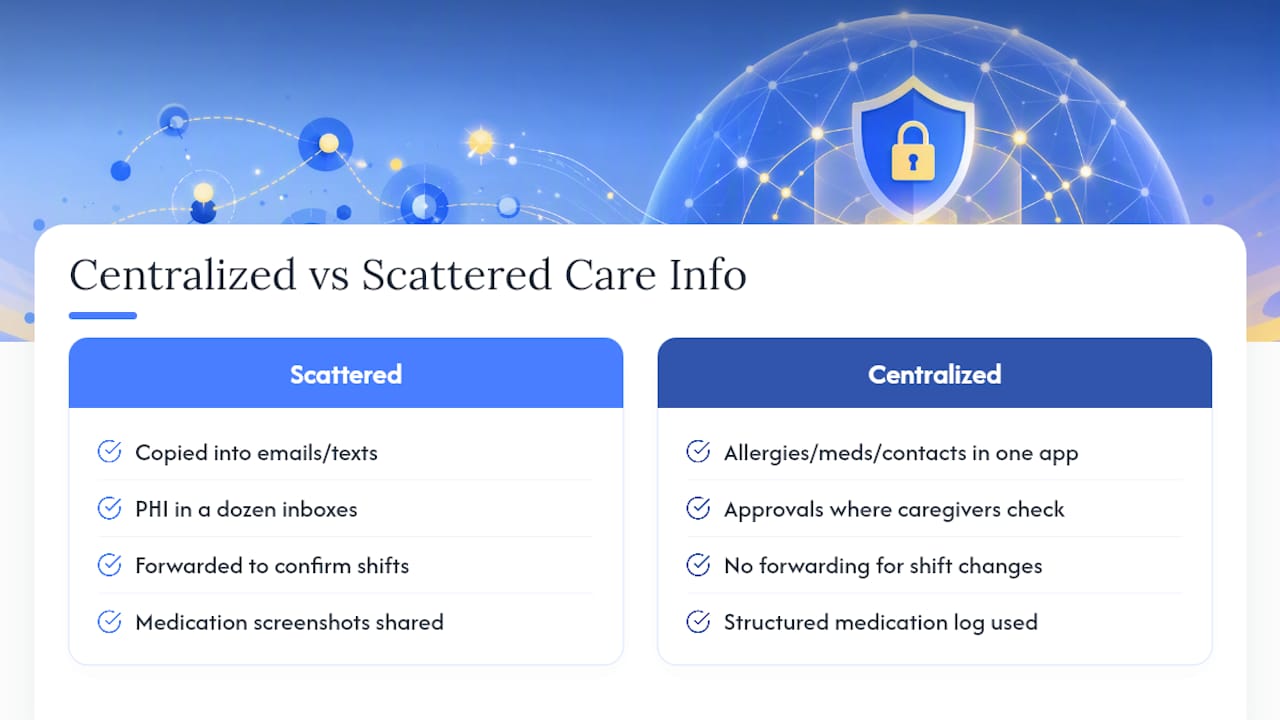
Every time a medication list gets copied from a text thread into an email, then forwarded to a new aide, another copy of sensitive data lands somewhere new. That's how PHI ends up scattered across a dozen inboxes nobody remembers to secure.
One approach centers on keeping allergies, medications, emergency contacts, and daily activity notes inside one app rather than spread across texts and email. Schedule approvals happen in the same place caregivers already check for job details, so families aren't forwarding sensitive notes just to confirm a shift change. For medication tracking specifically, a structured medication log beats a screenshot passed between caregivers, and a consistent caregiver daily log keeps care notes out of casual text threads entirely.
Pro Tip: Every time you're tempted to text a medication update instead of logging it in your care app, ask whether that message will still be findable, and secure, six months from now.
Balancing Safety and Dignity in Caregiver Data Privacy
Every monitoring decision is a tradeoff, and pretending otherwise does families a disservice. A fall sensor might genuinely save a life. It also means someone's movements are being tracked in their own home, and that person's preferences deserve real weight in the decision, not an afterthought after the device is already installed.
I'd encourage every family to write a short, plain-language privacy agreement before deploying any monitoring technology: what's being tracked, who can see it, and when you'll revisit the decision. Review it every few months, not just once. The research on family monitoring guidance backs this up. Families that talk through cameras and sensors before installing them, rather than after a conflict forces the conversation, end up with arrangements everyone actually respects.
— mercedes
A Simpler Way to Keep Caregiver Information Private
Scattered texts, forwarded screenshots, and shared logins are how caregiver data protection breaks down in real households, not through some dramatic hack. Thecaretracker centralizes schedules, medications, allergies, and emergency contacts in one place built for caregivers and families, so information stops leaking across a dozen apps and message threads.

After you sign up on the Thecaretracker app, run the same privacy checks this article walked through: confirm each caregiver has their own login, turn on MFA, and review who has access to the care recipient's profile. The core app features cover schedule approvals, a unified calendar, and instant access to care details without digging through old messages, and it's completely free for caregivers to use. If your household also needs accurate hour tracking for payroll purposes, that data stays in the same secure workflow instead of a separate spreadsheet. Create your caregiver profile today and see how much scattered information disappears once it has one home.
Sources
- HHS — HIPAA laws and regulations
- NCBI — Appendix H: HIPAA and Caregivers' Access to Information
- Future of Privacy Forum — AgeTech resources
- NeelaCares — Ensuring privacy and security in family care apps
- CMS — HIPAA basics for providers (PDF)
This article is general information, not a substitute for advice from a qualified doctor. Consult a qualified healthcare professional about your own circumstances before acting on anything here.
FAQ
Does HIPAA Apply to Private Caregivers?
Not automatically. Private caregivers usually need a personal representative designation, a signed HIPAA authorization, or a provider's professional judgment to legally access health information, as explained in NCBI's caregiver access review.
What Are Caregivers Not Allowed to Do With Health Information?
Caregivers without a personal representative designation or signed authorization generally cannot demand access to medical records, share PHI with third parties without consent, or assume verbal permission from staff carries legal weight.
What Are the Core Principles of Data Privacy?
Common frameworks emphasize limiting access to what's needed for a role, keeping data secure through encryption and access controls, being transparent about how data is used, and giving people the ability to review, export, or delete their own information.
Can Someone Access My Medical Records Without My Permission?
Generally, no. Providers can only share records with someone other than the patient under specific conditions, including personal representative status, a signed authorization, or the provider's judgment that sharing serves the patient's best interest when the patient isn't present.