
When your nanny's schedule changes, notify her right away, confirm the change in writing, and log it in a shared calendar or app. Then agree on any pay or contract updates before the new pattern repeats. Doing this within the first day protects the relationship and keeps you compliant with pay rules that don't bend just because your week did.
TL;DR:
- Nanny schedule changes should be communicated at least 48 hours in advance for minor shifts and a week for recurring or permanent adjustments.
- Always document schedule modifications in writing and update shared calendars to prevent misunderstandings and disputes over pay or hours.
- A clear, signed agreement should specify guaranteed hours, PTO policies, notice requirements, and cancellation terms to avoid confusion during schedule changes.
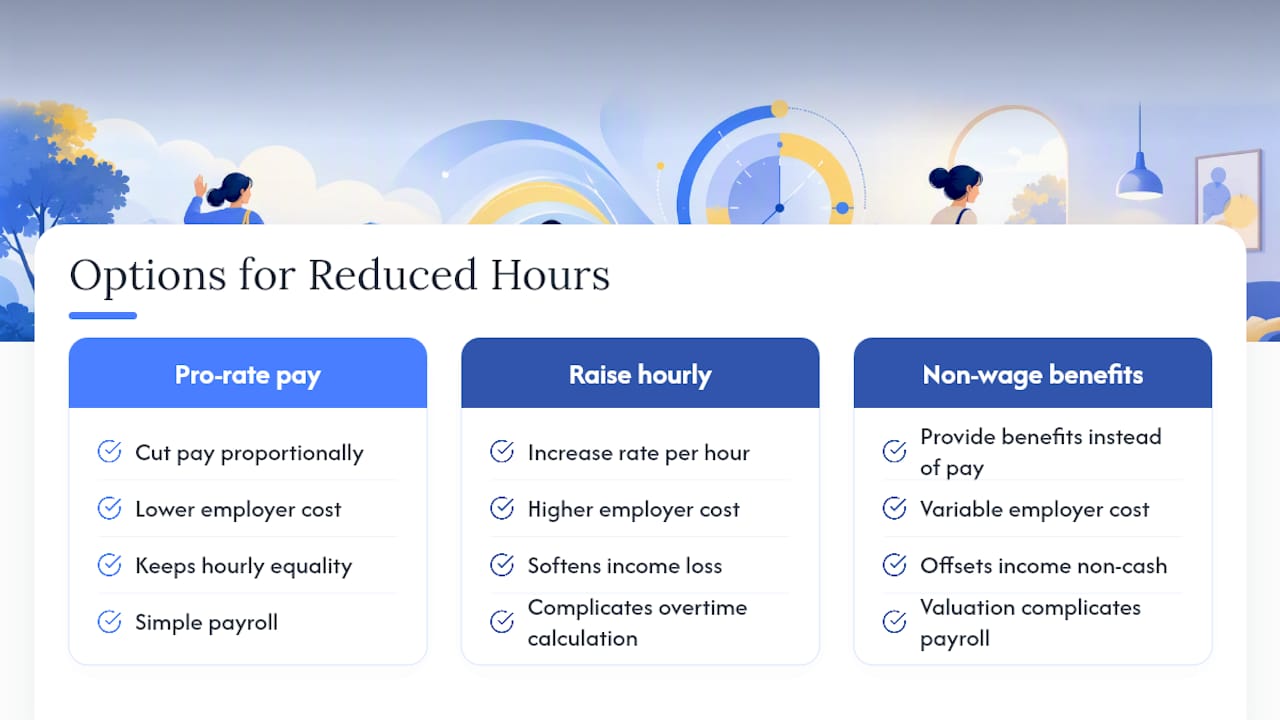
- When hours change permanently, consider whether to pro-rate pay, increase hourly rates, or provide benefits, and record these agreements with signed addenda.
- Using a unified scheduling app like The Caretracker simplifies communication, automates hour tracking, and ensures consistency for last-minute or seasonal schedule shifts.
Table of Contents
- Why Nanny Schedule Changes Matter More Than You Think
- How Should You Communicate a Nanny Schedule Change?
- What Should Be in a Written Nanny Agreement?
- What Do Nanny Schedule Changes Mean for Pay?
- What Tools Help Coordinate a Flexible Nanny Schedule?
- How Do You Handle School Starts, Travel, and Seasonal Shifts?
- How Do You Prepare for Last-Minute Nanny Availability Changes?
- A Fair Process Builds a Lasting Nanny Relationship
- Manage Nanny Schedule Changes With The Caretracker App
- Authoritative Resources to Consult
- Sources
- FAQ
Why Nanny Schedule Changes Matter More Than You Think
A missed nap or a late pickup feels small in the moment, but routine disruption adds up for young children, and the American Academy of Pediatrics points to consistent daily patterns as a real factor in behavior and sleep quality. Your nanny's life runs on that same routine. Many caregivers stack a second job, a class schedule, or a commute around your hours, so a sudden change to her availability affects her paycheck and her other commitments, not just your afternoon.
There's a payroll layer too. When hours shift or you cancel without notice, you may owe different pay than you expect, and a written agreement is what keeps that conversation from turning into a dispute later.
How Should You Communicate a Nanny Schedule Change?
Treat notice windows as a floor, not a suggestion. Give at least 48 hours for a minor, one-off change, and a full week when the change is recurring or permanent. Anything shorter puts your nanny in a bind she didn't create.
Every change needs a written trail, whether that's a text, an app message, or an email, plus an update to the shared calendar so nobody is working from memory.
For anything long-term, a short sit-down conversation beats a rushed text. A five-minute check-in works better than a one-line message when the schedule is changing for weeks, not days.
A solid change notice should include:
- The specific dates or start date of the new schedule
- How long the change is expected to last (temporary or permanent)
- Whether pay, hours, or overtime eligibility shifts as a result
- Confirmation that the shared calendar has been updated
Cora Partners' HR guidance recommends actually consulting your nanny before finalizing a change like this, rather than presenting it as a done deal. That single step avoids most of the resentment that builds when caregivers feel decisions are made around them instead of with them.
What Should Be in a Written Nanny Agreement?
A written agreement is your best defense against confusion when nanny schedule adjustments happen. Nanny and other professional placement resources consistently recommend documenting the following before problems come up, not after.
- Guaranteed hours and the regular weekly schedule, so both sides know the baseline the changes are measured against.
- PTO policy, covering vacation, sick days, and holidays, and how each is earned or accrued.
- Notice requirements, spelled out separately for the family and the nanny.
- Break policy, including paid versus unpaid breaks during long shifts.
- Cancellation terms, meaning what happens to pay when you cancel a scheduled shift.
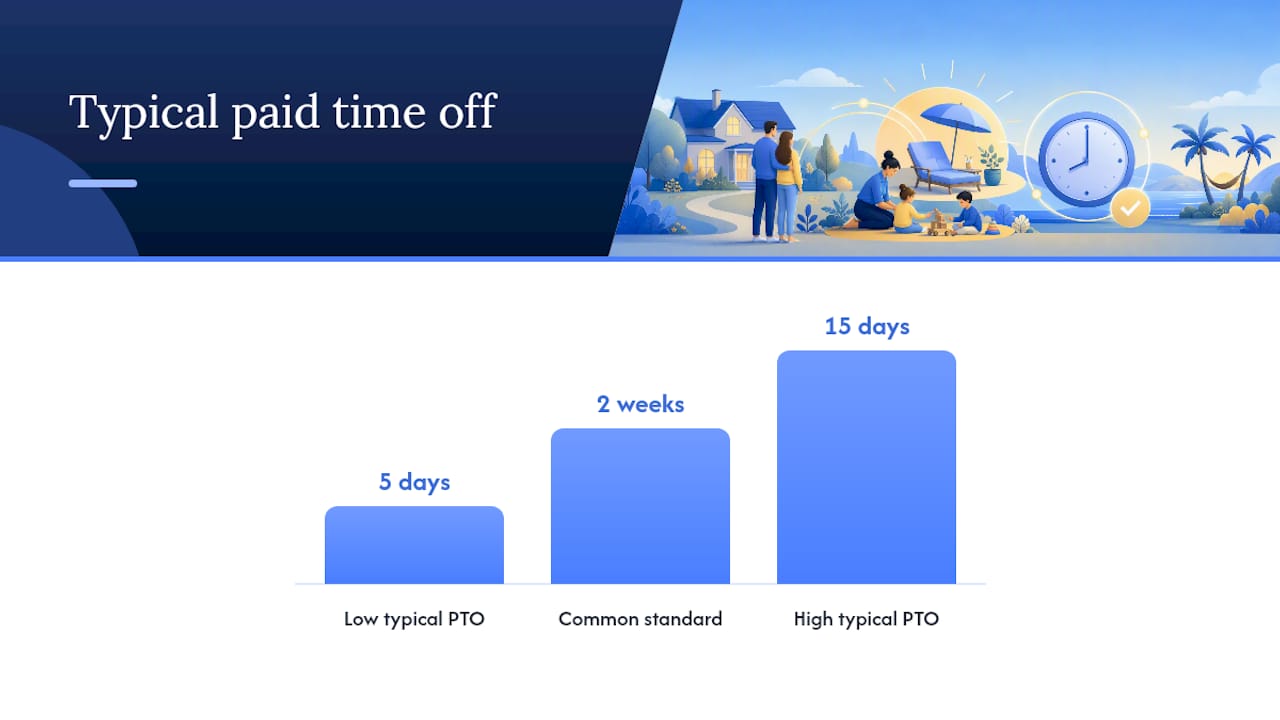
Industry benchmarks from the NannyKeeper blog put typical combined paid time off (vacation, sick, and personal days) between five and fifteen days a year for full-time nannies, with two weeks of vacation as a common standard. Some families split vacation weeks, choosing a set number of dates themselves while letting the nanny choose the rest.
When hours change permanently, decide whether you'll pay out unused scheduled time or count it toward the nanny's vacation bank, and write that choice into an addendum both of you sign.
Pro Tip: Date and sign every addendum, even a one-page one. A dated signature is what turns "we talked about it" into something you can both point back to six months later.
What Do Nanny Schedule Changes Mean for Pay?
The Fair Labor Standards Act doesn't require paid vacation or PTO for household employees, but its overtime rules still apply once hours cross the weekly threshold, and many states and cities mandate paid sick leave regardless of what your contract says. Check your state's rules before you rewrite any PTO policy, because a locally required benefit can override what you'd otherwise agree to privately.
Paid PTO and hours actually worked are two different buckets on a timesheet, and mixing them up is one of the most common payroll mistakes families make.
When regular hours drop, you generally have three options: pro-rate the existing pay, raise the hourly rate to soften the income hit, or offer non-wage benefits to make up part of the difference. Each comes with trade-offs in cost and fairness. Whatever you choose, accurate timesheets protect both of you if a dispute over hours or overtime ever comes up.
What Tools Help Coordinate a Flexible Nanny Schedule?
Pick one primary channel and stop scattering updates across five apps. A widely cited approach to shared reminder systems recommends texting for anything urgent, using an app or shared calendar for routine updates, and reserving email for formal, signed changes.
A unified family calendar removes the daily guessing game of who's covering pickup. Scheduling apps like The Caretracker let your nanny approve or request changes directly, view every job in one calendar, and track hours automatically, cutting out the back-and-forth that eats up a Sunday night.
- Set a recurring reminder, like a Sunday-night schedule confirmation, so surprises don't land on a Monday morning
- Store allergy, medication, and nap or nursing schedules in one place so a last-minute substitute isn't working blind
- Require written confirmation of any change before it takes effect
A national survey on family caregiving found that scheduling conflicts are a top source of stress for people balancing caregiving with other work, which is exactly the friction a shared system is built to remove.
How Do You Handle School Starts, Travel, and Seasonal Shifts?
Start planning for the school year weeks in advance, not the weekend before. Revise drop-off and pickup duties, transportation, and total weekly hours together so nobody finds out about the new arrangement on the first day.
For travel weeks, confirm your nanny's availability early, decide whether you'll pay for travel days or hire temporary coverage, and put the agreement in writing before you book anything.
If your nanny picks up a second job or starts school herself, renegotiate hours and pay before her new routine begins, not after. Cora Partners notes that offering a temporary rate increase or helping her find supplemental work are both reasonable ways to offset lost hours when a child starts school and daily coverage shrinks.
Any permanent shift deserves a signed addendum with a clear notice period and start date, not a verbal understanding.
How Do You Prepare for Last-Minute Nanny Availability Changes?
Keep a short list of vetted backup caregivers ready before you need one, and agree on their pay rate in advance so you're not negotiating during an emergency.
- Decide ahead of time who covers the cost of last-minute backup care, and whether premium pay applies for short notice
- Build an emergency contact list and store it in your scheduling app or a printed binder near the door
- Ask your regular nanny to help choose backup caregivers, since she knows your household's routines best
- Review the backup plan every few months, since babysitters and availability change
Involving your nanny in this planning spreads the responsibility instead of leaving you scrambling alone when plans fall through.
A Fair Process Builds a Lasting Nanny Relationship
Families juggle real unpredictability. Nannies need reliable hours to plan their own lives. Both things are true, and the families who keep good caregivers longest are the ones who treat that tension as something to manage together, not something the nanny just has to absorb.
Regular check-ins and a contract everyone actually reads aren't bureaucracy. They're what keeps small disagreements from becoming the reason a great caregiver leaves.
— mercedes
Manage Nanny Schedule Changes With The Caretracker App
The Caretracker turns the process this article just walked through into something you can do from your phone in under a minute, instead of juggling texts, sticky notes, and a mental calendar. It's built for exactly the workflow described above: your nanny requests or approves changes, you both see the same unified calendar, and hours get tracked automatically for accurate pay.

Every care detail your backup plan depends on, allergies, medications, nap and nursing schedules, emergency contacts, lives in one place your nanny can pull up instantly, even on a day nobody planned for. When hours shift, the app's time tracking keeps your records straight for overtime and payroll instead of leaving you to reconstruct a week from memory. Ready to stop tracking schedule changes on scraps of paper? Set up your free account at Thecaretracker and get your first shared calendar running today.
Authoritative Resources to Consult
For deeper reading on routine and child development, healthychildren.org from the American Academy of Pediatrics is a reliable starting point. For PTO norms and contract language, see Care.com's guidance on nanny vacations and sick days and Nanny.org for professional placement standards. For family-wide calendar planning, The Planner from Baby Bare Essentials covers coordinating schedules beyond just childcare.
Sources
- Healthychildren
- NannyKeeper blog — Nanny PTO: vacation, sick, paid time off
- LegalClarity — Do nannies get paid vacation? Laws and PTO standards
FAQ
Is $20 an Hour a Good Rate for a Nanny?
It depends heavily on your region and the nanny's experience, but many families use it as a reasonable starting point in lower cost-of-living areas, while metro areas often run higher. Check local nanny agency rate guides for your specific city before settling on a number.
What Is a Typical Nanny Work Schedule?
Most full-time nannies work around a standard weekly schedule on a set daily pattern, though families with variable jobs sometimes negotiate flexible or split shifts. Any schedule outside the typical weekly hours should be spelled out clearly in the written agreement, including overtime terms.
What Are Red Flags When Hiring a Nanny?
Reluctance to provide references, inconsistent stories about past employment, and resistance to a written agreement covering pay, PTO, and notice are all warning signs. A nanny who won't discuss schedule expectations upfront often struggles with schedule changes later.
At What Age Do Kids No Longer Need a Nanny?
There's no fixed age. Many families reduce hours once a child starts full-day school, often around age five or six, while others keep part-time coverage through elementary school for after-school care and transportation. The right time is when your family's actual coverage gaps close, not a specific birthday.
How Do You Manage Sudden Nanny Schedule Changes?
Notify your nanny as soon as the change is known, confirm it in writing, and log it in your shared calendar or app immediately. If the change is last minute, address compensation, such as premium pay or agreed cancellation pay, per your written agreement.