
A caregiver-focused unified family calendar consolidates every job, approved shift, tracked hour, and care detail into one app so nannies, au pairs, and household employers can coordinate across multiple homes and produce payroll-ready records without chasing spreadsheets. Thecaretracker is the fastest way to get there, and it's completely free for caregivers.
Here's what you can expect once it's set up:
- A single calendar view showing all active jobs and households
- A schedule request and approval workflow with role-based permissions
- Clock-in/clock-out time tracking with overtime flags and shift notes
- Exportable timesheets in payroll-ready formats with state-specific pay settings
- Bilingual mobile access (English and Spanish) on iOS and Android
The immediate next step: download Thecaretracker, create your household profile, and invite your caregiver to a free account.
Table of Contents
- What does a "unified family calendar" mean for nannies and caregivers?
- How do you set up a unified family calendar in six steps?
- How does the unified calendar support payroll and DOL-ready recordkeeping?
- Key Takeaways
- What actually makes a unified caregiver calendar work day to day
- Thecaretracker gives you a caregiver-focused calendar that's ready on day one
- Useful sources and resources
What does a "unified family calendar" mean for nannies and caregivers?
Most people searching this phrase land on consumer apps that list school pickups and soccer practice. That's not what professional caregivers need.
For nannies, au pairs, home health aides, and the families who employ them, a unified caregiver calendar is something more specific: a single digital workspace that shows every active job, every approved shift, every logged hour, and every care detail across all households in one place. It's a collaborative family organizer built around the caregiver's work, not the family's social schedule.
In a typical multi-household setup, a nanny might work three days for one family and two days for another. An au pair might cover mornings for one household and evenings for a second. Without a shared caregiver planner, hours get missed, care details get lost, and payroll becomes a guessing game. The unified calendar solves all three problems at once.
How do you set up a unified family calendar in six steps?
Setup takes less than 30 minutes when you follow a clear sequence. Here's the order that works best for multi-household caregiving arrangements.
- Onboard caregivers with a short checklist. Walk through the caregiver scheduling guide together, enable shift reminders, and confirm the caregiver can clock in successfully before the first shift.
Pro Tip: Pick a consistent clock-in time habit, such as clocking in within two minutes of arriving, and add a one-line note for any day that differs from the usual routine. Payroll reviewers will thank you.
How does the unified calendar support payroll and DOL-ready recordkeeping?
Accurate daily records are the foundation of household payroll compliance. The U.S. Department of Labor expects employers to maintain clock-in/clock-out records, break time, and overtime for domestic workers covered by the Fair Labor Standards Act.
The DOL's free Timesheet App is available for iOS and Android in both English and Spanish. It supports multiple pay frequencies and includes an enhanced comments feature for logging exceptions. Use it to cross-check hours against your app exports, especially during the first few pay periods.
Thecaretracker's nanny time-tracking features produce payroll-ready exports tailored by pay frequency and overtime rules, so the numbers you send to payroll already reflect state-specific calculations. Here's how to keep those records clean:
- Log clock-in and clock-out times at the start and end of every shift, not at the end of the week from memory
- Record break times separately; some states require paid break rules that affect overtime calculations
- Add a shift note for any exception: early departure, additional errands, mileage, or a reimbursable expense
- Run a weekly summary report and send it to the employer for review before the pay period closes
- Keep exports on file for at least three years, which aligns with DOL recordkeeping guidance for household employers
Annotations for reimbursements and time-off requests belong in the app, not in a side email thread. Keeping everything in one place means your records are auditable if a question ever arises.
Key Takeaways
A caregiver-focused unified calendar app is the most reliable way to consolidate jobs, approvals, and payroll-ready hours across multiple households while keeping care details secure and accessible.
| Point | Details |
|---|---|
| Caregiver-first calendar | Consolidates jobs, shifts, tracked hours, and care details in one app, not a general household event calendar. |
| Role-based record-keeping | Caregivers enter hours; employers review and approve weekly to prevent payroll disputes. |
| DOL-ready exports | Match pay frequency and overtime settings to state rules before generating timesheets; cross-check with the free DOL Timesheet App. |
| Naming and permissions | Consistent job naming and role-based access prevent double-booking and protect household privacy. |
| Thecaretracker | Free for caregivers; consolidates jobs, approvals, time tracking, and care profiles in one bilingual mobile app. |
What actually makes a unified caregiver calendar work day to day
The apps that fail aren't missing features. They're missing habits.
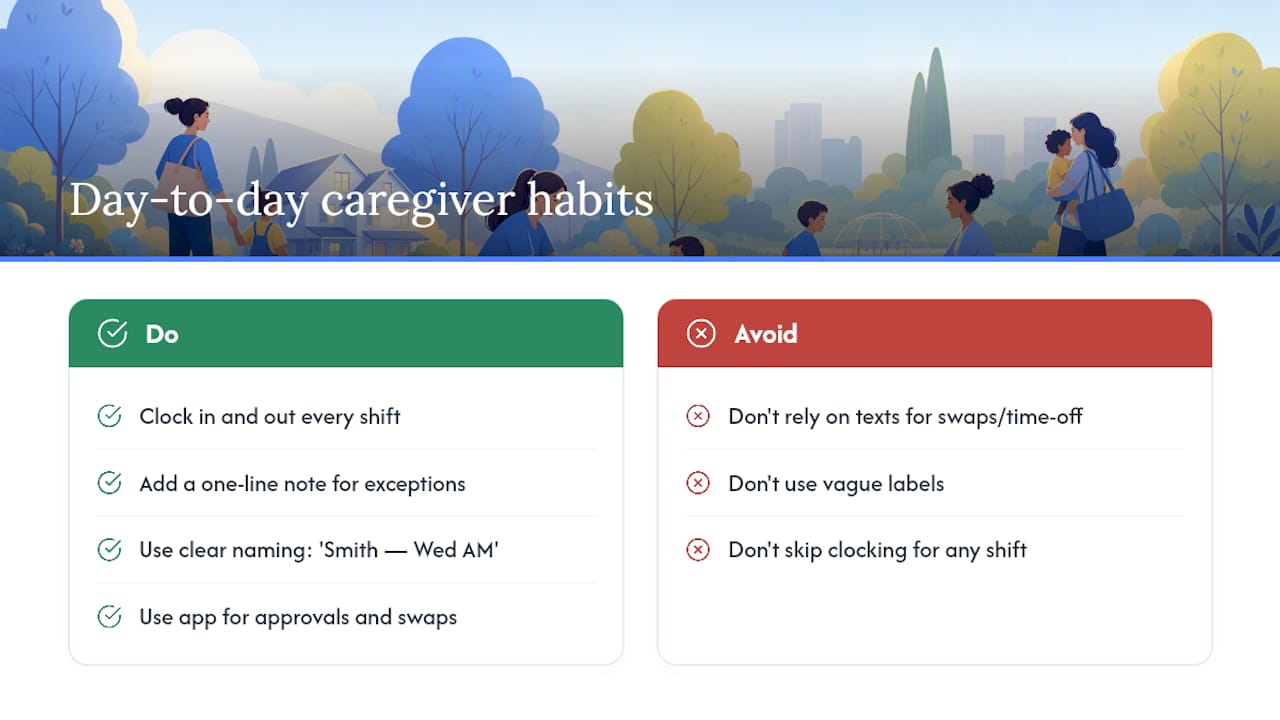
The caregivers who get the most out of a shared family planner treat the clock-in like a professional ritual: open the app, tap in, add a one-line note if anything is unusual, and tap out at the end of the shift. That's it. The discipline of doing it every single shift, without exception, is what makes the weekly timesheet accurate and the payroll conversation short.
Managing multiple households adds a layer of complexity that most general calendar tools weren't built for. When you're working for two or three families, the naming convention you set up on day one matters more than any feature. "Smith — Wednesday AM" and "Garcia — Wednesday PM" are unambiguous at a glance. Vague labels create confusion that compounds over weeks.
The approval workflow is where trust gets built between caregivers and employers. When a shift swap or time-off request goes through the app rather than a text thread, both sides have a record. That transparency protects the caregiver and gives the employer confidence. It's a small process change with a disproportionate effect on the working relationship.
Thecaretracker gives you a caregiver-focused calendar that's ready on day one
Tracking hours across multiple households, managing schedule requests, and keeping care details organized shouldn't require three different apps and a shared spreadsheet. Thecaretracker brings all of it together: a consolidated jobs calendar, a schedule request and approval workflow, payroll-ready time tracking with state-specific overtime support, and household profiles that store allergies, medications, emergency contacts, and nap schedules in one place.

The app is completely free for caregivers. Employers get household profiles, approval controls, and exportable reports that make payroll straightforward. Bilingual support in English and Spanish means every caregiver on your team can use it comfortably, and the onboarding video and inline help get new users up and running without a long learning curve.
Ready to consolidate your caregiver schedules? Get started with Thecaretracker today, create your household profile, and invite your caregivers to their free accounts. For a closer look at the time-tracking features, visit the nanny time tracking page to see how exports and pay settings work before your first pay period closes.
Useful sources and resources
- Track Your Hours: Just Tap the App | U.S. Department of Labor
- How to Track Your Nanny's Hours (2026) | NannyKeeper Blog
- The Ultimate Childcare Software Buyer's Guide 2026 | Procare
- How to Choose Childcare Management Software in 2026 | Neztio
- Streamlining Family-Nanny Communication: The Top Apps for Simplifying Schedules and Tasks — Nanny Blog | A Perfect Fit Nanny Agency
- Caretracker | Track hours for nannies or caregivers
- Nanny Time Tracking — CareTracker