
Get an EIN, collect I-9 and W-4 forms, register with your state unemployment agency, and pick a payroll method that produces W-2s and Schedule H at year end. That is the whole job, boiled down to one sentence.
For most families with one nanny, payroll software built for household employers is the sweet spot: cheaper than full-service, far less error-prone than doing it by hand. Full-service makes sense once you have multiple caregivers or zero appetite for tax forms. DIY works only if you genuinely enjoy spreadsheets and IRS instructions.
Before you do anything else, handle these three items:
- Apply for an EIN through the IRS EIN application page
- Complete Form I-9 and Form W-4 with your nanny
- Register with your state's unemployment insurance agency
Pro Tip: Do the EIN application first thing in the morning. It takes about 15 minutes online and you get the number immediately, which unblocks everything else.
Most households finish setup in three to five business days and pay somewhere between $40 and $80 a month on an ongoing basis, depending on which approach they choose.
| Point | Details |
|---|---|
| First action | Apply for your EIN online before anything else. |
| Time to compliant | Most households finish core setup in 3–5 business days. |
| Ongoing cost | Expect $40–$80/month depending on service level. |
Key Takeaways
Compliant nanny payroll setup requires an EIN, completed I-9/W-4 forms, state registration, and a payroll method that produces accurate W-2 and Schedule H data.
| Point | Details |
|---|---|
| Start with the EIN | Apply online through the IRS; it's required for every subsequent filing. |
| Choose based on complexity | Software fits one nanny; full-service fits multiple employees or low tolerance for tax forms. |
| You stay liable | Outsourcing doesn't transfer legal responsibility for filings or deposits. |
| Budget beyond the fee | Add 9–12% above gross wages for employer-side payroll taxes. |
| Track hours from day one | Thecaretracker gives caregivers a free way to log hours and export clean data for payroll. |
Table of Contents
- Comparing Your Options for Nanny Payroll Setup
- How Do You Set Up Nanny Payroll Step by Step?
- Which Taxes Apply to a Nanny's Paycheck?
- How Do State Rules Change Your Nanny Payroll Setup?
- DIY, Software, or Full-Service: How Do You Choose?
- Why Time Tracking Makes Payroll Accurate
- What Do Payroll Services and Software Actually Include?
- You Are Still Responsible, Even If You Outsource
- What Does Nanny Payroll Setup Actually Cost?
- Make Payroll Accurate From the First Timesheet
- Frequently Asked Questions
- Sources
Comparing Your Options for Nanny Payroll Setup
Three broad paths exist for handling payroll for household employees, and each fits a different kind of family.
DIY/manual payroll means calculating withholding yourself, tracking deposits, and filing Schedule H on your own tax return. It costs nothing but your time, and your time here is not trivial. One missed quarterly deposit or miscalculated FICA share can snowball into penalties.
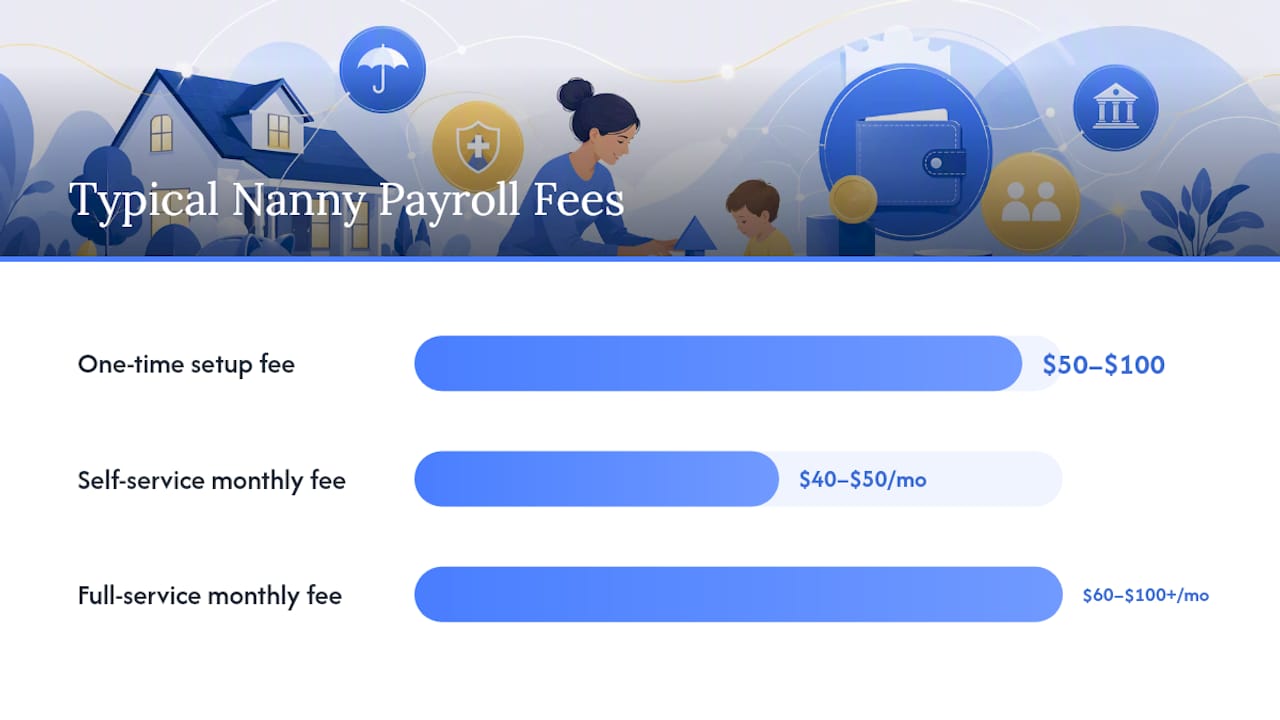
Payroll software (self-service) automates the math and generates pay stubs, W-2s, and often files Schedule H data for you, while you stay in the driver's seat for approvals. This tier usually runs $40 to $50 a month.
Full-service payroll providers handle everything, including tax deposits and filings, for a higher monthly fee, typically $60 to $100+. Some also offer audit assistance if the IRS or a state agency comes calling.
| Approach | Pricing model | Tax filing included | Setup effort |
|---|---|---|---|
| DIY/manual | Free (your time) | No, you file yourself | High, ongoing learning curve |
| Payroll software | Flat monthly fee | Usually, W-2 and Schedule H support | Low, guided setup |
| Full-service provider | Flat or tiered monthly fee | Yes, deposits and filings included | Lowest, mostly hands-off |
According to Publication 926, employer-side payroll taxes typically add roughly 9 to 12 percent on top of gross wages, a cost every category above must account for regardless of who does the filing.
Watch for hidden fees before you commit to anything:
- One-time setup or onboarding charges separate from the monthly fee
- Extra charges for year-end W-2 preparation and mailing
- State registration fees some providers pass through without disclosing upfront
Before buying, ask any vendor: Do you file Schedule H data, or just generate the numbers? Do you cover my state's unemployment insurance registration? What happens if a tax notice arrives?
How Do You Set Up Nanny Payroll Step by Step?
Follow this order and you will avoid the most common mistakes families make.
- Confirm you're a household employer. If you pay a nanny $2,800 or more in a year (the federal cash wage threshold that triggers Social Security and Medicare withholding), you're on the hook for payroll taxes.
- Apply for an EIN. Use the IRS's online application. You'll need this number for every filing going forward.
- Collect Form I-9 and Form W-4. USCIS guidance requires I-9 completion within three business days of the start date. W-4 determines federal withholding.
- Register with your state. Most states require separate registration for state unemployment insurance and, in some cases, state income tax withholding.
- Choose a pay frequency and method. Weekly or biweekly direct deposit is standard; paper checks work too, but they leave a thinner paper trail.
- Set up time tracking. You need a system that logs regular hours, overtime, and pay periods before you run your first check.
- Run a sample payroll. Confirm the math on gross pay, FICA withholding, and net pay before the real thing.
- Set a reminder for quarterly estimated payments. Household employment taxes get reported annually on Schedule H, but the IRS recommends quarterly estimated payments to avoid an underpayment penalty at filing time.
Pro Tip: Overtime for household employees kicks in after 40 hours in a workweek under federal FLSA rules. Calculate it at 1.5 times the regular hourly rate, not a flat "extra" amount, and verify it against your timesheet before every payroll run.
Expect the EIN and forms to take one afternoon. State registration is the slow part. It can take one to three weeks depending on your state's processing backlog, so start it early.
Which Taxes Apply to a Nanny's Paycheck?
Social Security and Medicare (FICA) taxes apply once you cross the annual cash wage threshold, and they're split between you and your nanny. Federal income tax withholding is optional unless your nanny requests it in writing on Form W-4.
FUTA (federal unemployment tax) is an employer-only cost, generally owed if you pay $1,000 or more in a calendar quarter to household employees. Publication 926 lays out the exact FICA rates and FUTA mechanics with worked examples.
Key filing deadlines:
- W-2 to your employee: due by January 31
- W-2/W-3 to the Social Security Administration: also January 31
- Schedule H: filed with your personal Form 1040, generally by the April tax deadline
If you pay your nanny's share of FICA instead of withholding it, that amount counts as additional taxable wages and must show up correctly on the W-2, per Publication 926.
| Deadline | What's due |
|---|---|
| January 31 | W-2 to employee and SSA |
| April (tax deadline) | Schedule H filed with Form 1040 |
| Quarterly | Estimated payments recommended |
How Do State Rules Change Your Nanny Payroll Setup?
State requirements vary more than most first-time employers expect. Some states require paid family leave or disability insurance registration for household employers. Others set unusual triggers based on quarterly wage totals rather than annual ones, and pay frequency rules differ too, some states require overtime calculated on a daily basis, not just weekly.
To check your state, search your state's department of labor site for "household employer" or "domestic employer" registration, and check your state's revenue or taxation department for withholding rules separately.
Pro Tip: Register with your state unemployment agency the same week you get your EIN. Many states charge penalties or back interest for late registration, even if you had no idea the requirement existed.
DIY, Software, or Full-Service: How Do You Choose?
Match your choice to your household's actual complexity, not to what sounds most impressive.
- One nanny, tight budget, comfortable with basic math: payroll software is usually the right fit. It automates the parts most likely to cause errors.
- Multiple caregivers, or zero desire to touch tax forms: full-service is worth the higher monthly cost.
- True DIY: only makes sense if you're already fluent in payroll tax rules and enjoy tracking deadlines manually.
Before signing with any vendor, ask directly: Who signs and files Schedule H? How are tax deposits handled and confirmed? What audit support do you provide if a state agency sends a notice?
Red flags worth walking away from: vague answers about who actually files your taxes, undisclosed W-2 preparation fees, or a provider that doesn't cover your specific state.
Why Time Tracking Makes Payroll Accurate
Every payroll run needs the same core data: employee name, Social Security number, pay period dates, regular and overtime hours, gross pay, and deductions tracked carefully. Missing or fuzzy hours are the single biggest source of payroll errors we see.

Thecaretracker lets caregivers log hours in real time, and employers can export that data as a CSV or PDF to hand directly to payroll software or a provider. A clean timesheet export with those exact fields is often all a payroll service needs to onboard you without back and forth.
| Field | Why it matters |
|---|---|
| Regular hours | Base for gross pay calculation |
| Overtime hours | Must be flagged separately for 1.5x rate |
| Pay period dates | Aligns with your chosen pay frequency |
Pro Tip: Double-check overtime totals against the FLSA 40-hour weekly threshold before you submit hours to payroll. It's the single most common correction we see requested after a payroll run.
What Do Payroll Services and Software Actually Include?
Most self-service payroll platforms for household employers advertise coverage across all 50 states, flat monthly pricing, and automatic W-2 and Schedule H data generation. That combination is worth checking closely, because "50-state coverage" sometimes means the software calculates the numbers while you're still responsible for submitting state-specific registrations yourself.
Full-service providers typically bundle tax deposits, quarterly filings, and year-end W-2 preparation into one fee, and many offer a free trial or live demo before you commit. That trial period is worth using. Log into the demo, upload a sample timesheet, and see how the platform actually calculates overtime and net pay before you hand over payment information.
Pricing transparency separates the reputable options from the rest. A flat monthly fee that's clearly published on the provider's site, with add-on costs (extra employees, W-2 printing, state filing) itemized rather than buried, is a good sign. Customer ratings and reviews are worth a quick scan too, particularly comments about how the provider handled a tax notice or a missed deposit, since that's the moment a payroll service actually earns its fee.
Whichever option you choose, confirm it can generate the specific documents you need: Form W-2 for your nanny, the underlying data for your Schedule H, and quarterly deposit confirmations you can keep in your own records.
You Are Still Responsible, Even If You Outsource
Hiring a payroll provider doesn't transfer your legal liability. The Schedule H instructions are explicit on this point: the household employer remains responsible for tax filings and deposits even when a third party handles the mechanics.
That means if a payroll company misses a deposit deadline or files an incorrect W-2, the IRS notice comes to you, not them. It's your name on the EIN and your Social Security number tied to Schedule H.
Practical steps to protect yourself: confirm in writing what the provider files and what they don't, keep copies of every deposit confirmation and filed form, and check your state and federal accounts periodically rather than assuming everything went through. A provider's marketing claim of "we handle everything" is not the same as a legal transfer of responsibility.
This is also why documentation matters so much on your end. If a dispute arises, whether about hours worked, wages paid, or tax deposits made, your own timesheet records, pay stubs, and confirmation emails become your evidence. Outsourcing the mechanics of payroll is reasonable. Outsourcing your attention to whether it's actually happening correctly is not.
What Does Nanny Payroll Setup Actually Cost?
Setup costs and ongoing fees vary more than families expect, and the gap between the cheapest and most expensive options isn't always about quality.
One-time setup costs are often minimal or waived entirely by payroll software providers trying to win your business. Full-service providers sometimes charge a setup fee in the range of $50 to $100, though many waive it as a promotion.
Ongoing monthly fees typically fall between $40 and $50 for self-service payroll software and $60 to $100 or more for full-service providers, depending on the number of employees and add-ons like audit support.
Hidden costs to watch for:
- Year-end W-2 preparation and mailing fees charged separately from the monthly rate
- State registration or amendment fees passed through without warning
- Direct deposit or payment processing fees on top of the base subscription
- Fees for correcting errors caused by late or incomplete timesheet data
Don't forget the employer-side tax burden itself. Beyond the software or provider fee, budget roughly 9 to 12 percent above gross wages for Social Security, Medicare, and FUTA contributions. That's the real cost of employing a nanny, and it's separate from whatever you pay a payroll company to manage the paperwork.
The cheapest option on paper isn't always the cheapest option in practice. A $40 software plan that doesn't handle your state's registration might cost you more in penalties than a $70 full-service plan that does.
Why Accurate Tracking and the Right Setup Matter
Household payroll mistakes almost always trace back to one thing: incomplete hour records. A nanny's overtime pay, unemployment eligibility, and even Social Security credit all depend on documentation you control.
Outsourcing payroll doesn't remove your liability. It's still your EIN, your Schedule H, your name on the notice if something's wrong.
Beyond the legal side, accurate payroll protects your caregiver, too. It's how they qualify for unemployment benefits if a job ends and how their future Social Security benefits get calculated correctly.
Make Payroll Accurate From the First Timesheet
Every payroll approach on this page, whether software or full-service, runs on the same input: accurate hours. Thecaretracker gives caregivers a simple way to log hours in real time, submit them for approval, and give you an export you can hand straight to a payroll provider or software platform without reconstructing a week from memory or text messages.

The app tracks regular and overtime hours, supports schedule approvals so there's no end-of-week guessing, and logs mileage for reimbursement alongside payroll data. Employers can pair those exports with any payroll software, or hand them directly to a payroll provider or to Thecaretracker's own payroll consultation service if you want help getting the whole system set up correctly the first time.
If your current setup still runs on paper timesheets or memory, start with Thecaretracker's time-tracking tool this week. It's free for caregivers to use, and it gives you the clean data every payroll option on this page actually needs to work.
Frequently Asked Questions
How long does nanny payroll setup take from start to finish? Most households finish the core steps, EIN, I-9/W-4, and choosing a payroll method, within three to five business days. State registration can add one to three weeks depending on processing times.
Do I need an EIN to pay a nanny? Yes. You need an EIN for W-2, W-3, and Schedule H filings, and you can apply online through the IRS in about 15 minutes.
What happens if my payroll provider makes a filing mistake? You remain legally responsible. The Schedule H instructions confirm that outsourcing payroll doesn't shift liability away from the household employer.
Is federal income tax withholding required for a nanny? No, it's optional unless your nanny requests withholding in writing on Form W-4. Social Security and Medicare withholding, by contrast, generally becomes required once you cross the annual cash wage threshold.
What's the difference between nanny payroll software and a full-service provider? Software automates calculations and form generation while you stay involved in approvals; full-service providers handle deposits and filings on your behalf for a higher monthly fee.
Sources
Start with these authoritative resources when you need forms or official guidance rather than a summary: