
If you employ a nanny in the U.S., you must pay at least the applicable federal, state, or local minimum wage and overtime when required. Under the Fair Labor Standards Act, most household employees are entitled to at least the federal minimum wage for every hour worked, plus time-and-a-half for hours beyond 40 in a workweek. The rate that applies to your nanny is whichever is highest: federal, state, or city.
Here is what to do right now:
- Look up your state and city minimum wage (not just the federal rate).
- Confirm your nanny is classified as an employee, not an independent contractor.
- Start tracking hours by the clock, every day, even if you agreed on a day rate.
- Set up payroll reporting and prepare to file a W-2 if annual wages reach the reporting threshold.
Live-in nannies are not exempt from minimum wage. They must be paid for all hours worked. Overtime rules for live-in workers differ in some states, but the minimum-wage floor still applies.
Pro Tip: Even if your nanny works a predictable schedule, document actual start and stop times daily. A verbal agreement about hours is not a legal substitute for a timesheet.
Key Takeaways
Every household employer must pay the highest applicable minimum wage, track hours by the clock, and meet payroll tax obligations once annual wages reach the reporting threshold.
| Point | Details |
|---|---|
| Federal baseline applies | FLSA covers most nannies; pay at least the federal, state, or city minimum, whichever is highest. |
| Overtime after 40 hours | Live-out nannies earn time-and-a-half beyond 40 hours; live-in rules vary by state. |
| Nanny tax threshold | Paying $2,800 or more per year triggers FICA, FUTA, and W-2 obligations for household employers. |
| Signed timesheets protect you | Keep clock-in/clock-out records with caregiver sign-off for at least three years. |
| Thecaretracker simplifies compliance | The free app tracks hours, flags overtime, and exports payroll-ready reports for W-2 preparation. |
Table of Contents
- Does the FLSA cover your nanny as a household employee?
- How federal, state, and local minimum wages apply to your nanny
- When does overtime apply, and how do you calculate it?
- How to track hours and keep payroll records correctly
- Payroll taxes and employer obligations you cannot skip
- How a time-tracking app reduces compliance risk
- Why compliance is also about trust, not just legal risk
- Thecaretracker makes hour tracking simple for household employers
- Sources
Does the FLSA cover your nanny as a household employee?
Classification is the first decision you need to get right, because it determines every obligation that follows.
The IRS and the Department of Labor both apply a behavioral-control test: if you set the schedule, direct the work, and the care happens in your home, your nanny is almost certainly your employee. An independent contractor, by contrast, typically sets their own hours, works for multiple clients, and uses their own tools and methods. Most nannies do not meet the contractor standard.
Why it matters: Misclassifying an employee as a contractor means you skip payroll taxes, overtime, and W-2 filing. That creates back-tax liability, potential penalties, and wage-claim exposure.
Quick classification self-check
Run through these questions before you decide:
- Do you set the nanny's schedule and hours?
- Does the work happen in your home, with your children?
- Do you direct how care is provided day to day?
- Does the nanny work primarily or exclusively for your household?
- Do you provide the supplies, equipment, or materials used?
If you answered yes to three or more, you have an employee. Proceed with payroll, minimum wage, and overtime obligations.
Useful references:
- IRS Publication 926 covers household employer tax rules and the employee vs. contractor distinction.
- The DOL's FLSA overview explains which workers are covered under federal law.
Pro Tip: When in doubt, treat the worker as an employee. The IRS and DOL both default to employee status for household caregivers, and the cost of misclassification far exceeds the cost of correct payroll setup.
How federal, state, and local minimum wages apply to your nanny
The federal minimum wage is a floor, not a ceiling. The Department of Labor is clear: when a state or city sets a higher rate, that higher rate controls for workers in that jurisdiction. For household employers, this means you cannot rely on the federal rate alone.
The rate that applies is determined by where your nanny works, which is your home. If you live in a city with its own minimum wage ordinance, that city rate may be higher than both the federal and state rates. Chicago is a direct example: its local ordinance requires household employers to pay at least the Chicago minimum wage, which is set to increase on a specified schedule. That is well above the federal baseline.
How to find the rate that applies to you
| Jurisdiction level | Who sets it | Where to check |
|---|---|---|
| Federal | U.S. Congress / DOL | dol.gov/whd/minwage |
| State | State legislature | Your state's Department of Labor website |
| City / county | Local government | City or county official website |
The highest rate among these three is the one you must pay.
Practical steps to confirm your rate:
- Search "[your state] Department of Labor minimum wage" for the current state rate.
- Search "[your city] minimum wage ordinance" to check for a local rate above the state level.
- Bookmark both pages. Rates often update on January 1 or July 1 each year.
- If your nanny works across city or county lines, apply the rate for the location where most hours are worked.
Pay rates also vary significantly by market. National nanny pay data show wide variation by city, and many experienced nannies earn well above the legal minimum. Knowing the minimum is your compliance baseline; knowing your local market rate helps you attract and keep good caregivers.
When does overtime apply, and how do you calculate it?
Under the FLSA, domestic service employees must be paid at least the federal minimum wage for all hours worked and are generally entitled to overtime at not less than time-and-a-half for hours over 40 in a workweek. That rule applies to most live-out nannies without exception.
Live-in nannies: A nanny who lives in your home is still entitled to minimum wage for all hours worked. The overtime rules are narrower. Under federal law, live-in domestic employees are not automatically entitled to FLSA overtime, but many states do require it. California, for instance, has its own rules that extend overtime protections to live-in caregivers. Always check your state law.
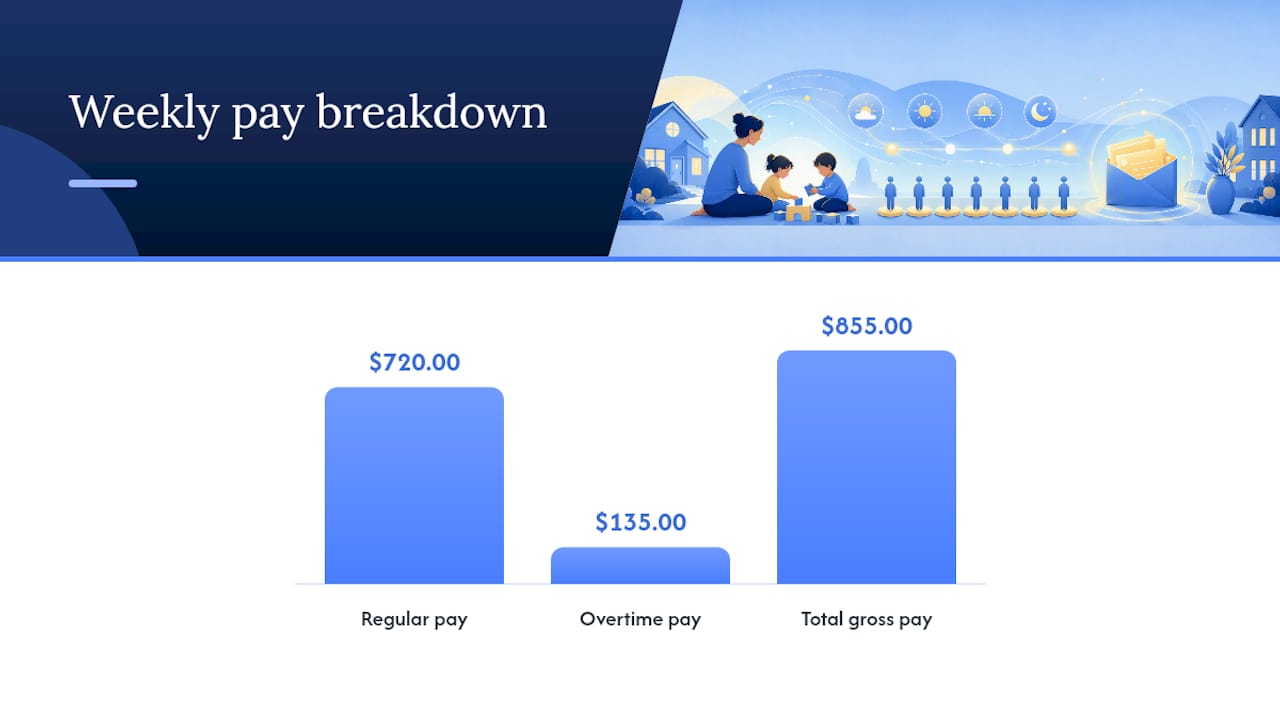
Worked overtime example
Suppose your nanny earns $18.00 per hour and works 45 hours in one week.
- Regular pay: 40 hours × $18.00 = $720.00
- Overtime rate: $18.00 × 1.5 = $27.00 per hour
- Overtime pay: 5 hours × $27.00 = $135.00
- Total gross pay: $855.00
The "regular rate" must include all compensation for that week, including any bonuses or extra pay. Dividing total compensation by total hours gives you the true regular rate for overtime purposes.
Common employer mistakes to avoid:
- Paying a flat weekly salary and assuming overtime is not owed (it usually still is).
- Forgetting to include bonuses or extra payments in the regular rate calculation.
- Treating on-call or sleep-in time as unpaid without confirming it qualifies as exempt under DOL guidance.
- Applying the live-in exemption without verifying it applies in your state.
- Resetting the workweek mid-week to avoid crossing the 40-hour threshold.
For California-specific rules, the California nanny overtime guide on the Thecaretracker blog walks through the state's distinct thresholds.
How to track hours and keep payroll records correctly
Hourly tracking is not optional, even if you and your nanny agreed on a day rate. The DOL's direct care FAQ is explicit: verbal day-rate agreements do not override FLSA hourly-tracking and overtime obligations. If you pay a day rate, you still need to know the actual hours worked each day to verify minimum wage and calculate any overtime owed.

Converting a day rate to an hourly rate: Divide the day rate by the number of hours actually worked that day. If your nanny earns $160 for a 10-hour day, the effective hourly rate is $16.00. That must meet or exceed your applicable minimum wage, and any hours beyond 40 in the week still trigger overtime.
What a compliant timesheet must capture
A nanny timesheet template should include at minimum:
| Field | Why it matters |
|---|---|
| Date | Identifies the workday |
| Clock-in time | Establishes hours worked |
| Clock-out time | Closes the daily record |
| Break time (unpaid) | Reduces total compensable hours |
| Total daily hours | Feeds weekly overtime calculation |
| Weekly total | Triggers overtime flag at 40+ hours |
| Nanny signature | Creates a signed record for dispute resolution |
Sample week calculation
Your nanny works Monday through Friday: 9 hours, 8 hours, 9 hours, 8 hours, 9 hours. Total: 43 hours. At $17.00 per hour, regular pay covers 40 hours ($680.00) and overtime covers 3 hours at $25.50 ($76.50), for a gross weekly total of $756.50.
Recordkeeping requirements: The FLSA requires household employers to retain payroll records for at least three years. Keep copies of timesheets, pay stubs, and any signed weekly summaries.
Pro Tip: Ask your nanny to sign or digitally approve the timesheet at the end of each week. A signed record is your strongest protection if a wage dispute arises later.
Payroll taxes and employer obligations you cannot skip
Once you pay a household employee $2,800 or more in a calendar year, nanny tax obligations apply: you must withhold and pay FICA (Social Security and Medicare) taxes, and you may owe FUTA (federal unemployment tax).
Your core obligations as a household employer:
- Withhold the employee's share of FICA (7.65% of gross wages).
- Pay the matching employer share of FICA (another 7.65%).
- Pay FUTA on the first $7,000 of wages (6%, reduced by state unemployment credits).
- Register for state unemployment insurance and pay state unemployment taxes.
- Check whether your state requires workers' compensation coverage for household employees (many do).
- Issue a W-2 to your nanny by January 31 each year.
Steps to set up payroll correctly
- Obtain an Employer Identification Number (EIN) from the IRS at irs.gov.
- Register with your state's Department of Revenue or Labor for state payroll taxes.
- Set up a payroll schedule (weekly or biweekly is most common for household employees).
- Withhold federal and state income tax if your nanny requests it on Form W-4.
- Use a payroll service or consult a payroll professional for your first year.
- File Schedule H with your personal federal tax return each year to report household employment taxes.
Employer provides a practical, step-by-step resource for small employers covering payroll setup, hiring obligations, and links to state agencies.
Pro Tip: If you have been paying a nanny informally for months, a payroll cleanup consultation can help you retroactively correct records and avoid penalties before filing season.
How a time-tracking app reduces compliance risk
Accurate hour tracking is the foundation of every obligation covered above: minimum wage verification, overtime calculation, payroll tax reporting, and W-2 preparation. A dedicated time-tracking app removes the guesswork and creates an auditable record automatically.
Features that matter most for household employer compliance:
- Clock-in and clock-out logging with timestamps (not just estimated hours).
- Automatic overtime flagging when weekly hours exceed 40.
- Break-time tracking to separate compensable and non-compensable time.
- Caregiver approval or sign-off on each timesheet entry.
- Exportable reports in CSV or Excel format that map directly to payroll entries.
- Audit log showing any edits made to time records, with timestamps.
Using a digital timesheet that exports payroll-ready reports simplifies W-2 preparation and reduces employer-side payroll tax errors. When your payroll provider receives a clean weekly CSV, the risk of manual entry mistakes drops significantly.
Pro Tip: Look for an app that lets your nanny clock in and out from their phone and sends you an approval request. That two-step confirmation creates a mutual record, which is the most defensible documentation if questions arise during an audit or wage claim.
Thecaretracker's nanny time tracking feature captures clock-in/clock-out times, flags overtime, and generates exportable reports your payroll provider can use directly. It also stores care information like allergies, medications, and emergency contacts, so your nanny has everything they need in one place.
Why compliance is also about trust, not just legal risk
Wage law compliance is often framed as a legal obligation, and it is. But the household employers who handle it well tend to think about it differently.
When you pay accurately, track hours transparently, and issue a proper W-2, you are telling your nanny that you take the relationship seriously. That matters in a field where turnover is high and good caregivers have options. Families that build clear, documented employment practices tend to retain their nannies longer and have fewer disputes. The recordkeeping that protects you in an audit is the same recordkeeping that builds day-to-day trust.
There is also a practical reality: the DOL can investigate household employers, and wage claims can go back two to three years. An employer with signed weekly timesheets and clean payroll records is in a fundamentally different position than one relying on memory and informal agreements. Good records are not just compliance hygiene. They are peace of mind.
Thecaretracker makes hour tracking simple for household employers
Tracking nanny hours accurately is the single step that makes every other compliance obligation easier. Thecaretracker gives you a free, purpose-built tool to do exactly that: your nanny clocks in and out from their phone, you approve the timesheet, and the app generates a payroll-ready export at the end of each week.

No spreadsheets, no end-of-month guesswork. The app also stores care details like allergies, medications, and nap schedules, so your caregiver has everything they need in one place. For household employers who need help getting payroll set up correctly from the start, a standard payroll consultation is available to walk you through W-2 filing, FICA obligations, and state registration.
Start tracking hours with Thecaretracker today and give yourself a clean, documented record from day one.
Sources
Wage rates and tax thresholds change. These are the official resources to check before each pay period and at the start of every new year:
Local rates change frequently. Set a calendar reminder to check your state labor department page each January 1 and July 1, when most rate increases take effect.
This article is general information, not a substitute for advice from a qualified lawyer. Consult a qualified legal professional about your own circumstances before acting on anything here.