
Nanny care qualifies for Dependent Care FSA reimbursement when it meets two IRS tests: the child must be under age 13 (or a dependent incapable of self-care), and the care must enable both parents to work, look for work, or attend school full-time. If those conditions are met, you can help families claim their dependent care account benefits by providing the right documentation from day one.
Quick checklist to give your family right now:
- Your full legal name, current address, and SSN or EIN
- Signed timesheets showing dates, start/stop times, and total hours
- A brief written description of care provided
- Payroll stub or cancelled check as proof of payment
- Bank or ACH statement confirming the transfer
Families also need to know:
- They must file IRS Form 2441 with their federal return to report dependent care expenses.
- Their employer's plan cap may be lower than the federal maximum. Always confirm with HR before electing a contribution amount.
Table of Contents
- What are the IRS eligibility rules for dependent care FSA nanny expenses?
- What documentation does the FSA administrator require from you?
- How does the step-by-step reimbursement workflow actually work?
- Practical recordkeeping tips you can use every day
- Common mistakes that block FSA reimbursement and how to prevent them
- How Thecaretracker helps you produce the documentation families need
- Key Takeaways
- Why accurate records protect you as a caregiver
- Thecaretracker makes FSA documentation simple and free
- Authoritative sources and next steps
What are the IRS eligibility rules for dependent care FSA nanny expenses?
Nanny care is an eligible expense under a Dependent Care FSA when two conditions are met: the person receiving care is a child under age 13 who lives with the family, or a spouse or dependent of any age who is incapable of self-care and lives in the home. The care must be work-related, meaning it allows the parent (and their spouse, if married) to work or look for work.
Care provided for personal reasons, such as date nights or personal errands, does not qualify. You also cannot double-count the same expenses under both a Dependent Care FSA and the Child and Dependent Care Tax Credit. The FSA typically offers more savings for higher-income families because contributions avoid both federal income tax and FICA.
One thing families often miss: the IRS federal maximum does not force every employer to adopt the higher limit. A plan may cap contributions below the federal ceiling. Confirming the actual plan cap with HR before open enrollment is the single fastest way to avoid over-contributing.
| Limit Type | Amount |
|---|---|
| Married filing jointly / single / head of household | Up to the maximum allowed by law |
| Married filing separately | Up to a set limit per person |
| Employer plan cap (varies) | Confirm with HR |
Pre-tax savings note: Dependent Care FSA contributions reduce taxable income and avoid FICA, which means families save on both income tax and payroll tax — not just one.
What documentation does the FSA administrator require from you?
FSA administrators and Form 2441 require specific provider information before any reimbursement is approved. As the caregiver, you need to supply your full legal name, current mailing address, and either your Social Security Number (SSN) or Employer Identification Number (EIN). Without those three fields, the family's claim will be denied.
Proof of payment matters just as much as provider details. Payroll stubs showing tax withholding are the gold standard. Cancelled checks and bank or ACH statements also qualify. Venmo or Zelle screenshots alone do not meet the standard because they lack a service description and provider identification.
Sample receipt fields families will request from you:
| Field | Example |
|---|---|
| Provider full legal name | Jane A. Smith |
| Date(s) of service | June 2–6, 2026 |
| Description of care | Childcare for dependent under age 13 |
| Provider signature | _________________ |
Household employee vs. independent contractor: If you are classified as a household employee, the family may need to file Schedule H and issue you a W-2. That classification changes which documents are required and affects how the family reports payments on Form 2441. When in doubt, the family should confirm classification with a payroll professional.
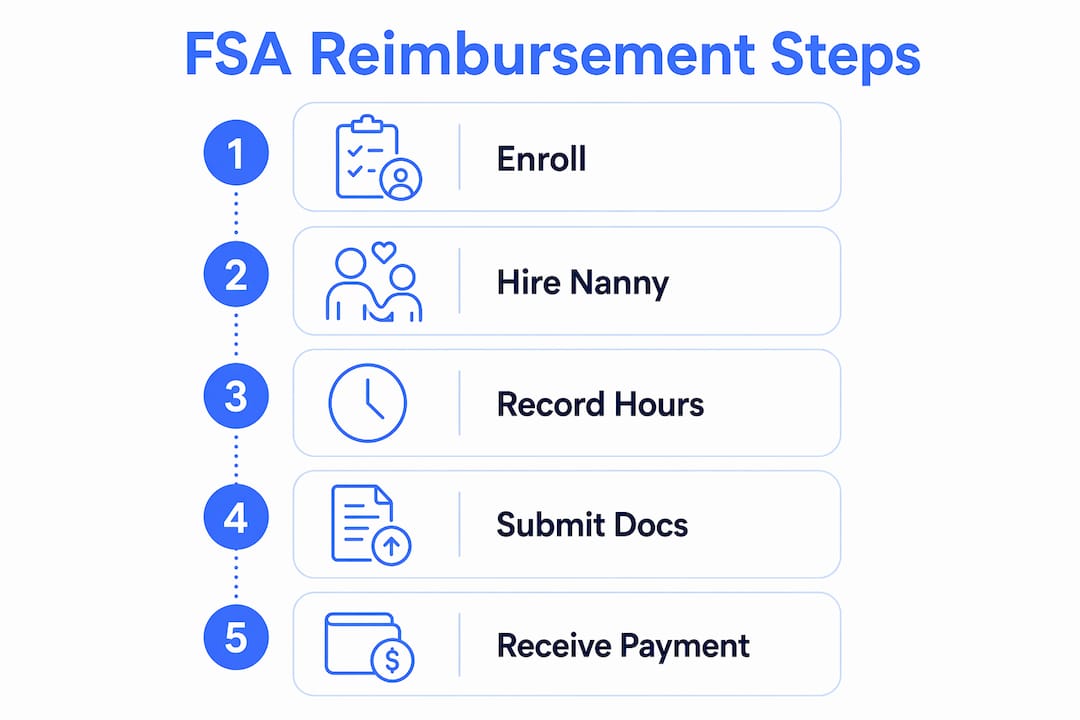
How does the step-by-step reimbursement workflow actually work?
-
At hiring: Provide your full legal name, address, and SSN or EIN in writing. Agree on a written work arrangement that specifies your role, schedule, and pay rate. This document becomes the foundation for every FSA claim that follows.
-
Each pay period: Log hours contemporaneously, meaning the same day or week you work them. A signed nanny timesheet with start/stop times, total hours, and a brief care summary is what FSA administrators want to see. Get it signed by the family before the next pay period starts.
-
For each reimbursement: The family submits your pay stub or signed receipt plus your provider information to their FSA administrator. If the administrator requests additional documentation, supply a signed receipt using the fields in the table above. Most Dependent Care FSAs are not pre-funded, so families can only claim reimbursement up to the balance already in the account at the time of the request.
-
At year-end: The family completes Form 2441, which requires your name, address, and tax ID. Informal or undocumented pay creates real risk here. If there are no payroll records, the family may be unable to complete Form 2441 correctly, which can trigger an audit or disqualify the FSA benefit entirely.
Open enrollment reminder: FSA elections must be made during open enrollment and cannot be changed mid-year except for qualifying life events. Families should estimate annual nanny costs before electing a contribution amount, and remember the use-it-or-lose-it rule: unused funds are generally forfeited at year-end.
Practical recordkeeping tips you can use every day
An ideal contemporaneous hours log includes the date, start and stop times, total hours, a one-line summary of care activities, and a family signature. Logging this daily takes under two minutes and eliminates disputes at year-end. A nanny schedule template can make this even faster.

For file naming, use a consistent format: PayStub_YYYY-MM-DD.pdf and SignedReceipt_YYYY-MM-DD.pdf. Keep two copies: one in your app and one emailed to the family as a PDF. That redundancy protects both of you if records are ever questioned.
Pro Tip: Request that the family run payroll rather than pay you in cash. Payroll stubs are the cleanest proof of payment for FSA claims and make Form 2441 straightforward. If the family is currently paying informally, a payroll cleanup service can help convert prior payments into documented records.
Large lump-sum payments or backdated receipts attract extra scrutiny from FSA administrators. If a payment was delayed for any reason, attach a brief written explanation to the receipt noting the original service dates and the reason for the timing gap.
Common mistakes that block FSA reimbursement and how to prevent them
- Missing SSN or EIN on receipts. The fix is simple: include it on every signed receipt you provide. Without it, the claim is rejected outright.
- Using only Venmo or Zelle screenshots. These show a payment but not a service description or provider ID. Always pair them with a signed receipt.
- Informal "under the table" cash payments. Paying a nanny informally disqualifies most families from using a Dependent Care FSA because there is no verifiable payroll documentation for Form 2441.
- No contemporaneous logs. Reconstructed timesheets created weeks later raise red flags. Log hours the same day or week they occur.
- Misclassifying the nanny as an independent contractor. Most nannies are household employees. That classification affects Schedule H, W-2 issuance, and which documents the FSA administrator will accept.
Split-care situations: When two caregivers share hours for the same dependent, each caregiver must provide their own provider information, signed timesheets, and proof of payment. The family allocates hours and payments to each caregiver separately on Form 2441. Keep records for each caregiver completely independent to avoid confusion during reimbursement.
How Thecaretracker helps you produce the documentation families need
Thecaretracker's time-tracking features are built around exactly the fields FSA administrators require: provider name, dates of service, start/stop times, total hours, and a care activity summary. Every log entry is timestamped, which satisfies the contemporaneous requirement the IRS looks for.
When a family needs to submit a claim, you can export a signed timesheet report directly from the app. That export includes all the fields listed in the documentation table above, formatted so the family can attach it to their FSA submission without reformatting anything.
| Thecaretracker Feature | FSA Documentation Need |
|---|---|
| Contemporaneous time logging | Dated, timestamped hours record |
| Signed timesheet export | Provider-signed proof of service |
| Care activity log | Description of care provided |
| Payroll-ready report | Pay stub equivalent for reimbursement |
| Share-to-employer export | Instant delivery to family for FSA claim |
From the CareTracker blog: Accurate, exportable records are the single biggest factor in whether a family successfully claims their FSA benefit. When caregivers log hours consistently and share signed exports each pay period, year-end Form 2441 preparation becomes a straightforward task rather than a stressful scramble.
Families that need help converting informal pay into documented payroll can access a payroll consultation through Thecaretracker to get their records in order before the next FSA claim.
Key Takeaways
Nanny care qualifies for Dependent Care FSA reimbursement when the care is work-related, the dependent meets IRS age or self-care criteria, and the caregiver provides complete provider documentation including SSN or EIN, signed timesheets, and payroll-verified proof of payment.
| Point | Details |
|---|---|
| IRS eligibility test | Care must be for a child under 13 or a dependent incapable of self-care, and must enable parents to work. |
| Required provider info | Full legal name, address, SSN or EIN, dates of service, and a description of care are mandatory for Form 2441. |
| Proof of payment standard | Payroll stubs, cancelled checks, or bank statements qualify; Venmo or Zelle screenshots alone do not. |
| Confirm employer plan cap | The federal maximum applies, but your family's employer plan may cap contributions lower. |
| Thecaretracker | Free for caregivers; produces timestamped logs and signed timesheet exports that meet FSA documentation requirements. |
Why accurate records protect you as a caregiver
Missing records hurt caregivers just as much as they hurt families. When documentation is incomplete, families may lose their FSA benefit, and that loss can create tension in the working relationship. Worse, informal pay arrangements can complicate your own tax situation if the IRS ever questions whether you were properly classified as a household employee.
The practical answer is to standardize your process from the first day of any job. Give every new family the checklist from the opening of this article at hire. Log hours daily. Export and share a signed timesheet every pay period. That routine takes minutes and builds the kind of trust that makes long-term working relationships work.
Thecaretracker makes FSA documentation simple and free
Thecaretracker gives caregivers a free tool to log hours, track care activities, and export signed timesheets that families can submit directly for FSA reimbursement. No paperwork pile-up, no reconstructed records at year-end. Download the app and start logging today.

Families that need help setting up documented payroll can book a payroll consultation to convert informal pay history into the verified records FSA administrators require.
Authoritative sources and next steps
- IRS Publication 503: Child and Dependent Care Expenses — full eligibility rules and the work-related test
- Instructions for Form 2441 — provider identification requirements and year-end reporting
- FSAFEDS Dependent Care FSA — use-it-or-lose-it rules and contribution guidance
Next steps for caregivers:
- Confirm the family's employer plan cap with HR before open enrollment
- Set up payroll or documented pay before the first FSA claim is submitted
- Export a signed timesheet from Thecaretracker each pay period and email it to the family
- Keep pay stubs, signed receipts, bank statements, and contemporaneous logs for at least three years in case of audit
This article is general information, not tax or legal advice. Confirm current rules with the IRS or a qualified tax professional for your specific situation.