
Yes, you can pay your nanny by direct deposit, and in most states, you can even make it your primary payment method. What you cannot do is assume it changes anything about your tax obligations. Paying by direct deposit doesn't touch your requirements to get an EIN, withhold taxes above the wage threshold, or issue a W-2. Before your first transfer, get a signed authorization, confirm the account is real, and keep clean paystubs.
TL;DR:
- Direct deposit for household payroll relies on ACH credit transfers, which typically take one to three business days to settle, not instantaneously.
- Many states prohibit mandatory direct deposit, so employers must offer alternative payment methods like paper checks or payroll cards and obtain proper written authorization.
- Accurate setup involves verifying bank accounts, obtaining signed authorization forms, and running test payments before automating payroll to avoid failures and delays.
- Payroll records and tax obligations remain unchanged by direct deposit; employers must still withhold taxes, issue W-2s, and retain documentation regardless of payment method.
- Households should regularly consult federal and state regulations, such as IRS Publication 926 and NACHA rules, to ensure compliance and stay informed about evolving payroll rules.
Table of Contents
- How Direct Deposit Works for Nanny Payroll
- When Will the Money Arrive?
- What Federal and State Law Actually Requires
- Setting Up Nanny Direct Deposit Step by Step
- Why ACH Transfers Fail (and How to Fix Them)
- Payroll Records and Taxes Don't Change With Direct Deposit
- What If Your Nanny Doesn't Have a Bank Account?
- Your Copy-Ready Direct Deposit Checklist
- How CareTracker Fits Into Your Payroll Workflow
- A Practical Take on Convenience Versus Choice
- Pair Direct Deposit With Accurate Hour Tracking
- Where to Verify These Rules Yourself
- Sources
- FAQ
How Direct Deposit Works for Nanny Payroll
Direct deposit for household payroll runs on the Automated Clearing House network, the same electronic system that moves Social Security payments and most corporate paychecks. Your bank (called the Originating Depository Financial Institution, or ODFI) sends an ACH credit through a central operator, which routes it to your nanny's bank (the Receiving Depository Financial Institution, or RDFI). The money moves as a batch instruction, not a real-time wire, which is why timing matters more than people expect.
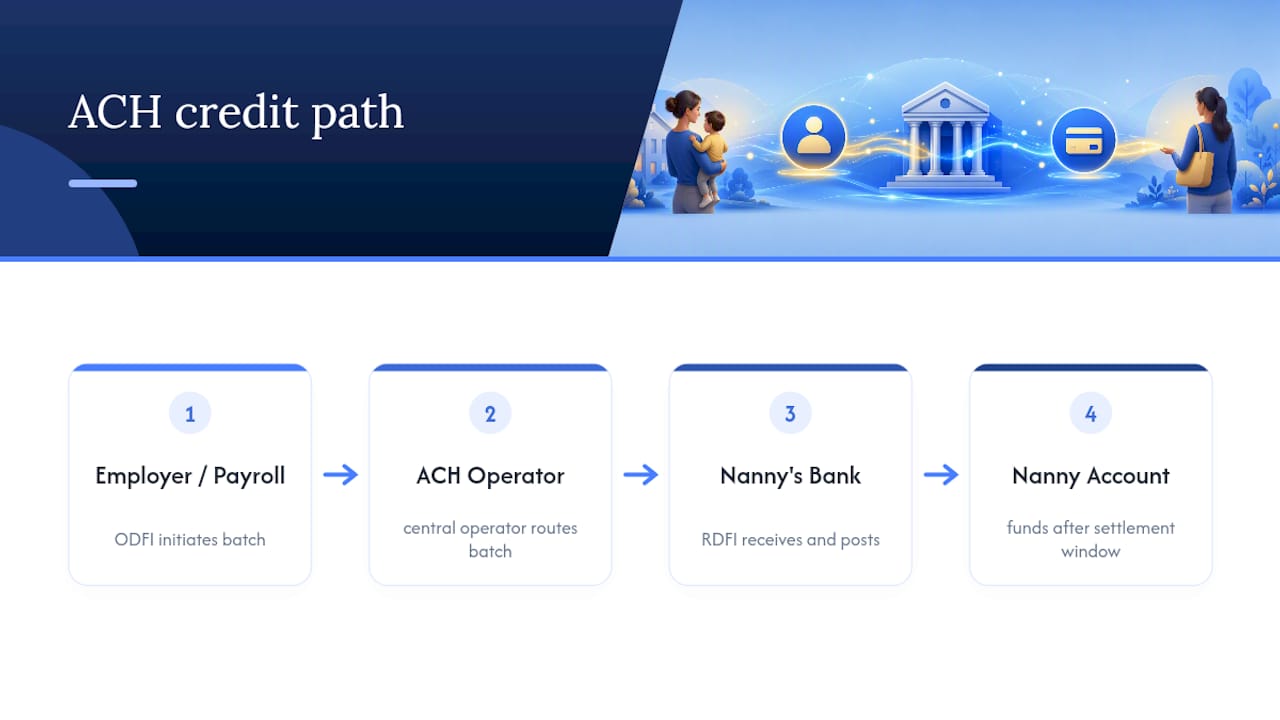
Household payroll almost always uses ACH credit rather than ACH debit. That means you're pushing money out to your nanny's account, not authorizing her bank to pull it from yours. If you use a payroll provider built for household employers, that service typically initiates the transfer on your behalf after calculating gross pay, withholdings, and net pay, then submits the batch to its bank for processing.
Authorization has to happen before any money moves. Your nanny signs a form (or approves an electronic agreement) that names the specific account, gives you or your payroll service permission to deposit wages there, and spells out how she can cancel that permission later. Once that's on file, deposits post according to the standard settlement window, not instantly, which is a common source of confusion for first-time household employers who expect direct deposit to behave like Venmo.
When Will the Money Arrive?
Standard ACH transfers typically take one to three business days to post, depending on when your bank submits the file and which cutoff windows it uses. Same-Day ACH exists and many banks and payroll services offer it, but it usually carries an earlier submission deadline and sometimes a small extra fee.
Weekends and bank holidays don't count as processing days, so a payday that lands on a Monday holiday needs to be submitted a day or two earlier than usual. If you run payroll manually through your bank's bill pay or transfer tool, build in a buffer. Missing a cutoff by an hour can push your nanny's paycheck into the following business day.
Faster real-time rails like RTP and FedNow exist, but adoption for household payroll remains limited. Most household payroll services still rely on standard or Same-Day ACH, so plan around those windows rather than assuming instant transfers are available.
What Federal and State Law Actually Requires
Regulation E, which implements the Electronic Fund Transfer Act, sets the baseline federal protections for electronic transfers. It requires clear authorization before you initiate deposits and gives your nanny the right to revoke that authorization at any time, in writing or verbally, depending on how the original agreement was structured.
Here's the part many employers miss: you generally cannot require direct deposit as a condition of employment in many states. Roughly 19 states restrict mandatory direct deposit for employees, including California, New York, Illinois, Pennsylvania, and New Jersey. In these states, your nanny has a right to choose an alternative payment method even if you'd prefer to run everything electronically. Rules vary by state, so confirm the current statute for your state's labor department before assuming direct deposit is mandatory.
A written authorization should include:
- The nanny's name and the specific bank account and routing numbers
- A statement that she consents to recurring deposits of net wages
- Clear language on how to revoke or change that authorization
- The date and signature of both parties
Even where the law allows you to require direct deposit, giving your nanny a real choice, rather than presenting it as a take-it-or-leave-it term, tends to build more trust and avoid disputes later. The Regulation E framework is built around consumer choice, and treating it that way protects you if a disagreement ever surfaces.
Setting Up Nanny Direct Deposit Step by Step
Getting direct deposit running correctly the first time saves you from chasing down failed transfers later. Follow these steps in order.
- Collect banking details securely. Ask for the account number, routing number, and account type (checking or savings) through an encrypted form or a payroll platform's secure portal, never over unencrypted text or email.
- Get signed authorization. Use a written form that names the account, states the deposit amount or method of calculation, and includes a revocation clause.
- Verify the account before the first live payment. Micro-deposit verification sends two small test amounts (often under a dollar) that your nanny confirms in her online banking, which typically takes one to two business days. Instant verification services like Plaid or Stripe Financial Connections confirm ownership in seconds by having the nanny log into her bank directly, and this method tends to reduce ACH return rates compared with micro-deposits.
- Set up recurring payroll. Whether you're using your bank's bill pay feature or a dedicated household payroll service, schedule the pay date with enough lead time to clear standard ACH windows.
- Run a test payment first. Confirm the first deposit lands correctly and matches your calculated net pay before treating the schedule as fully automated.
A nanny payroll setup guide can walk you through matching this process to your specific state's requirements, since some states add wrinkles around pay stub disclosures or wage notice timing.
Why ACH Transfers Fail (and How to Fix Them)
Failed direct deposits happen more often than you'd think, especially in the first month of a new payroll relationship. NACHA's operating rules define standard return codes that tell you exactly what went wrong:
- R01 (Insufficient Funds): the nanny's account can't cover a debit, though this is rare on incoming payroll credits.
- R02 (Account Closed): the account was closed after she gave you the details. Ask for updated information immediately.
- R03 (No Account/Unable to Locate Account): the account number doesn't match any real account. Double-check every digit against her bank statement, not a text message.
- R04 (Invalid Account Number): a formatting or transposition error, often just one or two swapped digits.
- R09 (Uncollected Funds): less relevant for credits, but occasionally flagged by certain bank systems.
Returns typically post back to your account within two to five business days, which means you may not know a deposit failed until well after payday. If that happens, pay your nanny by an alternate method, a same-day transfer app, a check, or cash with a signed receipt, so she isn't left waiting on a correction cycle. Preventing repeat failures usually comes down to using instant verification instead of micro-deposits and asking your nanny to read her account and routing numbers back to you rather than texting a photo of a check.
Payroll Records and Taxes Don't Change With Direct Deposit
Direct deposit is a payment mechanism, not a tax strategy. IRS Publication 926 makes clear that how you pay your nanny has zero bearing on whether she's classified as a household employee, whether you owe employment taxes, or whether you need to issue a W-2. That classification depends on the nature of the work relationship, not the transfer method.
If you pay a household employee $2,800 or more in cash wages in a calendar year (the threshold that applies for the 2026 tax year, subject to annual IRS adjustment), you generally need to withhold and pay Social Security and Medicare taxes. Once you cross that line, you'll need an Employer Identification Number, a completed Form W-4 from your nanny, and a year-end Form W-2 reporting her wages and withholdings. You'll report and reconcile these taxes on Schedule H when you file your personal return.
Keep these documents on file regardless of how you pay:
| Document | Purpose | Retention |
|---|---|---|
| Form I-9 | Verifies work eligibility | Duration of employment plus 3 years |
| Form W-4 | Sets withholding elections | Duration of employment |
| Pay records/paystubs | Documents wages and hours paid | At least 4 years |
| New-hire report | State-required reporting | Per state agency rules |
The Form I-9 requirement applies to every household employee, not just those paid by paper check, and skipping it is a common oversight among first-time nanny employers. Detailed pay stub requirements around the $2,800 threshold are worth reviewing closely if you're unsure whether you've crossed it this year.
What If Your Nanny Doesn't Have a Bank Account?
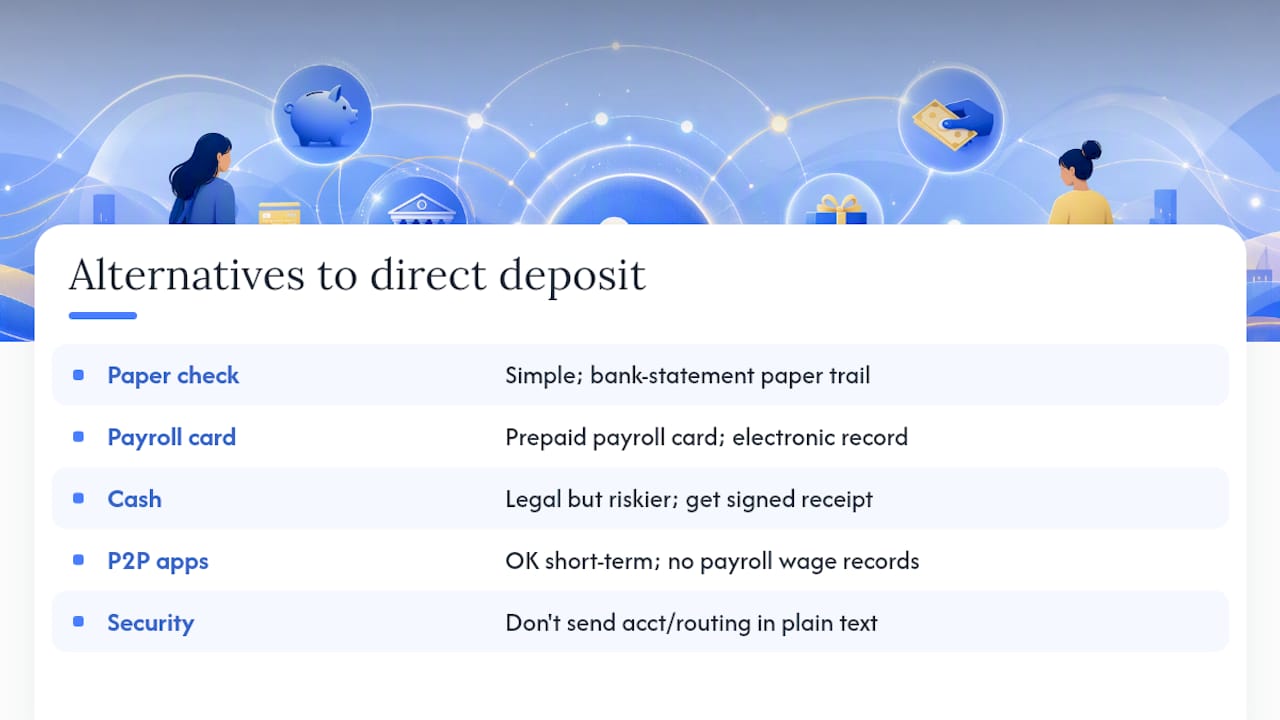
Direct deposit isn't universal, and you need a fallback that keeps you compliant. A paper check remains the simplest legal alternative and creates its own paper trail through your bank statement. A payroll card, a prepaid card loaded by your payroll provider, works for nannies without traditional banking access and still creates an electronic payment record. Cash is legal but riskier for documentation; if you pay cash, get a signed receipt every pay period noting the date, hours, and amount. Peer-to-peer apps like Venmo or Zelle can work in a pinch, but they aren't designed as payroll systems and won't generate the wage records you need for tax season on their own.
In states that restrict mandatory direct deposit, you're generally required to offer one of these alternatives rather than forcing electronic payment. Whichever method you use, never send full account or routing numbers over unencrypted text or email, and store any physical documents with banking details in a locked drawer or a password-protected file rather than a shared inbox.
Your Copy-Ready Direct Deposit Checklist
Keep this list handy before your first payroll run:
- Written job agreement with agreed hourly rate and pay schedule
- Completed I-9, W-4, and state new-hire report
- EIN obtained from the IRS
- Signed direct deposit authorization naming the account and revocation terms
- Verified bank account (micro-deposit or instant verification)
- A backup payment method ready in case of an ACH return
For the authorization form itself, make sure it includes the account number, routing number, account type, a clear consent statement, a revocation clause, and signature lines for both parties dated the same day.
Pro Tip: Once you've verified the account and completed the first successful deposit, shred or permanently delete any paper copies of the banking details you no longer need on hand. Keep only what your payroll records require, and store that securely.
How CareTracker Fits Into Your Payroll Workflow
Direct deposit only pays your nanny correctly if the hours behind it are accurate. CareTracker lets nannies log hours in real time, request schedule approvals, and gives you a single calendar view of every shift worked. When it's time to run payroll, exporting that data into a report cuts down on the guesswork that leads to underpayment disputes or ACH corrections down the line, and it keeps care details and time records in one secure place instead of scattered across texts and sticky notes.
A Practical Take on Convenience Versus Choice
Direct deposit is convenient for you, but convenience shouldn't override your nanny's right to a payment method she trusts. Offer a real alternative, document every agreement in writing, and honor revocation requests without friction. That's how you keep payroll simple and keep trust intact.
— mercedes
Pair Direct Deposit With Accurate Hour Tracking
Direct deposit solves how you pay your nanny. It doesn't solve what you owe her, and that number depends entirely on hours logged correctly week after week. CareTracker gives your nanny a free app to clock hours, request time off, and submit schedule changes for your approval, so the numbers feeding into your payroll run are accurate before you ever touch a bank transfer.

Because CareTracker is completely free for caregivers, your nanny can start logging hours immediately without you paying for a separate time-tracking subscription. It won't file your taxes or replace a household payroll service, but it removes the most common source of payroll disputes: disagreement over how many hours were actually worked. Pair it with your payroll provider, export a clean hours report each pay period, and you'll spend less time reconciling and more time confirming the deposit landed. Set up your household's tracking before your next pay cycle and see how much friction it removes from payday.
Where to Verify These Rules Yourself
Payroll and tax rules change, and state-specific direct deposit restrictions are worth confirming directly. Start with IRS Publication 926 for household employer tax obligations, NACHA's operating rules for ACH return codes and network standards, and the CFPB's Regulation E summary for electronic transfer protections. The Department of Labor's FLSA page covers wage and recordkeeping standards that apply regardless of payment method. For state-specific mandatory direct deposit rules, check with your state's labor or wage-and-hour office before finalizing your payroll setup.
This article is general information, not a substitute for advice from a qualified financial advisor. Consult a qualified financial professional about your own circumstances before acting on anything here.
Sources
- Publication 926 (Household Employers)
- NACHA operating rules
- Regulation E (EFTA) — CFPB
- Fair Labor Standards Act (FLSA) — DOL
FAQ
How much do nannies typically get paid per hour in the US?
Nanny pay varies widely by region and experience, and actual pay should reflect local market rates, hours, and the specific responsibilities involved.
What is the best payroll app for nannies?
The strongest setup pairs an hours-tracking app like CareTracker with a household payroll service that handles tax withholding, filings, and direct deposit. Accurate hours logged in real time reduce the payroll errors that cause disputes or ACH corrections.
Is it better to pay my nanny in cash or by payroll?
Payroll, whether by direct deposit or check, creates the wage records you need for tax reporting and is generally safer than cash. If you pay cash, document every payment with a signed receipt to protect both you and your nanny come tax season.
What is the nanny tax threshold for 2026?
Cash wages of $2,800 or more paid to a household employee in 2026 trigger Social Security and Medicare withholding obligations under IRS household employer rules. This threshold adjusts periodically, so confirm the current figure each tax year.