
For nannies and household employers who want accurate, compliant payroll without the paperwork headache, the clearest path is this: use Thecaretracker to log verified hours on your phone for free, then pair those records with a household payroll consultation when it's time to file taxes. That combination covers the two things that trip up most families: unverified hours that lead to wage disputes, and missed IRS filings that trigger penalties.
Here's what that workflow gives you from day one:
- Free mobile time tracking so every shift is logged, approved, and timestamped
- Verified hours that feed directly into accurate Social Security (FICA) and Medicare withholding calculations
- Exportable timesheets ready for any payroll consultation or tax preparer
- IRS-compliant year-end support through paid consultation packages covering W-2s and Schedule H
Table of Contents
- Why do the best nanny payroll services matter for compliance?
- Self-service vs. full-service payroll: which fits your household?
- What features should you require from a nanny payroll solution?
- How do you set up payroll for a nanny step by step?
- How does Thecaretracker help with verified hours and payroll consultation?
- What does nanny payroll typically cost?
- Checklist: questions to ask before starting or accepting payroll
- Key Takeaways
- Why the "just use a payroll app" advice misses the point
- Thecaretracker gives you free time tracking and payroll help when you need it
- Useful U.S. sources and references for household payroll and workers' comp
Why do the best nanny payroll services matter for compliance?
Household employment sits in a compliance gray zone that catches many families off guard. When you hire a nanny and pay more than the IRS threshold in a calendar year, you become a household employer. That means withholding federal income tax, Social Security, and Medicare from each paycheck, paying the employer's share of FICA, filing Schedule H with your personal tax return, and issuing a W-2 by January 31.
Miss any of those steps and the IRS can assess back taxes, interest, and penalties. State agencies add their own layer: unemployment insurance registration, state income tax withholding, and in many states, workers' compensation coverage.
Workers' comp is a common blind spot. Many families assume their homeowners insurance covers a nanny's workplace injury. Most homeowners policies exclude household employees who meet state workers' comp thresholds, leaving the employer personally liable if a claim is denied.
Accurate timekeeping sits at the center of all of this. Verified hours feed directly into correct tax withholding and overtime calculations, reducing wage disputes and simplifying your obligations under state overtime laws. A payroll service built on unverified or manually entered hours is a liability, not a solution.
Self-service vs. full-service payroll: which fits your household?
The choice between these two models comes down to one question: how much do you want to handle yourself?

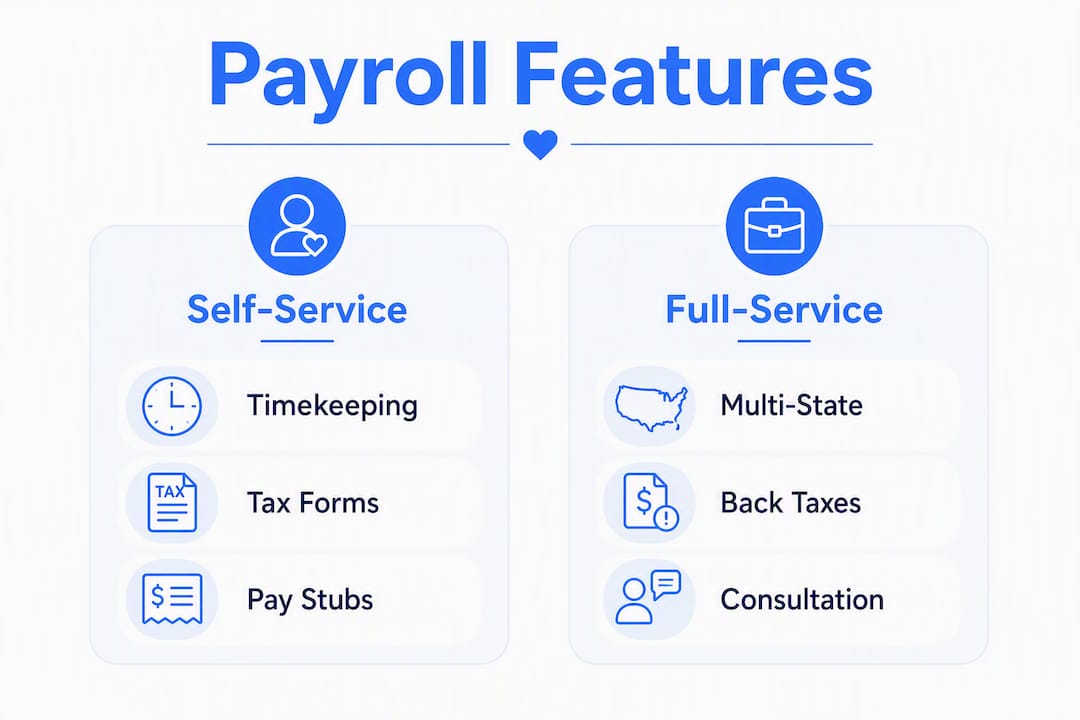
Self-service (automated) platforms generate pay stubs, calculate withholdings, and produce year-end forms. You review the numbers and submit tax deposits to the IRS and your state agency yourself. Fees are lower, but the responsibility for remittance stays with you.
Full-service (concierge) providers handle everything: calculations, deposits, quarterly filings, state registrations, and W-2 delivery. You pay more, but the provider carries the execution risk.
Key trade-offs at a glance:
- Self-service costs less but requires you to log in to the IRS EFTPS portal and your state's payment system each quarter
- Full-service reduces hands-on time and is worth the premium for multi-state households or anyone catching up on back taxes
- The decision hinges on whether you prefer lower fees or concierge-style support for tax notices and multi-state compliance
- If you previously paid a nanny off the books, a full-service provider with catch-up capabilities can calculate and file past-due taxes and reduce penalties without manual back-calculations
Pro Tip: Choose full-service if you have employees in more than one state, owe back taxes, or received a notice from the IRS. For a single-state household with straightforward hours, a self-service tool paired with a one-time payroll consultation is usually enough.
What features should you require from a nanny payroll solution?
Not every payroll tool is built for household employment. Before you commit, check for these features:
- Verified mobile time tracking with timestamped entries and employer approval
- Automatic overtime calculation aligned with your state's rules (California, for example, requires daily overtime after 8 hours)
- State-specific tax calculations covering income tax withholding, unemployment insurance, and workers' comp guidance
- W-2 and Schedule H generation so year-end filing is handled correctly
- Employee portal for W-4 submission and SSN handling
- Secure data storage with clear privacy practices
Accurate, timestamped mobile timekeeping is the single most useful input for improving payroll accuracy and lowering dispute risk. Without it, overtime calculations rest on memory or handwritten notes, both of which fail under audit.
Pro Tip: Ask any provider whether you can export timestamped timesheets as a PDF or CSV. Audit-ready timesheet exports let nannies prove hours worked if a wage dispute arises and give employers clean records for Schedule H.
How do you set up payroll for a nanny step by step?
Work through this checklist before the first paycheck goes out.
Required documents and responsibilities:
| Document / Step | Employer | Nanny | Payroll Provider |
|---|---|---|---|
| Employer Identification Number (EIN) | Apply via IRS.gov | ||
| Form W-4 (withholding elections) | Collect and retain | Complete and sign | |
| Social Security Number or ITIN | Verify | Provide | |
| State employer registration | Complete if required | Assist or handle | |
| Time-tracking setup (Thecaretracker) | Approve timesheets | Log hours daily | |
| First payroll run | Review and approve | Calculate and generate | |
| Quarterly tax deposits | Submit (self-service) or authorize | Remit (full-service) | |
| W-2 delivery by January 31 | Distribute | Retain for tax filing | Generate |
| Schedule H with Form 1040 | File by April 15 | Prepare (full-service) |
Timeline summary:
- Apply for an EIN before the first paycheck.
- Collect the nanny's W-4 and verify their SSN or ITIN on day one.
- Register for state unemployment and withholding accounts if your state requires it.
- Set up Thecaretracker so hours are logged and approved from the first shift.
- Choose self-service or full-service and run the first payroll.
- Remit federal and state tax deposits quarterly (or authorize your provider to do so).
- Deliver W-2 to the nanny by January 31 and file Schedule H with your personal return by April 15.
Use a nanny timesheet template to standardize how hours are recorded before payroll begins.
How does Thecaretracker help with verified hours and payroll consultation?
Thecaretracker is built specifically for nannies and caregivers. The core app is completely free and covers the timekeeping foundation that every payroll process depends on.
| Feature | What it does |
|---|---|
| Mobile time tracking | Logs shift start/end with timestamps; nanny and employer both see the record |
| Schedule approvals | Employer sends requests; nanny approves or flags conflicts |
| Unified calendar | All jobs visible in one view, reducing scheduling errors |
| Exportable reports | Download timestamped timesheets as clean records for payroll or audits |
| Payroll consultation (standard) | One-time filing assistance for employers who need help without a monthly subscription |
| Payroll consultation (premium) | Prior wage reporting and household payroll cleanup for back-tax correction |
The app also stores care information, including allergies, medications, and emergency contacts, so nannies have everything they need in one place. Data is handled securely, and the free tier never expires.
What does nanny payroll typically cost?
Pricing across household payroll services follows a few common shapes:
- Free tracking + paid consultation: Thecaretracker's model. The app costs nothing; you purchase a standard payroll consultation or premium cleanup package when filings are due.
- Monthly flat fee: Full-service providers typically charge a flat monthly rate covering calculations, deposits, and filings. You pay whether or not payroll runs that month.
- Per-paycheck fee: Some platforms charge per pay run, which works well for part-time or irregular schedules.
- All-in-one annual fee: Less common, but some household payroll specialists bundle the full year including W-2 generation into one price.
The cheaper the model, the more the employer typically does. A lower-cost automated tool may calculate everything correctly but still require you to log in to EFTPS and your state portal to submit the actual payments. Full-service costs more but removes that step entirely. Factor in state registration fees, the number of employees you manage, and whether you need catch-up work for prior years when comparing total cost.
Checklist: questions to ask before starting or accepting payroll
Employers should ask any provider:
- Do you file and remit federal and state tax deposits on my behalf, or do I submit payments myself?
- Do you generate the W-2 and prepare Schedule H?
- How do you handle state registrations and multi-state hours?
- What happens if I receive a tax notice after filing?
Nannies should ask employers or providers:
- How will my hours be recorded and who approves them?
- Will overtime be calculated correctly for my state?
- How are reimbursements and PTO tracked and paid?
- Will I receive a pay stub each pay period?
Pro Tip: During onboarding, request a sample pay stub and ask to see an exported timesheet from the tracking tool. If the employer cannot produce both, that's a signal the payroll process needs tightening before the first paycheck.
Key Takeaways
The most reliable nanny payroll setup combines free verified time tracking in Thecaretracker with a professional payroll consultation for tax filings, keeping both sides protected and compliant.
| Point | Details |
|---|---|
| Start with verified timekeeping | Log every shift in Thecaretracker so hours are timestamped and employer-approved before payroll runs. |
| Match service level to complexity | Use self-service for single-state, straightforward households; choose full-service or a consultation for multi-state or back-tax situations. |
| Know your deadlines | Deliver the W-2 by January 31; file Schedule H with your Form 1040 by April 15. |
| Workers' comp is often required | Homeowners insurance usually excludes household employees; check your state's threshold before the first shift. |
| Thecaretracker covers both needs | The free app handles verified timekeeping and exports; paid consultation packages handle filings and payroll cleanup when needed. |
Why the "just use a payroll app" advice misses the point
Most articles on household payroll focus on which subscription service to buy. That framing skips the step that actually determines whether payroll is accurate: the hours themselves.
A payroll service is only as good as the data you feed it. If hours are entered manually at the end of the week from memory, overtime errors and wage disputes follow. The payroll tool calculates correctly; the input was wrong. That's where most household payroll problems actually start, and it's why timekeeping and payroll need to be treated as one connected process, not two separate tasks.
Thecaretracker's approach, free verified tracking paired with on-demand consultation, fits most households better than a full-service monthly subscription because it matches the actual pattern of household employment: steady hours that need clean records, plus occasional professional help at tax time. Paying for full-service every month when you only need filing help twice a year is a cost that doesn't match the need.
Thecaretracker gives you free time tracking and payroll help when you need it
Free time tracking that actually connects to your payroll process is rare. Thecaretracker gives nannies and caregivers a no-cost mobile app with verified timesheets, schedule approvals, and exportable reports that any payroll consultation can work from directly.

When tax season arrives, you don't need a monthly subscription. Choose a standard or premium payroll consultation package to get your filings handled by a specialist, whether that's a first-time W-2 or a full back-tax cleanup. The free app stays in place year-round; the consultation comes in when you need it.
Download the free Thecaretracker app and start logging verified hours today.
Useful U.S. sources and references for household payroll and workers' comp
These official and industry resources cover national requirements and state-specific rules. Always check your state labor or insurance department for the final word on thresholds and registration requirements.
- IRS Topic: Household Employer's Tax Guide (Publication 926) — national authority on employer obligations, FICA, Schedule H, and W-2 deadlines
- Workers' comp for a nanny: requirements and costs (LegalClarity) — state-by-state workers' compensation requirements and insurance coverage gaps
- Household payroll and timekeeping analysis (GTM) — practical guidance on connecting verified hours to payroll accuracy
- Thecaretracker: free nanny time tracking app — free mobile app for verified timekeeping, schedule management, and payroll consultation packages
- Nanny Time Tracking — Thecaretracker — exportable, audit-ready timesheets for nannies and household employers
For state-specific workers' compensation thresholds, overtime rules, and unemployment insurance registration, contact your state's Department of Labor or workers' compensation board directly.