
To calculate nanny taxes, use an online nanny-tax calculator or the manual formulas below to combine FICA, FUTA, and state payroll costs, then compare employer total cost against employee net pay. The IRS calls these obligations "household employment taxes," and the term "nanny tax" is shorthand for the full set of federal and state payroll requirements that apply when you pay a caregiver above a certain annual wage threshold.
Quick options for estimating nanny payroll taxes:
- Interactive online calculators (such as those offered by Care.com HomePay, NannyTaxPrep, and GTM Payroll) accept hourly or salary inputs, apply state-specific rates, and return a side-by-side employer cost vs. employee net pay breakdown.
- Payroll-service calculators built into full-service platforms compute withholding, generate pay stubs, and can file forms on your behalf.
- Gross-up calculators work backward from a desired employee net pay to determine the gross wage you need to offer.
Always verify estimates against IRS Publication 926 and SSA employer guidance before filing, and register for an Employer Identification Number (EIN) before you make your first payroll deposit.
Key Takeaways
Accurate nanny-tax calculations require correct inputs, current state rates, and timely filings on Schedule H, Form W-2, and FUTA deposits.
| Point | Details |
|---|---|
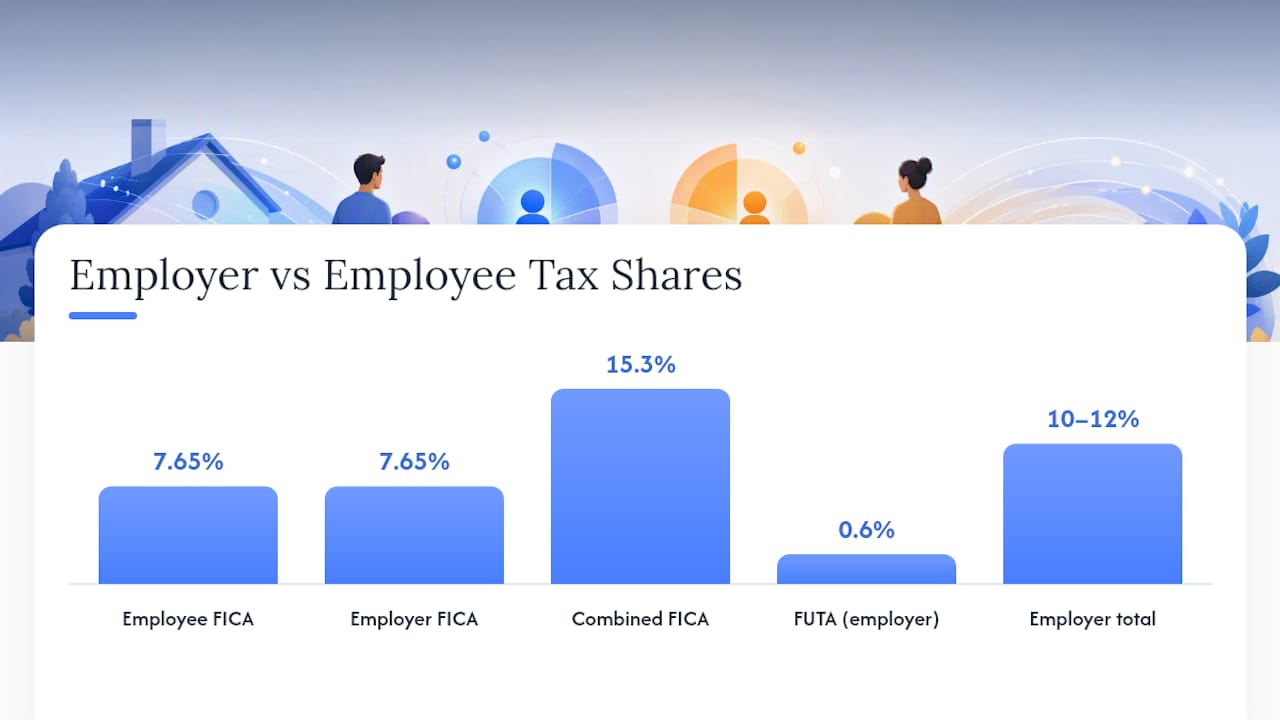
| FICA combined rate | Social Security and Medicare together total 15.3%, split equally between employer and employee. |
| FUTA effective rate | Employers who pay state UI on time reduce their federal FUTA rate to 0.6% on the first $7,000 of wages. |
| Social Security wage base | The SSA sets the 2026 taxable maximum at $184,500; calculators must use the current figure. |
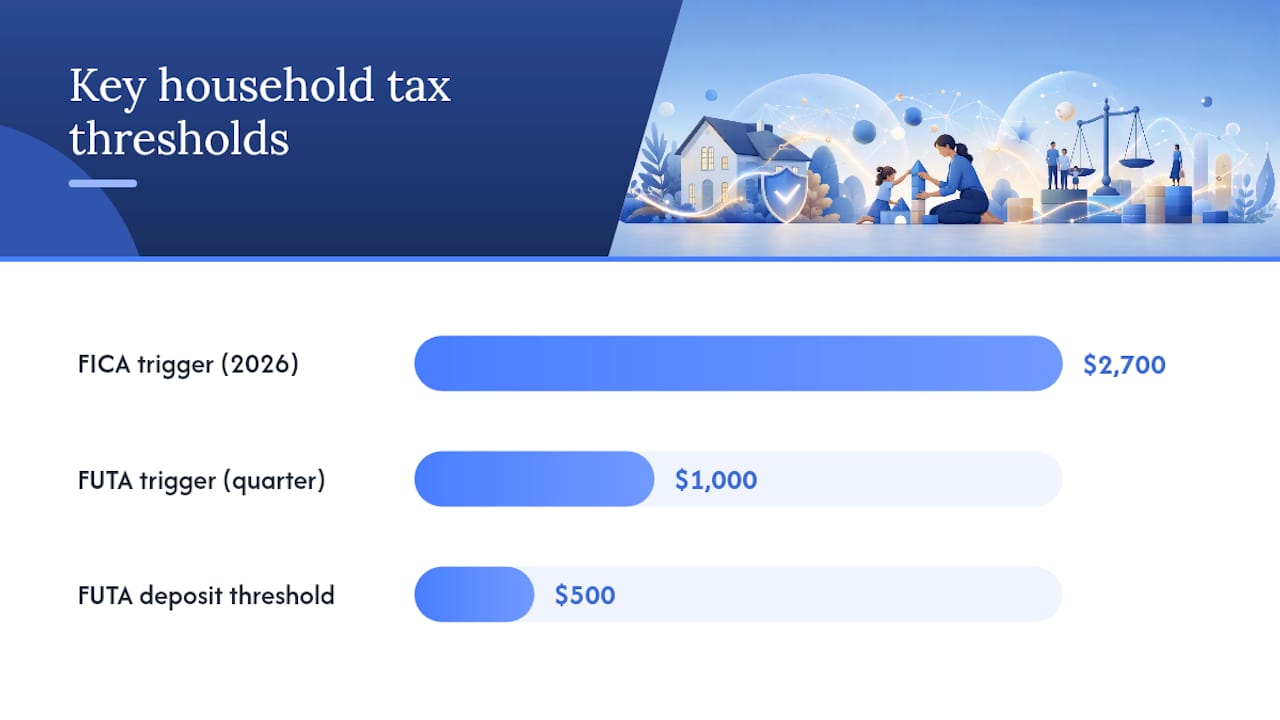
| Schedule H threshold | FICA obligations begin when you pay a household employee $2,700 or more in a calendar year. |
| Thecaretracker | Tracks hours and generates reports that produce accurate inputs for nanny-tax calculators and payroll consultations. |
Table of Contents
- How do you calculate nanny taxes step by step?
- Which taxes do nanny-tax calculators actually estimate?
- How does hourly vs. salary input change your estimate?
- A worked example: estimating nanny payroll taxes
- What forms do you need to file, and when?
- Should you DIY, use a payroll service, or combine tools?
- Why calculators give estimates, not guarantees
- What household employers often get wrong
- Thecaretracker makes accurate inputs easier
- Sources
How do you calculate nanny taxes step by step?
Getting an accurate estimate starts with gathering the right inputs before you open any calculator. Missing even one field, like overtime hours or a reimbursement amount, can shift your employer cost by hundreds of dollars per year.
Follow these steps to prepare:
- Confirm pay rate and pay period. Decide whether you are paying hourly or an annual salary, and choose a pay period (weekly, biweekly, or semi-monthly).
- Count regular and overtime hours. Total the hours worked in the pay period. Flag any hours over 40 per week as overtime, since those hours are paid at 1.5x the regular rate under federal law.
- Select your state. State unemployment insurance (UI) rates and wage bases vary widely. Choosing the wrong state will produce an inaccurate employer cost.
- Enter withholding choices. Decide whether you want to withhold federal income tax voluntarily. Enter the employee's W-4 exemptions or withholding amount.
- Separate reimbursements. Mileage and expense reimbursements paid under an accountable plan are not wages and should not be entered as pay. Entering them as wages inflates FICA.
- Add any taxable benefits. Health insurance premiums or other taxable benefits you provide may need to be included in gross wages depending on how they are structured.
Before running the estimate, pull these items from your records:
- Signed employment contract (pay rate, schedule, overtime agreement)
- Recent timesheets showing hours per week, including any overtime
- Bonus or holiday pay amounts
- Reimbursement records (mileage, supplies)
- Your state's current UI wage base and rate
Pro Tip: Use a nanny timesheet template to record hours weekly rather than reconstructing them at quarter-end. Rounding errors on daily hours can compound into meaningful FICA differences over a full year.
Which taxes do nanny-tax calculators actually estimate?
A well-built calculator covers every line item in your payroll cost, not just the taxes withheld from your nanny's paycheck. According to SmartAsset's step-by-step breakdown, the full calculation moves through wages, FICA shares, FUTA, and state withholding before arriving at a final employer cost.
Here is what the outputs typically include:
- Social Security tax: 6.2% withheld from the employee, 6.2% paid by the employer, for a combined FICA rate of 15.3% when Medicare is included.
- Medicare tax: 1.45% from the employee, 1.45% from the employer (an additional 0.9% applies to employee wages above $200,000, but that threshold rarely applies in household employment).
- FUTA: Paid by the employer only, at a gross rate of 6.0% on the first $7,000 of wages. Employers who pay state UI on time receive a credit that reduces the effective FUTA rate to 0.6%.
- State unemployment insurance (UI): Rates and wage bases differ by state and by how long you have been a registered employer. New employer rates are often higher.
- State disability insurance: Required in California, New Jersey, New York, Hawaii, and Rhode Island.
- Federal and state income tax withholding: Optional for federal; state rules vary.
The Social Security tax applies only up to the annual wage base. The SSA sets that cap at $184,500 for 2026, so calculators must reference the current figure to avoid over-withholding on higher-paid caregivers.
Employer vs. employee split: Calculators present two totals. The employee net pay reflects wages minus all withheld taxes. The employer total cost adds the employer's share of FICA, FUTA, and state UI on top of gross wages. That employer-side burden typically runs 10–12% above gross wages for most household employers, though state UI rates can push it higher.
How does hourly vs. salary input change your estimate?
The mode you choose changes both the inputs required and how overtime is computed.
Hourly mode:
- Enter the hourly rate, the number of regular hours in the pay period, and any overtime hours separately.
- The calculator multiplies overtime hours by 1.5x the regular rate before applying FICA.
- FUTA wage-base tracking is automatic because the calculator accumulates gross wages per period.
Salary mode:
- Enter the annual salary; the calculator divides by the number of pay periods.
- Overtime is less common for salaried workers, but a salaried nanny who does not meet the federal salary threshold for exempt status (currently $684 per week under the FLSA) may still be entitled to overtime pay.
- If your nanny occasionally works extra hours beyond the agreed schedule, salary mode alone may undercount your true payroll cost.
State overtime rules add another layer. California, for example, requires overtime after 8 hours in a single day, not just after 40 hours in a week. A calculator with a state selector will apply those rules automatically. One without it will underestimate your employer cost if you are in a state with daily overtime rules.
A worked example: estimating nanny payroll taxes
Assume you pay a nanny $20 per hour, 40 regular hours per week, with one week of 4 overtime hours, on a biweekly pay schedule in a state with a 2.7% UI rate on the first $7,000 of wages.
- Regular wages: 80 hours × $20 = $1,600.00
- Overtime wages: 4 hours × $30 (1.5x) = $120.00
- Gross wages this period: $1,720
Note: federal and state income tax withholding are excluded here because they are optional or vary by the employee's W-4 elections. FUTA and state UI amounts reflect the applicable wage base and will reduce to zero once cumulative wages exceed $7,000.
This example is an estimate only. State UI wage bases, new-employer rates, and FUTA credit eligibility change annually. Confirm current figures with IRS Publication 926 and your state's workforce agency before filing.
What forms do you need to file, and when?
H&R Block's household employment guidance summarizes the core triggers clearly: once you pay a household employee $2,700 or more in 2026, FICA withholding and employer matching are required. FUTA applies when you pay $1,000 or more in any calendar quarter.
Registration and setup (do these first):
- Apply for an EIN at IRS.gov before your first payroll deposit.
- Register with your state's workforce agency for a state UI account.
- Have your employee complete Form W-4 (federal) and any required state withholding form.
Ongoing filing timeline:
- Quarterly: Deposit FUTA if the accumulated liability exceeds $500 in a quarter. Most household employers deposit annually if the liability stays below that threshold.
- January 31: Issue Form W-2 to your employee and file Copy A with the SSA along with Form W-3.
- Tax return deadline: File Schedule H with your Form 1040 to report and pay household employment taxes for the year.
Federal income tax withholding is voluntary for household employers. You and your employee can agree to withhold it, which simplifies the employee's own tax filing, but you are not required to do so.
Should you DIY, use a payroll service, or combine tools?
After running an estimate, you have three realistic paths:
- DIY with manual formulas and Schedule H: Works well if you have one employee, a consistent schedule, and no state complications. Use the SmartAsset calculation method as a reference and keep a running wage ledger.
- Full-service payroll provider: Handles deposits, W-2 generation, and state filings automatically. Worth the cost if you have irregular hours, multiple states, or limited time.
- Time-tracking app plus a payroll consultation: A practical middle path. Accurate hour records reduce the risk of calculation errors, and a one-time consultation can set up your accounts and confirm your rates.
Decision criteria: If your nanny works across state lines, earns overtime regularly, or you missed prior filings, a payroll service or consultation is the safer choice. For straightforward single-state arrangements, DIY with a reliable calculator and clean timesheets is manageable.
Pro Tip: Documenting hours weekly in a nanny time-tracking app means your Schedule H entries match your actual payroll records exactly, which reduces the risk of discrepancies if the IRS requests documentation. Accurate records also make mileage reimbursement documentation straightforward.
Why calculators give estimates, not guarantees
Online calculators apply standard federal formulas and state rate lookups, but they are not a substitute for official filings or professional advice. The IRS research paper on household employment compliance documents a historically large Schedule H filing gap, which suggests many household employers either miscalculate or skip filing entirely.
For binding guidance on rates, wage bases, and filing requirements, consult IRS Publication 926, the SSA employer FAQ, and the DOL FUTA credit page. A tax professional familiar with household employment can confirm your specific situation.
Common calculator limitations to watch for:
- Stale state UI wage bases: Rates update annually; a calculator that has not been refreshed will produce incorrect employer costs.
- Overtime entered incorrectly: Entering total hours without separating overtime understates gross wages and FICA.
- Reimbursements counted as wages: Accountable-plan reimbursements are not taxable wages. Including them inflates every tax line.
- Missing fringe benefit treatment: Employer-paid health premiums may or may not be taxable depending on plan structure.
- Gross-up errors: If you agreed to cover your nanny's tax share, a standard calculator will not compute the correct gross wage automatically.
What household employers often get wrong
Most calculation mistakes come down to three surprises: overtime that was not tracked, reimbursements that were counted as wages, and FUTA base assumptions that were never updated after the first $7,000 of wages was reached.
The fix is simpler than it sounds. Keep a weekly timesheet from day one, set a consistent pay schedule, and run a fresh estimate each quarter to catch any drift between what you paid and what you reported.
Practical habits that prevent errors:
- Record hours every week, not at quarter-end.
- Separate reimbursements from wages on every pay stub.
- Confirm your state UI rate with your state workforce agency each January.
- Reconcile total wages paid against your W-2 before filing Schedule H.
Pro Tip: Keep a simple log of any benefits you provide (health insurance contributions, transit benefits) and confirm their tax treatment before year-end. Misclassifying a benefit as non-taxable when it is taxable is one of the most common Schedule H errors.
Thecaretracker makes accurate inputs easier
Accurate nanny-tax calculations depend on clean data, and clean data starts with reliable hour tracking. Thecaretracker gives household employers a free, organized way to collect exactly the inputs a calculator or payroll consultant needs.

With Thecaretracker, you can track weekly hours, approve schedule requests, and generate reports that reflect actual time worked, including overtime. That means when you sit down to estimate payroll costs or prepare your Schedule H, your numbers come from a verified record rather than a reconstructed guess. For employers who need more than an estimate, Thecaretracker also offers a payroll consultation service staffed by household employment specialists who can register your accounts, clean up prior filings, and confirm your rates.
Start with the Thecaretracker time-tracking app today and give your payroll calculations a foundation you can trust.
Sources
Use these primary sources to confirm rates, wage bases, and filing requirements before you file:
- Publication 926 (Household Employer's Tax Guide)
- Who Is Minding the Nanny Tax? (IRS research paper)
- Social Security Administration — Employer FAQs
- Social Security Administration — Cost-of-Living Adjustments and taxable maximum
- DOL — FUTA credit
- Household Employment Taxes | H&R Block
- Nanny Tax: What It Is and How to Calculate It | SmartAsset
This article provides general information about household employment taxes and is not a substitute for professional tax advice. Confirm current rates and filing requirements with the IRS, SSA, or a qualified tax professional before filing.