
Federal law does not force every household employer to hand over a printed pay stub, but it does require you to track wages, withhold taxes once you cross set thresholds, and file specific forms. Many states go further and mandate itemized pay statements. In practice, that means you should treat accurate pay stubs and time records as a requirement, not an option. If you employ a nanny, your first moves are simple: get an EIN, collect your employee's paperwork, and start logging hours today.
TL;DR:
- Families must accurately track hours, wages, and deductions in real time, as inconsistent recordkeeping is the most common cause of compliance issues.
- Employers should obtain an EIN, collect W-4 and I-9 forms before paying, and maintain detailed pay period records for at least three to four years.
- Federal thresholds require withholding Social Security and Medicare taxes on wages over $3,000 annually and reporting earnings via W-2 forms.
- Several states, including California and New York, mandate itemized pay statements every pay period, often allowing electronic delivery with employee consent.
- Using time-tracking apps and consistent documentation minimizes errors and disputes, reinforcing compliance and supporting the nanny’s earnings record.
Table of Contents
- Nanny Paystub Requirements: A Quick Compliance Checklist
- Federal Rules That Shape Nanny Payroll and Pay Stubs
- Which States Require Itemized Pay Stubs
- Building a Pay Stub Your Nanny Can Actually Use
- What to Keep, and for How Long
- Setting Up Household Payroll Step by Step
- Why Consistent Time Tracking Beats Compliance Guesswork
- A Practical Next Step: Time Logs and Pay-Period Reports
- What Nanny Paystub Requirements Really Come Down To
- Where to Verify These Rules Yourself
- Sources
Nanny Paystub Requirements: A Quick Compliance Checklist
Before you worry about formatting a pay stub, get the foundation right. Skipping these steps is how families end up with penalties or a confused nanny at tax time.
- Apply for an EIN and save the confirmation letter somewhere you can find it.
- Collect a completed W-4 and I-9 from your nanny before the first paycheck.
- Set a fixed pay schedule and track hours, including overtime, every single week.
- Decide whether you'll withhold federal income tax if your nanny requests it, and budget for Social Security and Medicare once wages hit the federal threshold.
- Keep pay-period records and issue pay stubs whenever your state requires them or your nanny asks for one.
Pro Tip: Set a recurring calendar reminder for the last day of each pay period. Missed hours are far easier to reconstruct the same week than three months later during tax season.
Federal Rules That Shape Nanny Payroll and Pay Stubs
Federal law is where nanny tax obligations start, and the numbers matter more than the paperwork. If you pay a household employee wages that meet the federal threshold, currently $3,000 for 2026, you must withhold and pay Social Security and Medicare on the full wages, according to the IRS's household employer tax guidance. That threshold adjusts most years, so check it annually rather than assuming last year's number still applies.
You'll also cross a separate trigger for federal unemployment tax (FUTA) once you pay $1,000 or more in any calendar quarter. That obligation is calculated quarterly, not annually, which surprises a lot of families who only think about payroll once a year.
Several federal forms come into play, and each has its own deadline:
- Form SS-4 to apply for an EIN, which you need before you can report wages at all.
- Form W-4, collected from your nanny, to determine any voluntary federal income tax withholding.
- Schedule H, filed with your personal Form 1040, to report household employment taxes.
- Form W-2, issued to your nanny and filed with the Social Security Administration, along with Form W-3.
FICA taxes split between you and your nanny. You can either withhold the employee's share from each paycheck or cover both halves yourself as an added benefit. IRS Publication 926 walks through exact filing requirements and timing for each of these forms.
Which States Require Itemized Pay Stubs
Federal law sets the tax floor, but your state decides whether you must document each payment in writing. California, Massachusetts, New York, and Washington, D.C. all require employers, including household employers, to issue itemized pay statements every pay period, and other states are adding similar rules. Verify your own state's requirement directly with its labor department, since the wording and exemptions vary and small-employer carve-outs sometimes apply.
Across the states that do mandate pay stubs, the required fields tend to overlap heavily:
- Employer name, address, and sometimes EIN.
- Employee name and pay period dates.
- Gross pay and net pay for the period.
- Itemized deductions (taxes, benefits, any reimbursements).
- Hours worked, including any overtime hours, and year-to-date totals.
Format flexibility exists in most states. Many allow electronic delivery instead of a printed slip, as long as your nanny consents and can access or print the statement herself. This aligns with the state pay-stub requirements payroll guides summarize for caregivers specifically.
Building a Pay Stub Your Nanny Can Actually Use
A compliant pay stub doesn't need to look complicated. It needs to be complete and consistent every pay period. Follow this order and you'll cover what nearly every state, and every nanny, expects to see:
- Header details: your name/address as employer, your nanny's name, and the pay period dates.
- Hours and rate: regular hours, overtime hours at 1.5x, and the hourly rate applied to each.
- Gross pay: the total before any deductions.
- Itemized deductions: Social Security, Medicare, and any federal or state income tax withheld.
- Net pay: what actually lands in your nanny's account.
- Year-to-date totals (optional but useful): running totals of gross pay and taxes withheld, which help at tax time.
For weekly pay, this list alone satisfies most state rules. Biweekly pay doubles the hours and totals across two workweeks, but federal law requires calculating overtime on a weekly basis.
You can build this in payroll software that generates app-based pay reports, a payroll service, or even a well-labeled spreadsheet exported as a PDF each pay period.
Pro Tip: Attach a simple time-tracking summary to every pay stub, even a screenshot. It's the fastest way to settle a dispute about hours months later.
What to Keep, and for How Long
Pay stubs are only half the recordkeeping picture. The Department of Labor's domestic service recordkeeping fact sheet requires household employers to track, for every workweek:
- Hours worked each day and total hours for the week.
- The basis on which wages are paid (hourly, weekly, etc.) and the regular rate.
- Any additions to or deductions from wages.
- The total wages paid and the date of payment.
Retain payroll records for at least three to four years. Hold onto your EIN confirmation and W-2 filings longer since they're harder to reconstruct than a weekly time log. These records aren't just for your protection. Pay stubs give your nanny documented proof of income and support her Social Security earnings record, which matters if she ever applies for a loan, benefits, or credit down the road. Store everything somewhere retrievable, whether that's encrypted PDFs on your own drive or backups through a payroll service.
Setting Up Household Payroll Step by Step
Getting this right the first time saves you from amending filings later. Work through it in order.
- Confirm employment status and paperwork. Collect a completed I-9 and W-4 before your nanny's first day of paid work.
- Register with the IRS and your state. Apply for an EIN online, then register with your state's unemployment insurance and withholding agencies.
- Choose pay frequency and method. Decide between manual payroll, software, or a payroll service, and confirm whether your nanny wants federal income tax withheld voluntarily.
- Remit taxes on schedule. Some states require quarterly deposits; issue W-2 forms by January 31 and attach Schedule H to your Form 1040 when required.
The most common pitfalls are avoidable: paying entirely in cash with no records, skipping state unemployment registration, and ignoring overtime because "nanny work is different." It isn't. Overtime rules apply the same way they would to any hourly employee, and paying off the books risks penalties for you and lost Social Security credits for your nanny. A dedicated nanny payroll setup guide can walk through state-specific registration steps in more detail.
Why Consistent Time Tracking Beats Compliance Guesswork
Most nanny payroll mistakes trace back to one root cause: hours logged from memory instead of in real time. A workflow where hours get tracked daily, exported into a weekly or biweekly report, and then fed straight into payroll removes the guesswork that leads to missed overtime or a mismatched pay stub.
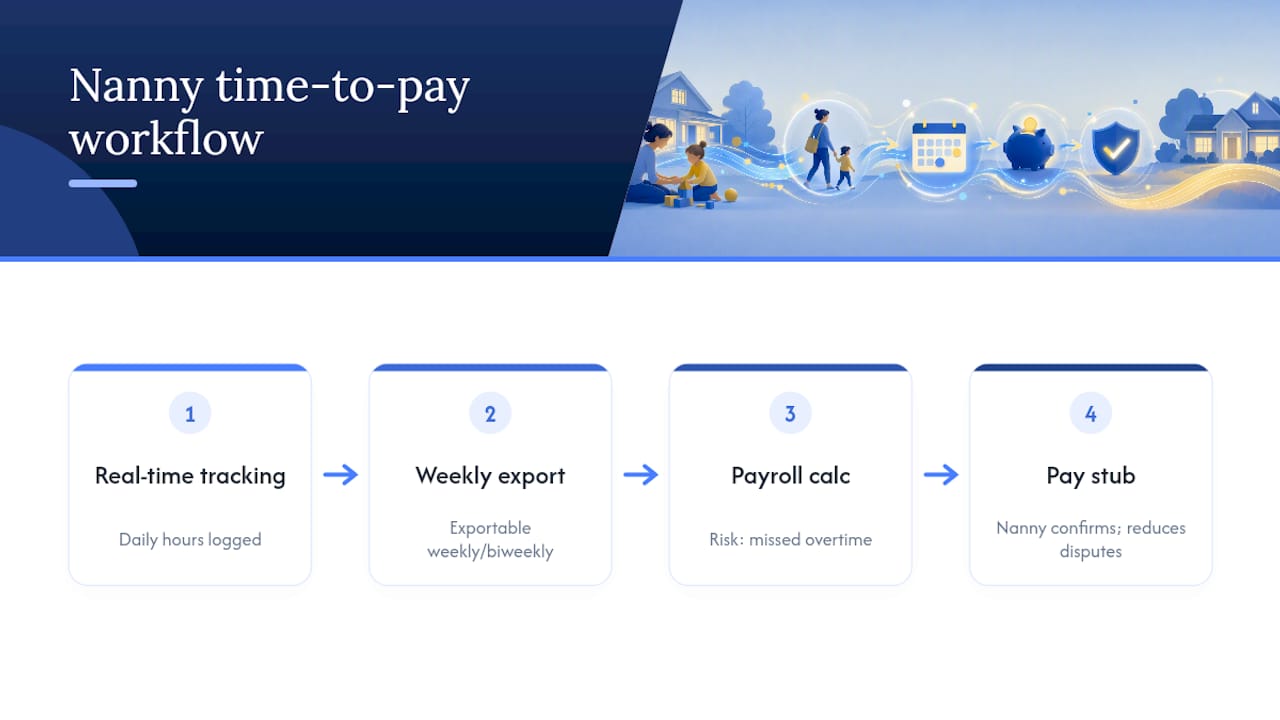
When you're evaluating any tracking tool, look for exportable reports, a shared job calendar, and a clear weekly hours summary your nanny can also see and confirm. That transparency cuts down on pay disputes before they start. It's the same principle behind Fact Sheet #79C's recordkeeping requirements: the employer who tracks in real time rarely has to reconstruct anything after the fact.
A Practical Next Step: Time Logs and Pay-Period Reports
An app like Thecaretracker can help with daily tracking challenges that trip up many household employers. Such an app lets your nanny log hours as she works, and you can approve schedule requests and view jobs in one calendar instead of piecing together texts and notes at the end of the month.

Once a pay period closes, you get a clear weekly hours summary you can hand to a payroll service, plug into payroll software, or use as backup documentation alongside the pay stub you generate. It's not a tax-filing service, but it solves the part of nanny payroll that causes the most errors: knowing exactly how many hours were worked and when. Caregivers use the core app for free, and families can explore the time-tracking features to see how exported reports fit into their existing payroll routine. If accurate hours are the piece you've been guessing at, that's the place to start.
What Nanny Paystub Requirements Really Come Down To
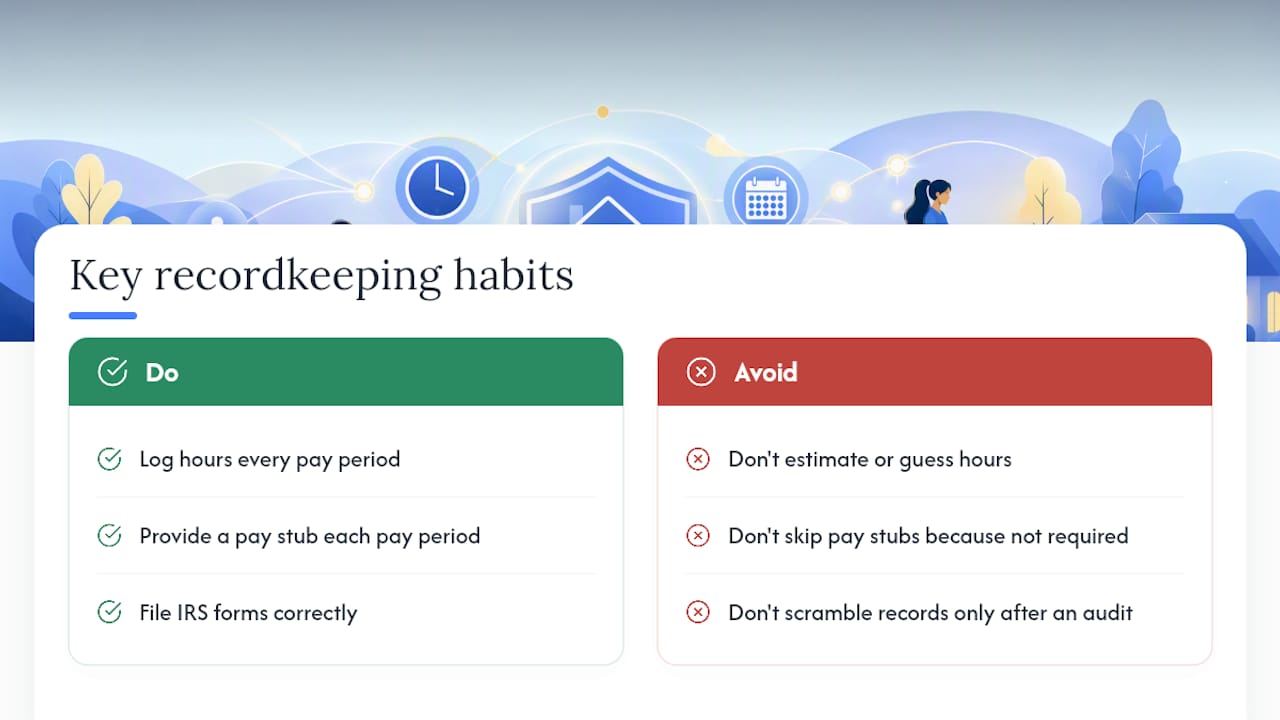
The federal thresholds and state pay-stub rules get most of the attention, but they're not where families actually go wrong. The real failure point is almost always inconsistent hour tracking. You can have every IRS form filed correctly and still end up in a dispute if your nanny's hours were estimated instead of logged.
I'd argue the "pay stubs aren't legally required in my state" mindset is the most expensive shortcut a household employer can take. Even where state law doesn't mandate it, a pay stub is cheap insurance. It documents what you paid, protects your nanny's Social Security record, and gives you both a shared reference when memory gets fuzzy about a particular week's overtime. Treat it as a habit built into every pay period, not a document you scramble to produce if the IRS or a state auditor ever asks.
— mercedes
Where to Verify These Rules Yourself
Confirm current thresholds and forms directly with the IRS's household employer guidance and the DOL's recordkeeping fact sheet. Always check your own state labor office for the exact pay-stub wording that applies to you.
Sources
- Tax Topic No. 756 - Household Employer's Tax Responsibilities
- Fact Sheet #79C: Domestic Service — Recordkeeping
- Caregiver or Nanny Pay Stubs: Are they required?