
Set your hourly rate to cover your desired net pay plus employer-side costs, track every hour you work, and confirm overtime rules before your first paycheck. Care shows posted average nanny rates around $21.75 per hour (roughly $870 per week), but that number is a starting point, not a ceiling. Your rate should reflect your experience, location, duties, and the real cost of employing you. Start here:
- Pick an hourly rate using the formula in Section 2.
- Begin logging your hours daily, starting today.
- Confirm whether your state adds overtime rules beyond the federal standard.
- Request or propose a written employment agreement before your next pay period.
Pro Tip: Use CareTracker to track hours for free from day one. It timestamps entries and produces exportable records your family can use for payroll.
Key Takeaways
Nannies and in-home caregivers who set rates using the gross-pay formula, track hours daily, and secure a written agreement are far better protected against pay disputes and compliance gaps.
| Point | Details |
|---|---|
| Use the rate formula | Gross hourly = (desired annual gross + employer costs) ÷ billable hours; employer add-ons typically run 10–15% above gross wages. |
| Overtime kicks in at 40 hours | You earn at least 1.5× your regular rate for every hour over 40 in a workweek; a salary does not waive this right. |
| Employers keep records 3 years | Daily hours, weekly totals, pay rate, and total wages must be preserved for at least three years under FLSA rules. |
| Written agreement prevents disputes | Include rate, overtime policy, schedule, PTO, reimbursements, and payroll schedule before your first shift. |
| Thecaretracker is free for caregivers | Log timestamped hours, approve schedules, and export timesheets at no cost using the CareTracker app. |
Table of Contents
- How to set your hourly rate as a caregiver
- How overtime works for household employees — with worked examples
- FLSA coverage, live-in rules, and what records your employer must keep
- What your written employment agreement should include
- Practical ways to track your hours and stay compliant
- How to present your pay request and confirm your classification
- Thecaretracker makes hour tracking simple and free for caregivers
- Setting fair pay takes confidence, not just math
- Sources
How to set your hourly rate as a caregiver
Your asking rate needs to cover more than your take-home pay. Families pay employer-side costs on top of your gross wages, and understanding that math helps you quote a number that holds up in negotiation.
Step 1: Define your target gross annual pay. Start with what you want to net after taxes, then work backward.
Step 2: Estimate employer-side add-ons. Industry payroll guides estimate these commonly add 10–15% above gross wages:
Step 3: Apply the formula.
Example: You want $45,000 gross annually. Total employer outlay: $50,400. Divide by 2,000 hours (40 hours/week × 50 weeks): your rate to quote is about $25.20/hr.
Pro Tip: Charge shift differentials for evenings, weekends, and overnights, typically $2–$5 above your base rate. If you care for two or more children, a per-child premium of $2–$4/hr is standard and worth building into your quote.
How overtime works for household employees — with worked examples
Under the FLSA, nonexempt household employees earn at least 1.5 times their regular rate for every hour worked beyond 40 in a single workweek. State rules can add further requirements, so always check your state labor department.
What counts as hours worked: Any time you are on duty, required to be available, or "engaged to wait" (present and waiting for the family's convenience). For live-in caregivers, interrupted sleep during an on-duty period may also count, though specific sleep-time exclusion rules apply. See Section 4 for live-in details.
Example A: Hourly nanny, 45 hours worked
- Regular rate: $22/hr
- Regular pay (40 hrs): $880
- Overtime rate: $22 × 1.5 = $33/hr
- Overtime pay (5 hrs): $165
- Total gross pay: $1,045
Example B: Salaried nanny, overtime-eligible
A salary does not exempt a nanny from overtime under FLSA nonexempt classification. A guaranteed salary covers a guaranteed minimum only. If a nanny earns $880/week and works 44 hours, the effective hourly is $880 ÷ 44 = $20/hr. The employer owes an additional 0.5× for 4 overtime hours: 4 × $10 = $40 extra. Total: $920.

When a bonus or flat reimbursement is included in a week's pay, it may affect the regular rate calculation. The DOL's guidance covers this in detail; when in doubt, consult a payroll professional.
FLSA coverage, live-in rules, and what records your employer must keep
DOL Fact Sheet 79C places the recordkeeping obligation on the employer, but you benefit directly from knowing what records must exist. Employers must preserve records used to compute pay for at least three years.
| Required record item | Why it matters to you |
|---|---|
| Daily hours worked | Confirms your time was logged correctly each day |
| Total weekly hours | Triggers overtime threshold review |
| Regular vs. overtime hours | Ensures correct rate was applied |
| Pay rate (regular and overtime) | Documents the agreed rate in case of a dispute |
| Total wages paid per period | Supports W-2 accuracy at year-end |
| Pay dates | Confirms payroll schedule was followed |
Live-in caregivers: Federal law may exempt live-in nannies from overtime requirements in some circumstances. However, DOL Fact Sheet 79D explains that sleep-time exclusions have specific conditions, and several states require overtime for live-ins regardless of the federal exemption. California is one example — check California nanny overtime rules if you work there.
Pro Tip: If you are a live-in caregiver and you and your employer agree to exclude sleep time from hours worked, get that agreement in writing and keep a copy with your own payroll records.
What your written employment agreement should include
A written agreement is not federally required, but legal experts strongly recommend one to prevent pay disputes. You can propose one yourself. The DOL offers a sample nanny employment agreement families can use as a model.
Your agreement should cover:
- Hourly rate and the schedule for any increases (annual review date, criteria)
- Overtime policy: how overtime is calculated and when it is paid
- Regular schedule and the process for approving schedule changes
- Paid time off and sick leave: accrual rate, notice requirements, payout on termination
- Reimbursement policies: mileage rate (IRS standard rate is a common reference), supplies, and how to submit requests
- Termination notice: required notice period for both parties
- Payroll schedule and tax handling: pay frequency, W-2 vs. 1099 confirmation
- Background check renewal: timing and who pays
- Confidentiality and house rules: social media, visitors, phone use during shifts
Pro Tip: Any time a family asks you to adjust your schedule, confirm the change in writing — a text or email works. Unplanned schedule extensions are a common source of untracked overtime. A brief written confirmation protects both of you.
Practical ways to track your hours and stay compliant
Reliable time records protect your pay. The method matters less than consistency and auditability.
| Method | Audit-readiness | Ease of use | Overtime auto-flag |
|---|---|---|---|
| Paper timesheet | Low (no timestamp) | High | No |
| Spreadsheet | Medium | Medium | Manual formula only |
| Shared calendar | Low | Medium | No |
| Purpose-built app (e.g., CareTracker) | High (timestamped) | High | Yes |
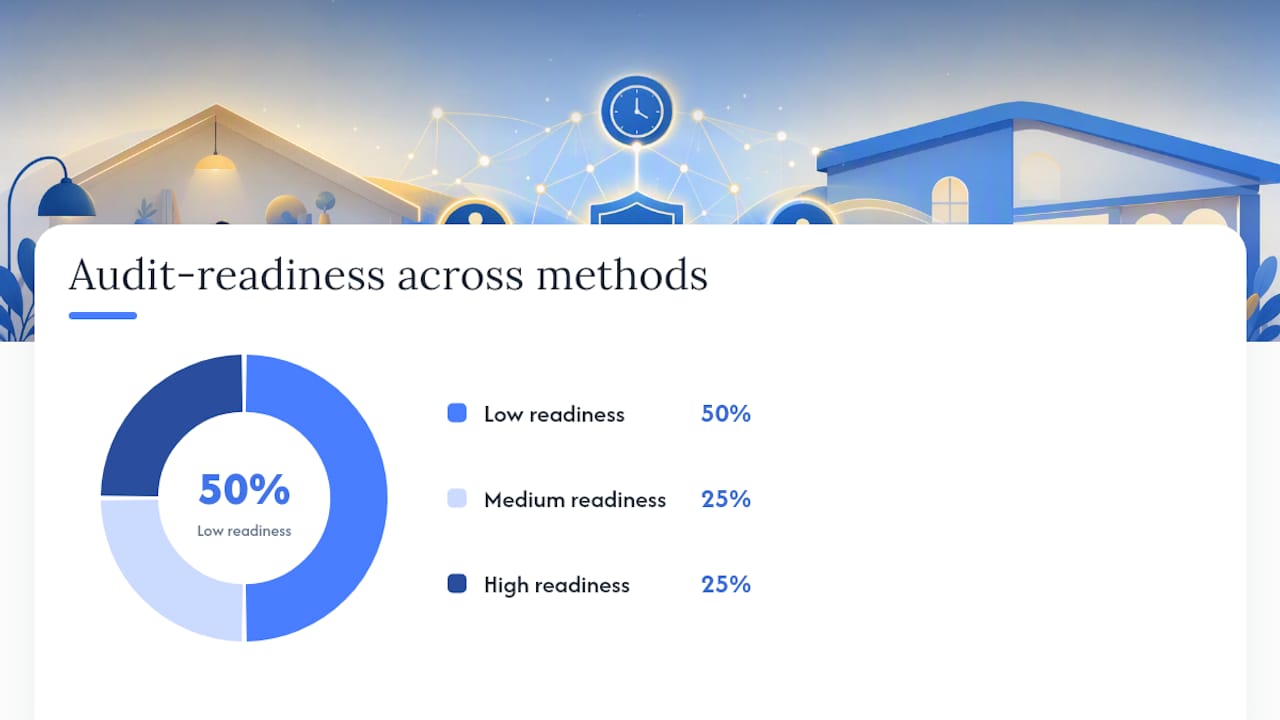
Practical guides and nanny tools consistently recommend caregiver-entered logs with employer approval, because that two-step process creates a clean, dispute-resistant record. Paper logs and spreadsheets work but require manual effort and offer no automatic overtime alerts.
Timesheet fields to capture every shift:
- Date and day of week
- Clock-in and clock-out times
- Break duration (unpaid breaks deducted)
- Total hours for the shift
- Running weekly total (flags when you approach 40 hours)
- Notes (e.g., travel, extra duties)
Thecaretracker's time-tracking feature timestamps entries, calculates weekly totals, supports schedule request approvals, and produces exportable timesheets — all free for caregivers. Those features map directly to the DOL recordkeeping items in Section 4. You can also download a nanny timesheet template if you prefer to start on paper and migrate later.
How to present your pay request and confirm your classification
Your pay statement should show enough detail to verify every dollar. When you submit a pay request or review a pay stub, confirm these fields are present:
- Pay period start and end dates
- Hours worked per day
- Regular hours subtotal and overtime hours subtotal
- Regular rate and overtime rate
- Gross pay (regular + overtime)
- Itemized deductions (taxes withheld)
- Reimbursements listed separately from wages
- Year-to-date gross wages
Employee vs. independent contractor: Most household caregivers are employees, not contractors. IRS Publication 926 states that a worker is a household employee when the family controls what work is done and how — classification depends on control, not hours worked or how you were hired. Misclassification as a contractor shifts tax obligations onto you incorrectly. If you receive a 1099 instead of a W-2, consult a tax professional.
Even when a family hires through an agency, the household employer typically retains employer responsibilities under IRS rules. Confirm how W-2 reporting and tax withholding will be handled before your first paycheck.
Pro Tip: Log mileage and supply purchases in a separate notes field or a simple spreadsheet, and submit reimbursement requests in writing. Keeping reimbursements out of your wage record prevents them from inflating your taxable income.
Thecaretracker makes hour tracking simple and free for caregivers
Tracking hours accurately is the single most effective thing you can do to protect your pay and simplify payroll for the families you work with. Thecaretracker gives you a free, purpose-built tool that handles exactly that.

With Thecaretracker, you can log timestamped hours, receive and approve schedule requests, view all your jobs in one calendar, and export clean timesheet records your family can hand directly to their payroll provider. The app also stores key care details — allergies, medications, emergency contacts, nap schedules — so everything you need is in one place, helping you coordinate smoothly with your nursery partners.
Three steps to get started today:
- Download Thecaretracker and create your free caregiver profile at Thecaretracker.
- Add your current family (or families) and set your regular schedule.
- Clock in at the start of your next shift and let the app build your compliant time record from there.
Families who need help with retroactive payroll or compliance can access premium payroll consultation services through the platform. For caregivers, the core app stays free.
Setting fair pay takes confidence, not just math
The rate-setting formula in this article gives you a defensible number. Using it in a conversation with a family is a different skill, and one worth practicing.
When a family pushes back on your rate, the most effective response is to walk through the employer-cost logic briefly: "My rate reflects my gross pay plus the employer taxes and benefits the family is responsible for — that's standard for household employment." You do not need to apologize for quoting a market rate. Presenting a written employment agreement at the same time signals professionalism and makes the conversation feel structured rather than adversarial.
A rate band with shift differentials ("$23/hr standard, $26/hr evenings and weekends") also gives families a choice rather than a take-it-or-leave-it number, which tends to move negotiations forward faster. Whatever you agree on, document it before the first shift.
Sources
- Handy Reference Guide to the Fair Labor Standards Act (FLSA) | U.S. Department of Labor
- Publication 926 (Household Employers) | Internal Revenue Service
- Care
- How Much Should You Pay Your Nanny? 2026 Rates + Calculator Guide | PAYHROLL
This article is general information, not a substitute for advice from a qualified lawyer. Consult a qualified legal professional about your own circumstances before acting on anything here.